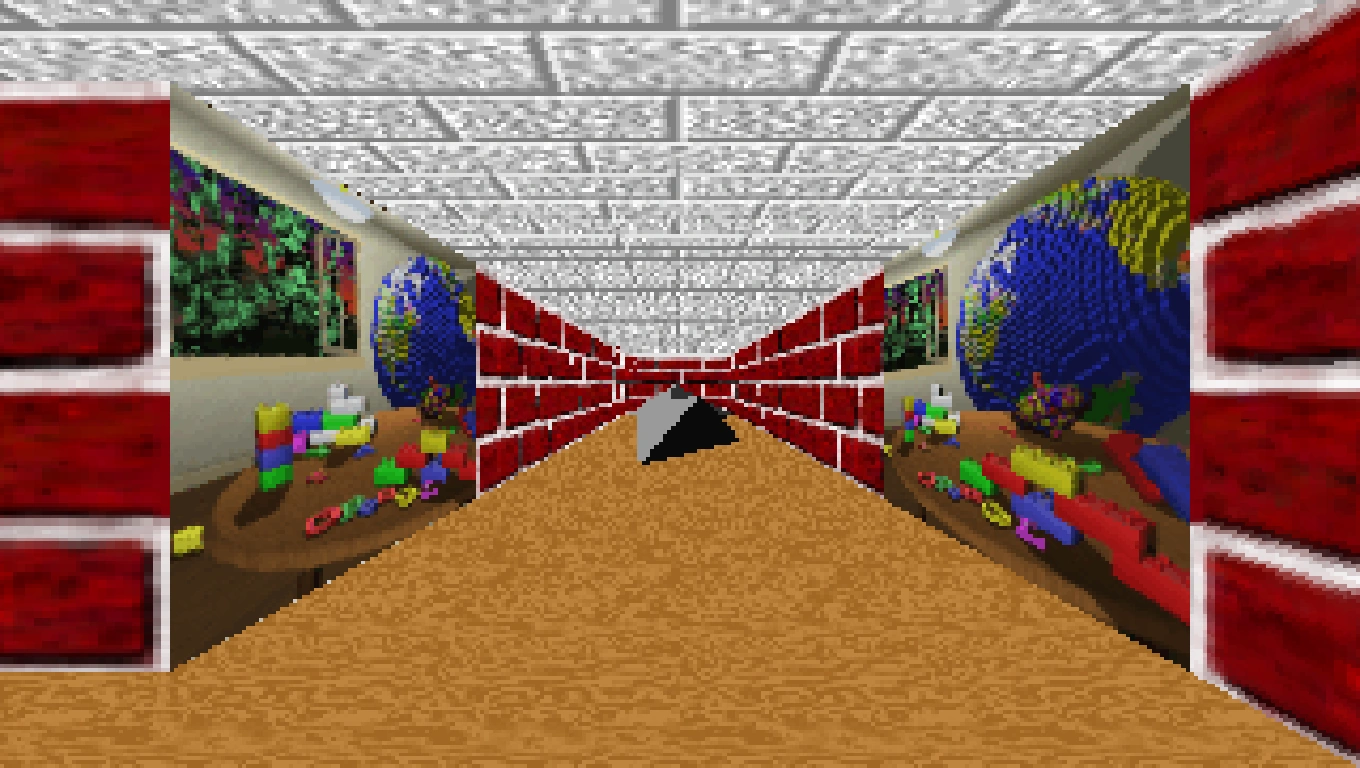

The 3D Maze screen saver.
3D Maze is a screen saver, created in OpenGL, included with some versions of Microsoft Windows. It was first introduced in Windows NT 4.0 and comes with every subsequent version of Microsoft Windows up to Windows Me. The screen saver's file name is "ssmaze.scr".
It was discontinued after Windows Me.
Description
This screensaver takes place inside a room separated into various paths by thin walls. The point of view starts near a floating rectangular bar resembling the contemporary Start button, and moves in a way that follows along every possible path in the maze, before reaching the finish goal (which resembles a yellow smiley face with blue, spherical eyes).
Various objects can be seen in the room, each serving different functions. These include a wallpaper showing the OpenGL graphic (a globe on a brown floor with colored blocks), replacing one of the wall tiles; a brown rodent that crawls along the floor; gray, rotating Platonic solids (a pyramid, diamond, dodecahedron, or icosahedron) that turn the room upside down and back when the point of view reaches them; and a floating OpenGL logo made of letters of assorted colors.
Settings
Under Textures, the appearances of the walls, floor, and ceiling of the room can be individually set. These include: alternating rows of small red clay bricks with white mortar, brown wood with orange accents, large gray stone bricks, and four animated textures that cycle through colors.
If the "Walls...", "Floor...", and "Ceiling..." buttons are clicked, they open the Configure Texture sub-menu for the specified room part. This allows one of two options to be selected:
- Default (selected by default) - Uses the texture specified in the main setup window.
- User - Allows the user to choose their own texture to use for that part of the room. The "Choose..." button opens a Select File window, where any .bmp file on the computer can be selected for use as the custom texture.
There are two options that can each be enabled or disabled:
- Maze Overlay (disabled by default) - When enabled, overlays a white gridline reflecting the layout of the maze. The point of view is represented on the map by a blue pointer that constantly points upward; the layout itself rotates when the point of view turns around. The start is shown with a red pointer; rotating shapes with white pointers; rodents with brown pointers; and the finish with a green pointer.
- Full Screen (disabled by default) - When disabled, the size of the screen saver's graphics is determined by the Size settings. When enabled, the screen saver is zoomed in to occupy the entire screen.
The Size slider allows the user to change how much of the screen the screen saver graphics occupy when Full Screen is disabled. The options range from Min to Max. The default setting is at Min.
The Image Quality drop-down menu is grayed out with default settings. The conditions to allow the setting to be adjusted are unknown. The default setting selected is "Default".