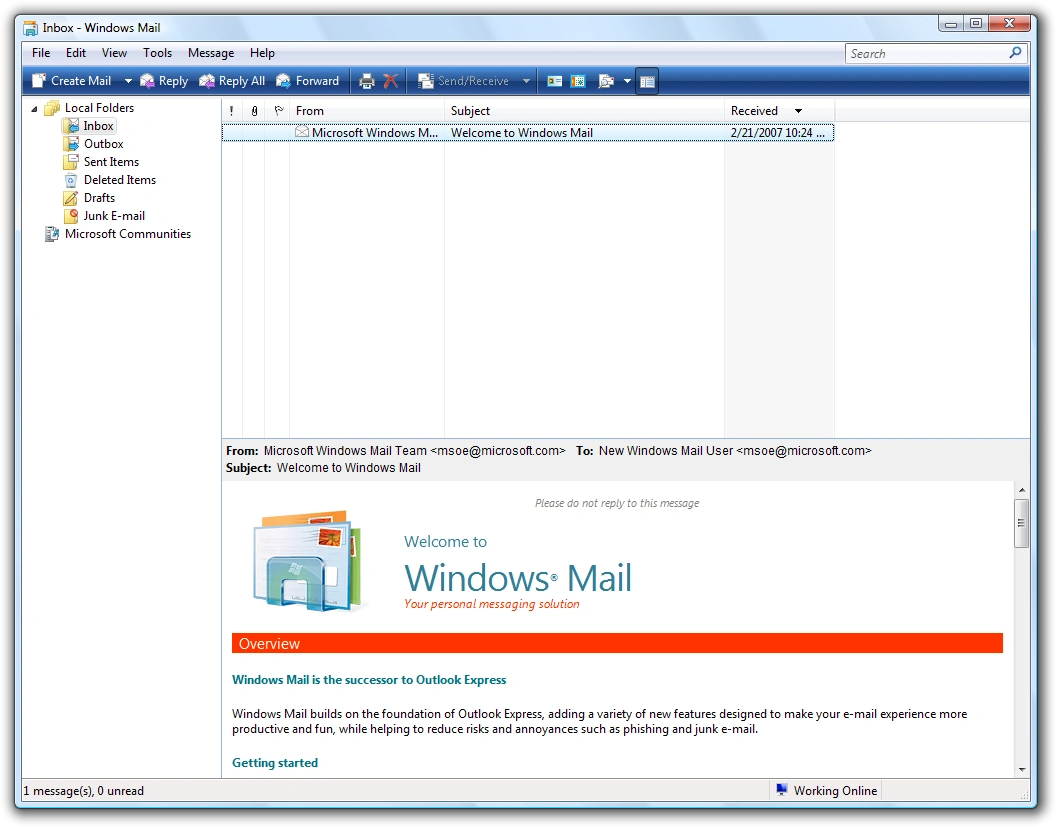

Screenshot of Windows Mail in Windows Vista.
Windows Mail is an email and newsgroup client included in Windows Vista. It replaced Outlook Express which was included with preceding versions of Microsoft Windows. Microsoft previewed Windows Mail on Channel 9 on October 10, 2005.
Windows Mail is not a component of Internet Explorer as was Outlook Express, which was bundled with Internet Explorer versions 4 to 6. As such, Windows Mail is not available for Windows operating systems prior to Vista, while Internet Explorer 7 was made available for Windows XP. Windows Mail was succeeded by Windows Live Mail, which was built by the same development team as Windows Mail and also serves as the replacement for Outlook Express for Windows XP. A newer replacement, simply named Mail, was introduced for Windows 8 and later.
Differences from Outlook Express
New features
Although the Windows Mail interface has only minor differences from Outlook Express such as the toolbar icons being replaced to reflect Windows Vista's interface and some interface features incorporated from Outlook 2003 including the right-hand "reading pane", larger changes have been made hidden from the user.
Microsoft bundled Outlook Express with all versions of Internet Explorer up to Internet Explorer 6. Windows Vista includes Internet Explorer 7, which is not bundled with an email program. Therefore, neither Outlook Express nor Internet Explorer 6 will work on Windows Vista or 7.
Windows Mail is not bundled with Internet Explorer and so it does work on both Windows 7 and 8, if all of the program files are copied over from Windows Vista.
- Windows Mail uses IPv6 if the domain name for the servers resolves to IPv6.
- Mail messages are now stored in individual files instead of in a single database file. A transactional index database based on the Extensible Storage Engine enables real-time searching and improves the stability and the reliability of the stored data. In case of corruption, the indices can be rebuilt from the mail files.
- Account setup information is no longer stored in the registry. It is instead stored alongside the mail itself, making it possible to copy an entire Windows Mail configuration and mail store to another machine in a single step.
- Features like Bayesian junk-mail filtering and top-level domain and encoding blocking have been added.
- A phishing filter has been incorporated as well, protecting users from web sites that have been identified as being malicious.
- Additionally, Microsoft Help Groups has been added, which is a preconfigured link to Microsoft's newsgroups. Some additional functionality has been layered on top of the standard newsgroup functionality to have individual threads be marked as a "question" or an "answered question". Postings may be rated as well.
- With the release of Windows Vista, Windows Mail has a documented COM-based API. Previously, the Outlook Express object model was undocumented, except for Simple MAPI messaging functionality.
Removed features
Unlike its predecessor Outlook Express, Windows Mail does not have WebDAV, making it incapable of accessing web-based email services through WebDAV. Although Outlook Express integrates with Windows Messenger, Windows Mail has no such integration as Windows Messenger is no longer included. A more full-featured free downloadable application, Windows Live Mail integrates with Windows Live Contacts.
Unlike Outlook Express, Windows Mail does not allow users to switch Identities or manage multiple identities within one running instance of the program. Instead, identities are now tied to the user account and to create additional users or identities, a new user account has to be created.
Also, HTTP clients are no longer supported in Windows Mail.
The ability to use the spellchecking dictionaries of MS Office (when installed) has been removed. Windows Mail only supports the following languages:
- English (US only)
- French
- German
- Spanish (International Sort)
Windows Mail on later versions of Windows
Windows 7
In Windows 7, Windows Mail's functionality was replaced by Windows Live Mail, part of Windows Live Essentials. However, the older Windows Mail can still be found in Windows 7 (in a folder named "Windows Mail" under Program Files), but is not use by default as the software itself (the file WinMail.exe) is hidden and marked as a system file, and cannot be loaded.
Windows Mail can be re-enabled in Windows 7 by the following actions:
- Connect to Windows as the Administrator user.
- Right-click the C:\Program Files\Windows Mail folder, and go on the menu to the "Properties" option, press the "Security" Tab, Advanced, there go to "Owners" Tab, Edit, select "Administrators", tick the option "Replace...", and press Apply.
- Rename the msoe.dll file in Windows Mail directory (so you'll be able to replace it with another file).
- Copy Windows Vista's msoe.dll file to the folder (c:\Program Files\Windows Mail\Msoe.dll on a Windows Vista machine).
- Go to "Folder Options" in Control Panel, and untick "Hide protected operating system files", and change the radio button on "Hidden files and folders" to "Show hidden files..." mode.
- Unhide the file WinMail.exe (Properties - Hidden - untick).
Windows 8
Windows 8 introduced Mail, a newer application based on Windows Runtime. It was designed with Microsoft's Metro design language and became available as a Windows Store app.
The older Windows Mail can also be re-enabled on Windows 8 by copying the Msidcrl30.dill from Windows/System32 folder in Windows 7 to the Windows/System32 folder in Windows 8. See http://www.eightforums.com for installing Windows Mail on Windows 8.
See also
External links
- Windows Vista: Windows Mail at Microsoft (archived 2007-02-02)
- Set up email and calendar at Microsoft Support
- Channel 9 (Microsoft) - 'The new Outlook Express: Windows Mail demoed'
- Windows Vista for Beginners - 'How to migrate from Outlook Express to Windows Mail'
- Windows Mail Forum - 'Discussion forum for Windows Mail Applications'
- Computerworld article - 'Microsoft gives Vista's 'Windows Mail' the heave-ho'
- How to Reinstate Windows Mail in Windows 7
- How to reinstate Windows Mail on Windows 8.
- Mail (Windows) at Wikipedia