Microsoft Word  is a word processor program developed by Microsoft. It was first released in 1983, under the name Multi-Tool Word for Xenix systems. Versions were later written for other platforms, including IBM PCs running DOS (1983), Apple Macintosh running Classic Mac OS (1985), Windows (1989), macOS (2001), web browsers (2010), iOS (2014), and Android (2015).
Microsoft Word has been the de facto standard word processing software since the 1990s when it eclipsed WordPerfect. Commercial versions of Word are licensed as a standalone product or as a component of Microsoft Office, which can be purchased with a perpetual license, as part of the Microsoft 365 suite as a subscription, or as a one-time purchase with Office 2024.
History
- Main article: History of Microsoft Word
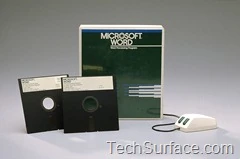

Early retail package of Microsoft Word.
In 1981, Microsoft hired Charles Simonyi, the primary developer of Bravo, the first GUI word processor, which was developed at Xerox PARC. Simonyi started work on a word processor called Multi-Tool Word and soon hired Richard Brodie, a former Xerox intern, who became the primary software engineer.
Microsoft announced Multi-Tool Word for Xenix and MS-DOS in 1983. Its name was soon simplified to Microsoft Word. Free demonstration copies of the application were bundled with the November 1983 issue of PC World, making it the first to be distributed on disk with a magazine. That year, Microsoft demonstrated Word running on Windows.
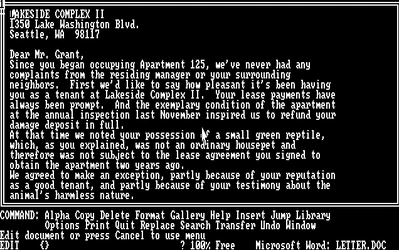

Microsoft Word 1.0 for DOS (1983) (using a black background with the font "IBM BIOS-2y")
Unlike most MS-DOS programs at the time, Microsoft Word was designed to be used with a mouse. Advertisements depicted the Microsoft Mouse and described Word as a WYSIWYG (What You See Is What You Get), windowed word processor with the ability to undo and display bold, italic, and underlined text, although it could not render fonts. It was not initially popular, since its user interface was different from the leading word processor at the time, WordStar. However, Microsoft steadily improved the product, releasing versions 2.0 through 5.0 over the next six years. In 1985, Microsoft ported Word to the classic Mac OS (known at the time as Macintosh System Software). This was made easier by Word for DOS having been designed for use with high-resolution displays and laser printers, even though none were yet available to the general public. It was also notable for its very fast cut-and-paste function and unlimited number of undo operations, which are due to its usage of the piece table data structure.
Following the precedents of LisaWrite and MacWrite, Word for Mac OS added true WYSIWYG features. It fulfilled a need for a word processor that was more capable than MacWrite. By 1988, WordPefect and Word dominated the DOS word processor market, but neither product nor any other offered true WYSIWYG, unlike Mac software; after its release, Word for Mac OS sold more copies than its MS-DOS counterpart for at least four years.
The second release of Word for Mac OS, shipped in 1987, was named Word 3.0 to synchronize its version number with Word for DOS; this was Microsoft's first attempt to synchronize version numbers across all platforms. Word 3.0 included numerous internal enhancements and new features, including the first implementation of the Rich Text Format (RTF) specification, but it was plagued with bugs. Within a few months, Word 3.0 was superseded by a more stable Word 3..01, which was mailed free to all registered users of 3.0. After MacWrite Pro was discontinued in the mid-1990s, Word for Mac OS never had any serious rivals. Word 5.1 for Mac OS, released in 1992, was a very popular word processor owing to its elegance, relative ease of use, and feature set. Many users say it is the best version of Word for Mac OS ever created.
In 1986, an agreement between Atari and Microsoft brought Word to the Atari ST under the name Microsoft Write. The Atari ST version was a port of Word 1.05 for the Mac OS and was never updated.
By the early 1990s, the growing popularity of Windows narrowed the word processor market to a few supporting the operating system, including Word, WordPerfect, and Ami Pro. The first version of Word for Windows was released in 1989. With the release of Windows 3.0, the following year, sales began to increase, and Microsoft soon became the market leader for word processors for IBM PC-compatible computers. In 1991, Microsoft capitalized on Word for Windows' increasing popularity by releasing a version of Word for DOS, version 5.5, that replaced its user interface with an interface similar to a Windows application. By then, Word had more than half of the Windows word processor market. When Microsoft became aware of the Year 2000 problem, it made Microsoft Word 5.5 for DOS available for free downloads. As of January 2026, it is still available for download from Microsoft's website.[1] In 1991, Microsoft embarked on a project codenamed Pyramid to completely rewrite Microsoft Word from the ground up. Both the Windows and Mac OS versions would start from the same codebase. It was abandoned when it was determined that it would take the development team too long to rewrite and then catch up with all the new capabilities that could have been added at the same time without a rewrite. Instead, the next versions of Word for Windows and Mac OS, dubbed version 6.0, both started from the code base of Word for Windows 2.0.
With the release of Word 6.0 in 1993, Microsoft again attempted to synchronize the version numbers and coordinate product naming across platforms, this time across DOS, Mac OS, and Windows (this was the last version of Word for DOS). It introduced AutoCorrect, which automatically fixed certain typing errors, and AutoFormat, which could reformat many parts of a document at once. While the Windows version received favorable reviews (e.g., from InfoWorld), the Mac OS version was widely derided. Many accused it of being slow, clumsy, and memory-intensive, and its user interface differed significantly from Word 5.1. In response to user requests, Microsoft offered Word 5 again, after it had been discontinued. Subsequent versions of Word for macOS are no longer direct ports of Word for Windows, instead featuring a mixture of ported and native code.
Features
Among its features, Word includes a built-in spell checker, a thesaurus, a dictionary, and utilities for manipulating and editing text. It supports creating tables. Depending on the version, it can perform simple and complex calculations and supports formatting formulas and equations.
Templates
Several later versions of Word include the ability for users to create their own formatting templates, allowing them to define a file in which the title, heading, paragraph, and other element designs differ from the standard Word templates.
For example, Normal.dotm is the master template from which all Word documents are created. It determines the margin defaults as well as the layout of the text and font defaults. Although Normal.dotm is already set with certain defaults, the user can change it to new defaults. This will change other documents that were created using the template. It was previously Normal.dot.
Image formats
Word can import and display images in common bitmap formats such as JPG and GIF. It can also be used to create and display simple line art. Microsoft Word added support for the common SVG vector image format in 2017 for Office 365 ProPlus subscribers, and this functionality was also included in the Office 2019 release.
WordArt
WordArt enables drawing text in a Microsoft Word document, such as a title, watermark, or other text, with graphical effects such as skewing, shadowing, rotating, stretching in a variety of shapes and colors, and even including three-dimensional effects. Users can apply formatting effects such as shadow, bevel, glow, and reflection to their document text as easily as applying bold or underline. Users can also spell-check text that uses visual effects and add text effects to paragraph styles.
Macros
A macro is a rule of pattern that specifies how a certain input sequence (often a sequence of characters) should be mapped to an output sequence according to a defined process. Frequently used or repetitive sequences of keystrokes and mouse movements can be automated. Like other Microsoft Office documents, Word files can include advanced macros and even embedded programs. The language was originally WordBasic, but changed to Visual Basic for Applications as of Word 97.
This extensive functionality can also be used to run and propagate viruses in documents. The tendency for people to exchange Word documents via email, USB flash drives, and floppy disks made this an especially attractive vector in 1999. A prominent example was the Melissa virus, but countless others have existed.
Word's macro security setting, which regulates when macros may execute, can be adjusted by the user, but in the most recent versions of Word, it is set to HIGH by default, generally reducing the risk from macro-based viruses, which have become uncommon.
Layout issues
Issues with technical documents
Bullets and numbering
Microsoft Word supports bullet lists and numbered lists. It also features a numbering system that helps add correct numbers to pages, chapters, headers, footnotes, and entries of tables of content; these numbers automatically change to correct ones as new items are added or existing items are deleted. Bullets and numbering can be applied directly to paragraphs and converted to lists. Word 97 through 2003, however, had problems adding correct numbers to numbered lists. In particular, a second irrelevant numbered list might not have started with number one but instead resumed numbering after the last numbered list. Although Word 97 supported a hidden marker that said the list numbering must restart afterward, the command to insert this marker (Restart Numbering command) was only added in Word 2003. However, if one were to cut the first item of the list and paste it as another item (e.g., fifth), then the restart marker would have moved with it, and the list would have restarted in the middle instead of at the top.
Word continues to default to non-Unicode characters and non-hierarchical bulleting, despite user preference for PowerPoint-style symbol hierarchies (e.g., filled circle/emdash/filled square/endash/emptied circle) and universal compatibility.
AutoSummarize
Hidden text
Word supports marking selected text as "hidden". Hidden text is text that is stored in the document but is not displayed. For example, pages containing large amounts of markup language text can be made visually more readable during the editing process.
Password protection
File formats
Filename extensions
Word's native file formats are denoted either by a .doc or .docx filename extension.
Although the .doc extension has been used in many different versions of Word, it actually encompasses four distinct file formats:
- Word for DOS
- Word for Windows 1 and 2; Word 3 and 4 for Mac
- Word 6 and Word 95 for Windows; Word 6 for Mac
- Word 97 and later for Windows; Word 98 and later for Mac OS
The newer ".docx" extension signifies the Office Open XML international standard for Office documents and is used by default on Word 2007 and later for Windows as well as Word 2008 and later for macOS.
Binary formats (Word 97-2007)
During the late 1990s and early 2000s, the default Word document format (.DOC) became a de facto standard of document file formats for Microsoft Office users. There are different versions of "Word Document Format" used by default in Word 97–2007. Each binary Word file is a Compound File, a hierarchical file system within a file. According to Joel Spolsky, Word Binary File Format is extremely complex, mainly because its developers had to accommodate an overwhelming number of features and prioritize performance over anything else.
As with all OLE Compound Files, Word Binary Format consists of "storages", which are analogous to computer folders, and "streams", which are similar to computer files. Each storage may contain streams or other storage. Each Word Binary File must contain a stream called the "WordDocument" stream, and it must start with a File Information Block (FIB). FIB serves as the first point of reference for locating everything else, such as where the text in a Word document starts and ends, what version of Word created the document, and other attributes.
Word 2007 and later continue to support the DOC file format, although it is no longer the default.
XML Document (Word 2003)
- Main article: Microsoft Office XML formats
The .docx XML format introduced in Word 2003 was a simple, XML-based format called WordProcessingML or WordML.
The Microsoft Office XML formats are XML-based document formats (or XML schemas) introduced in versions of Microsoft Office before Office 2007. Microsoft Office XP introduced a new XML format for storing Excel spreadsheets, and Office 2003 added an XML-based format for Word documents.
Cross-version compatibility
Opening a Word Document file in a version of Word other than the one with which it was created can cause an incorrect display of the document. The document formats of the various versions change in subtle and not-so-subtle ways (such as changing the font or the handling of more complex tasks like footnotes). Formatting created in newer versions does not always survive when viewed in older versions of the program, nearly always because that capability does not exist in the previous version. Rich Text Format (RTF), an early effort to create a format for interchanging formatted text between applications, is an optional format for Word that retains most formatting and all content of the original document.
Third-party formats
Plugins permitting the Windows versions of Word to read and write formats it does not natively support, such as the international standard OpenDocument format (ODF) (ISO/IEC 26300:2006), are available. Up until the release of Service Pack 2 (SP2) for Office 2007, Word did not natively support reading or writing ODF documents without a plugin, namely the SUN ODF Plugin or OpenXML/ODF Translator. With SP2 installed, ODF format 1.1 documents can be read and saved like any other supported format, in addition to those already available in Word 2007. The implementation faces substantial criticism, and the ODF Alliance and others have claimed that the third-party plugins provide better support. Microsoft later declared that the ODF support has some limitations.
In October 2005, one year before the release of Microsoft Office 2007, Microsoft declared that there was insufficient demand from Microsoft customers for the international standard OpenDocument format support and that, therefore, it would not be included in Microsoft Office 2007. That statement was repeated in the following months. As an answer, on October 20, 2005, an online petition was created to demand ODF support from Microsoft.
In May 2006, the ODF plugin for Microsoft Office was released by the OpenDocument Foundation. Microsoft declared that it had no relationship with the developers of the plugin.
In July 2006, Microsoft announced the creation of the Open XML Translator project – tools to build a technical bridge between the Microsoft Office Open XML Formats and the OpenDocument Format (ODF). This work was started in response to government requests for interoperability with ODF. The goal of the project was not to add ODF support to Microsoft Office, but only to create a plugin and an external toolset. In February 2007, this project released the first version of the ODF plugin for Microsoft Word.
Microsoft Word 2007 (Service Pack 1) supports (for output only) PDF and XPS formats, but only after manual installation of Microsoft's "Save as PDF or XPS" add-on. In later releases, this was offered by default.
Flaws
Macros
Like other Microsoft Office documents, Word files can include advanced macros and even embedded programs. The language was originally WordBasic, but changed to Visual Basic for Applications as of Word 97. Recently, .NET has become the preferred platform for Word programming.
This extensive functionality can also be used to run and propagate viruses in documents. The tendency for people to exchange Word documents via email, USB key, and floppy makes this an especially attractive vector. A prominent example is the Melissa worm, but countless others have existed in the wild. Some anti-virus software can detect and clean common macro viruses, and firewalls may prevent worms from transmitting themselves to other systems.
The first virus known to affect Microsoft Word documents was called the Concept virus, a relatively harmless virus created to demonstrate the possibility of macro virus creation.
Layout issues
As of Word 2007 for Windows (and Word 2004 for Macintosh), the program has been unable to handle ligatures defined in TrueType fonts: those ligature glyphs with Unicode codepoints may be inserted manually, but are not recognized by Word for what they are, breaking spellchecking, while custom ligatures present in the font are not accessible at all. Other layout deficiencies of Word include the inability to set crop marks or thin spaces. Various third-party workaround utilities have been developed.[9] Similarly, combining diacritics are handled poorly: Word 2003 has "improved support", but many diacritics are still misplaced, even if a precomposed glyph is present in the font. Additionally, as of Word 2002, Word does automatic font substitution when it finds a character in a document that does not exist in the font specified. It is impossible to deactivate this, making it very difficult to spot when a glyph used is missing from the font in use.
In Word 2004 for Macintosh, complex scripts support was inferior even to Word 97, and Word does not support Apple Advanced Typography features like ligatures or glyph variants.
Bullets and numbering
Users report that Word's bulleting and numbering system is highly problematic. Particularly troublesome is Word's system for restarting numbering.
Versions
Versions for MS-DOS include:
- 1983 November — Word 1
- 1985 — Word 2
- 1986 — Word 3
- 1987 — Word 4 aka Microsoft Word 4.0 for the PC
- 1989 — Word 5
- 1991 — Word 5.1
- 1991 — Word 5.5
- 1993 — Word 6.0
Versions for the Macintosh (Mac OS and Mac OS X) include:
- 1985 January — Word 1 for the Macintosh
- 1987 — Word 3
- 1989 — Word 4
- 1991 — Word 5
- 1993 — Word 6
- 1998 — Word 98
- 2000 — Word 2001, the last version compatible with Mac OS 9
- 2001 — Word v.X, the first version for Mac OS X only
- 2004 — Word 2004
- 2007 — Word 2008 (Will be a Universal binary)
Versions for Microsoft Windows include:
- 1989 November — Word for Windows 1.0 for Windows 2.x, code-named "Opus"
- 1990 March — Word for Windows 1.1 for Windows 3.0, code-named "Bill the Cat"
- 1983 - Word for Windows 1.0-1? for Windows 1.0x-2.x
- 1990 June — Word for Windows 1.1a for Windows 3.x
- 1991 — Word for Windows 2.0, code-named "Spaceman Spiff"
- 1993 — Word for Windows 6.0, code-named "T3" (renumbered "6" to bring Windows version numbering in line with that of DOS version, Macintosh version and also WordPerfect, the main competing word processor at the time; also a 32-bit version for Windows NT only)
- 1995 — Word 95 for Windows 95 (version 7) — included in Office 95
- 1997 — Word 97 (version 8) — included in Office 97
- 1999 — Word 2000 (version 9) — included in Office 2000
- 2001 — Word 2002 (version 10) — included in Office XP
- 2003 — Word 2003 (version 11) — included in Office 2003
- 2007 — Word 2007 (version 12) — included in all Office 2007 suites; released worldwide to consumers on January 30, 2007
- 2010 — Word 2010 (version 14) — included in all Office 2010 suites; released worldwide to consumers on June 15, 2010
- 2012 — Word 2013 (version 15) — included in all Office 2013 suites
- 2015 — Word 2016 (version 16) — included in all Office 2016 suites
- 2018 — Word 2019 (version 16) — included in all Office 2019 suites
- 2021 — Word 2021 (version 16) — included in all Office 2021 suites
- 2024 — Word 2024 (version 16) — included in all Office 2024 suites.
Note: Version number 13 was skipped due to superstition.
Versions for SCO UNIX include:
- Microsoft Word for UNIX Systems Release 5.1
Versions for OS/2 include:
- 1992 Microsoft Word for OS/2 version 1.1B
Platforms
Word for Windows
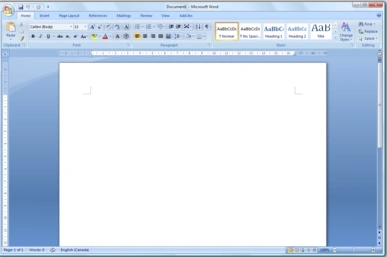

Microsoft Word for Windows (2007)
Word for Windows is available standalone or as a part of the Microsoft Office suite. Word contains rudimentary desktop publishing capabilities and is the most widely used word processing program on the market. Word files are commonly used as the format for sending text documents via email because almost every computer can read a Word document by using the Word application, a Word viewer, or a word processor that imports the Word format (see Microsoft Word Viewer).
Word 6 for Windows NT was the first 32-bit version of the product, released with Microsoft Office for Windows NT around the same time as Windows 95. It was a straightforward port of Word 6.0. Starting with Word 95, each release of Word was named after the year of its release, instead of the version number.
Word 2007 introduced a redesigned user interface that emphasized the most common controls, dividing them into tabs, and adding specific options depending on the context, such as selecting an image or editing a table. This user interface, called Ribbon, was included in Excel, PowerPoint, and Access 2007, and would later be introduced to other Office applications with Office 2010 and Windows applications such as Paint and WordPad with Windows 7, respectively.
The redesigned interface also includes a toolbar that appears when selecting text, with options for formatting included.
Word 2007 also included the option to save documents as Adobe Acrobat or XPS files, and upload Word documents like blog posts to services such as WordPress.
Word 2010 allows the customization of the Ribbon, adding a Backstage view for file management, has improved document navigation, allows creation and embedding of screenshots, and integrates with online services such as OneDrive.
Word 2019 added a dictation function.
Word 2021 added co-authoring, a visual refresh on the start experience and tabs, automatic cloud saving, dark mode, line focus, an updated draw tab, and support for ODF 1.3.
Microsoft Word 2024 (the fourth perpetual release of Office 16) for Microsoft Windows and MacOS was released on October 1, 2024.
Word for Mac
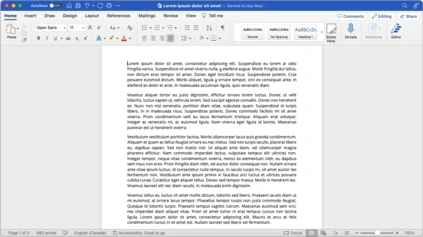

Word for Mac running on macOS Ventura (13.2)
The Mac was introduced on January 24, 1984, and Microsoft introduced Word 1.0 for Mac a year later, on January 18, 1985. The DOS, Mac, and Windows versions are quite different from each other. Only the Mac version was WYSIWYG and used a graphical user interface, far ahead of the other platforms. Each platform restarted its version numbering at "1.0". There was no version 2 for the Mac, but version 3 was released on January 31, 1987. Word 4.0 came out on November 6, 1990, and added automatic linking with Excel, the ability to flow text around graphics, and a WYSIWYG page view editing mode. Word 5.1 for Mac, released in 1992, ran on the original 68000 CPU and was the last to be specifically designed as a Macintosh application; Word 6 was a Windows port, but it was poorly received. Word 5.1 continued to run well until the last classic Mac OS. Many people continue to run Word 5.1 to this day under an emulated Mac Classic system for some of its excellent features, such as document generation and renumbering, or to access their old files.
In 1997, Microsoft formed the Macintosh Business Unit as an independent group within Microsoft focused on writing software for the classic Mac OS. Its first version of Word, Word 98, was released with Office 98 Macintosh Edition. Document compatibility reached parity with Word 97, and it included features from Word 97 for Windows, including spell and grammar checking with squiggles. Users could choose the menus and keyboard shortcuts to be similar to either Word 97 for Windows or Word 5 for Mac.


Microsoft Word 2011 running on OS X.
Word 2001, released in 2000, added a few new features, including the Office Clipboard, which allowed users to copy and paste multiple items. It was the last version to run on the classic Mac OS, and on Mac OS X, it could only run within the Classic Environment. Word X, released in 2001, was the first version to run natively on and require Mac OS X, and introduced non-contiguous text selection.
Word 2004 was released in May 2004. It included a new Noteoobk Layout view for taking notes either by typing or voice. Other features, such as tracking changes, were made more similar to Office for Windows.
Word 2008, released on January 15, 2008, included a Ribbon-like feature called the Elements Gallery, which could be used to select page layouts and insert custom diagrams and images. It also included a new view focused on publishing layout, integrated bibliography management, and native support for the new Office Open XML format. It was the first version to run natively on Intel-based Macs.
Word 2011, released in October 2010, replaced the Elements Gallery in favor of a Ribbon user interface that is much more similar to Office for Windows, and includes a full-screen mode that allows users to focus on reading and writing documents, and support for Office Web Apps.
Write for Atari ST
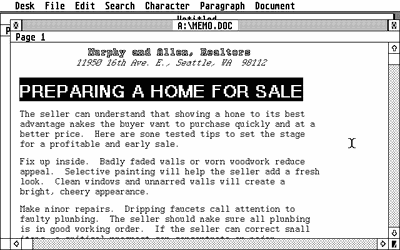

Microsoft Word on Atari ST was titled Microsoft Write.
Microsoft Write for the Atari ST is the ported Atari version of Microsoft Word 1.05 for the Apple Macintosh, sharing the same name as the Microsoft Write program included with Windows during the 80s and early 90s. While the program was announced in 1986, various delays caused the program to arrive in 1988. Microsoft Write for Atari ST and Microsoft Word for Windows would both make their debut at the 1988 COMDEX in Atlanta, Georgia, alongside their respective booths.
Like the Mac version, the Atari version featured WYSIWYG form (via GDOS) and used a graphical user interface (via GEM).
Microsoft Write was one of the first Atari word processors that utilized the GDOS (Graphics Device Operating System) part of GEM (Graphics Environment Manager), allowing the word processor to display and print graphic fonts/styles, and making it a multifont word processor for the Atari ST (a second disk drive was required to run both Microsoft Write and GDOS). Microsoft Write was packaged with GDOS 1.1 and the drives for the Atari XMM804 dot matrix print, along with third-party printers like the Epson FX-80 and Star Micronics NB-15 on four diskettes (3.5-inch format).
Accompanying the retail packaging was a 206-page slip-cased user's manual that was divided into three sections: Learning Write, Using Write, and Write Reference. In addition, Microsoft Write also featured a "Help Screen" tool to help users explore the advanced features of the word processor that earned high praise for its form and presentation.
Write for Macintosh
In October 1987, Microsoft released Microsoft Write for Macintosh, a version of Microsoft Word with limited features that Microsoft hoped would replace the aging MacWrite in the Macintosh word processor market. Write was priced well below Word, though at the time, MacWrite was included with new Macintoshes. Write is best described as Word locked in "Short Menus" mode, and as such, it uses the same file format so that users can exchange files with no conversion necessary. Write did not sell well and was discontinued before the System 7 era. Microsoft Write was part of a short-lived trend for "lightweight" Macintosh word processors initiated by the introduction of the Macintosh Portable and early PowerBook systems. Others included LetterPerfect and Nisus Compact.
Word on mobile platforms
![[icon]](https://static.wikia.nocookie.net/windows/images/3/31/Wiki_letter_w_cropped.png/revision/latest?cb=20151108163730) | This section requires expansion. |
Word for the web
- See also: Microsoft Office Online
Word for the web is a free, lightweight version of Microsoft Word available as part of Office on the web, which also includes web versions of Excel and PowerPoint.
Word for the web lacks some Ribbon tabs, such as Design and Mailings. Mailings allows users to print envelopes and labels and manage mail merge printing of Word documents. Word for the web is not able to edit certain objects, such as equations, shapes, text boxes, or drawings, but a placeholder may be present in the document. Certain advanced features, like table sorting or columns, will not be displayed but are preserved as they were in the document. Other views available in the Word desktop app (Outline, Draft, Web Layout, and Full-Screen Reading) are not available, nor are side-by-side viewing, split windows, and the ruler.
Reception
| This section requires expansion. |
Hidden features
- Typing "=rand (n)", where n is a number between 1 and 201, generates a placeholder statement n times:
- Word 2003 and older generate the sentence "The quick brown fox jumps over the lazy dog." (or another default pangram in a non-English version) in older versions of Word.[11]
- Office 2007 will generate the following text once or twice if n is 1 or 2:
- "On the Insert tab, the galleries include items that are designed to coordinate with the overall look of your document. You can use these galleries to insert tables, headers, footers, lists, cover pages, and other document building blocks. When you create pictures, charts, or diagrams, they also coordinate with your current document look."
- However, typing "=rand (3)" or higher will generate repetitions of the following text:0
- "On the Insert tab, the galleries include items that are designed to coordinate with the overall look of your document. You can use these galleries to insert tables, headers, footers, lists, cover pages, and other document building blocks. When you create pictures, charts, or diagrams, they also coordinate with your current document look."
- "You can easily change the formatting of selected text in the document text by choosing a look for the selected text from the Quick Styles gallery on the Home tab. You can also format text directly by using the other controls on the Home tab. Most controls offer a choice of using the look from the current theme or using a format that you specify directly."
- "To change the overall look of your document, choose new Theme elements on the Page Layout tab. To change the looks available in the Quick Style gallery, use the Change Current Quick Style Set command. Both the Themes gallery and the Quick Styles gallery provide reset commands so that you can always restore the look of your document to the original contained in your current template."
- Microsoft Word 97 contained a hidden pinball game.
- On the note about the pseudo-function rand, in Office 2003 and newer the function can take two parameters (i.e. =rand(2,3)). When using this pseudo-function this way, it will create 2 sets of the same line 3 times. The maxes for this function seem to be 200 and 99 so that you cannot create more than =rand(200,99) worth of text. About 235 pages.
References
- ↑ "Microsoft Word 5.5 for MS-DOS (EXE format)". Microsoft Download Center. Archived from the original on 2022-08-02.
External links
- Microsoft Word at Microsoft 365
- Word help & learning at Microsoft Support
- Microsoft Word at Wikipedia
 |
Wikipedia (article: Microsoft Word)
|
|---|