 |
Wikipedia
|
|---|
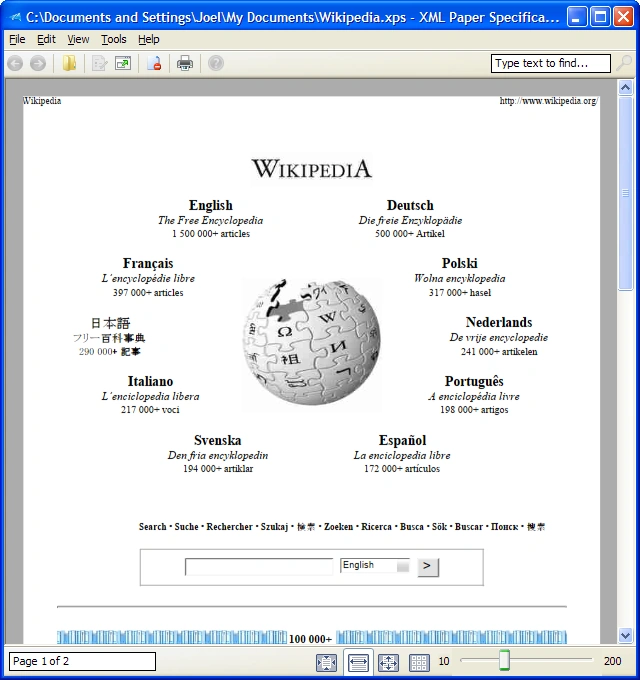

The XPS Viewer application displaying a printout of the Wikipedia front page
The Open XML Paper Specification  (also referred to as OpenXPS) is an open standard for a page description language and a fixed-document format, originally developed by Microsoft as XML Paper Specification (XPS). In June 2009, Ecma International adopted it as an international standard ECMA-388.[1]
It is an XAML-based standard, which is itself based on XML. It is based on a new print path and a color-managed vector-based document format that supports device independence and resolution independence. In Windows 8, .xps was replaced with the ECMA standard .oxps format, which is not natively supported in older Windows versions.[2]
Microsoft introduced OpenXPS as an alternative to Portable Document Format (PDF). However, PDF remained the standard choice, and support for and user familiarity with XPS files is limited. It has been described as neglected technology, which may cause difficulties to recipients of documents in a format they are not familiar with.[3]
Format
The XPS document format consists of structured XML markup that defines the layout of a document and the visual appearance of each page, along with rendering rules for distributing, archiving, rendering, processing, and printing the documents. Notably, the markup language for XPS is a subset of XAML, allowing it to incorporate vector elements in documents.
An XPS file is a ZIP archive using the Open Packaging Conventions, containing the files that make up the document. These include an XML markup file for each page, text, embedded fonts, raster images, 2D vector graphics, as well as the digital rights management information. The contents of an XPS file can be examined by opening it in an application that supports ZIP files.
There are two incompatible XPS formats available. The original document writer printed to .xps in Windows Vista and Windows 7. Beginning with Windows 8, the document writer defaults to the .oxps format.[2]
Microsoft provides two free converters: XpsConverter, which converts documents between .xps and .oxps format,[4] and OxpsConverter converts documents from .oxps to .xps format.[5]
Features
XPS specifies a set of document layout functionality for paged, printable documents. It also has support for features such as color gradients, transparencies, CMYK color spaces, printer calibration, multiple-ink systems, and print schemas. XPS supports the Windows Color System color management technology for color conversion precision across devices and a higher dynamic range. It includes a software raster image processor (RIP), which is downloadable separately. The print subsystem supports named colors, simplifying color definition for images transmitted to printers supporting those colors.
XPS also supports HD Photo images natively for raster images. The XPS format used in the spool file represents advanced graphics effects such as 3D images, glow effects, and gradients as Windows Presentation Foundation primitives, which printer drivers could offload their rasterization to the printer to reduce computational load if the printer is capable of rasterizing those primitives.
Comparison with PDF
Like Adobe's PDF format, XPS is a page description language using a fixed-layout document format designed to preserve document fidelity,[6] providing device-independent document appearance. PDF uses Carousel Object Syntax (COS syntax) to form a random-access database of objects that may be created from PostScript or generated directly from applications, whereas XPS is based on XML.[7] Both formats are compressed, albeit using different methods. The filter pipeline architecture of XPS is also similar to the one used in printers supporting the PostScript page description language. PDF includes dynamic capabilities purposely not supported by the XPS format. There are many resources for converting from XPS to PDF, and some for converting from PDF to XPS. A method often suggested is to open an XPS file in a program with printing capability, and then "print" to a virtual PDF printer such as Microsoft Print to PDF, with a similar procedure to convert from PDF to XPS.
Viewing and creating XPS documents
Windows Vista and later support both creating and viewing XPS documents. Additionally, the printing architecture of Windows Vista uses XPS as the spooler format.
Apps can create XPS documents by printing to XPS Document Writer, a virtual printer that comes bundled with Windows. These files open in XPS Viewer, an optional component that comes with Windows Vista and later. In Windows Vista, XPS is hosted within Internet Explorer, but in subsequent versions, it is a standalone app. Both versions support digital rights management and digital signatures. Windows 8 also comes with an app called "Reader", which reads XPS and PDF files.
The .NET Framework 3.0 installer for Windows XP also adds the IE-hosted XPS Viewer, as well as XPS Document Writer. Since then, Microsoft released the XPS Essentials Pack for Windows XP, Server 2003, and Vista, which includes the standalone viewer, an IFilter plug-in that helps Windows Desktop Search index the contents of XPS files, and another plug-in for Windows Explorer to help generate thumbnails for XPS files. Installing this pack enables operating systems before Windows Vista to use the XPS print spooler instead of the older GDI-based spooler. The XPS print spooler can produce better quality prints for printers that directly consume the XPS format.
Third-party software
- NiXPS is a commercial application for viewing and printing XPS files on Mac OS X and Windows.
- Outside Software Inc. offers a .NET library for developers called ExpertXPS that can generate XPS files on the fly.
Hardware
XPS has the support of printing companies such as Konica Minolta, Sharp, Canon, Epson, Hewlett-Packard, and Xerox, and software and hardware companies such as CSR (formerly Zoran) and Global Graphics. Native XPS printers were introduced by Canon, Konica Minolta, Toshiba, and Xerox. Devices at the Certified for Windows level of Windows Logo conformance certification were required to have XPS drivers for printing since June 1, 2007.
Licensing
Microsoft released XPS under a royalty-free patent license, allowing users to create implementations of the specification that read, write, and render XPS files, as long as they include a notice within the source that technologies implemented may be encumbered by patents held by Microsoft. Microsoft also requires that organizations "engaged in the business of developing (i) scanners that output XPS Documents; (ii) printers that consume XPS Documents to produce hard-copy output; or (iii) print driver or raster image software products or components thereof that convert XPS Documents for the purpose of producing hard-copy output, you covenant that you and your affiliates will not sue Microsoft or any of its licensees under the XML Paper Specification or customers for infringement of any XML Paper Specification Derived Patents (as defined below) on account of any manufacture, use, sale, offer for sale, importation or other disposition or promotion of any XML Paper Specification implementations." The specification itself is released under a royalty-free copyright license, allowing its free distribution.
On September 13, 2011, Monotype Imaging announced that it had licensed XPS-to-PCL 6 and XPS-to-PostScript vector conversion filters to Microsoft for use in the next version of Windows.
History and standardization
In 2003, Global Graphics was chosen by Microsoft to provide consultancy and proof of concept development services on XPS and worked with the Windows development teams on the specification and reference architecture for the new format. Microsoft submitted the XPS specification to Ecma International. In June 2007, Ecma International Technical Committee 46 (TC46) was set up to develop a standard based on the Open XML Paper Specification (OpenXPS).
At the 97th General Assembly held in Budapest on June 16, 2009, Ecma International approved Open XML Paper Specification (OpenXPS) as an Ecma standard (ECMA-388). TC46's members included Autodesk, Brother Industries, Canon, CSR (formerly Zoran), Fujifilm, Fujitsu, Global Graphics, Hewlett-Packard, Konica Minolta, Lexmark, Microsoft, Monotype Imaging, Océ Technologies, Panasonic (formerly Matsushita), Ricoh, Toshiba, and Xerox.
Malware vulernability
![[icon]](https://static.wikia.nocookie.net/windows/images/3/31/Wiki_letter_w_cropped.png/revision/latest?cb=20151108163730) | This section requires expansion. |
XPS files can be infected with malware.[8][9]
References
- ↑ Standard ECMA-388: Open XML Paper Specification (OpenXPS(®) (PDF) (1st ed.). Ecma International. June 2009.
- ↑ 2.0 2.1 Prince, Mitch (September 25, 2012). "XPS and OXPS file support in Windows 7 and Windows 8". MSDN. Microsoft. Archived from the original on January 29, 2013.
- ↑ Hoffman, Chris (July 5, 2017). "What Is an XPS File and Why Does Windows Want Me to Print to One?". How-To Geek.
- ↑ "XpsConverter". Microsoft Learn. Microsoft. December 15, 2021.
- ↑ "You cannot open an .oxps file in Windows 7 or Windows Server 2008 R2". Microsoft Support. Microsoft.
- ↑ Foley, Mary Jo (April 25, 2005). "Microsoft Readies New Document Printing Specification". Microsoft Watch. Ziff Davis. Archived from the original on January 28, 2013.
- ↑ "Glossary of PDF terms". PDF Association. Archived from the original on June 25, 2025.
- ↑ "CVE-2022-42397 detail". National Vulnerability Database. January 27, 2023.
- ↑ "Analysis of CVE-2020-0605 – Code Execution using XPS Files in .NET". MDSec. May 10, 2020.
External links
- ECMA 388 Open XML Paper Specification
- Open XML Paper Specification on Wikipedia