 |
Cleanup
To meet the Microsoft Wiki's quality standards, this article or section may require cleanup. Please help by improving the article.
|
|---|
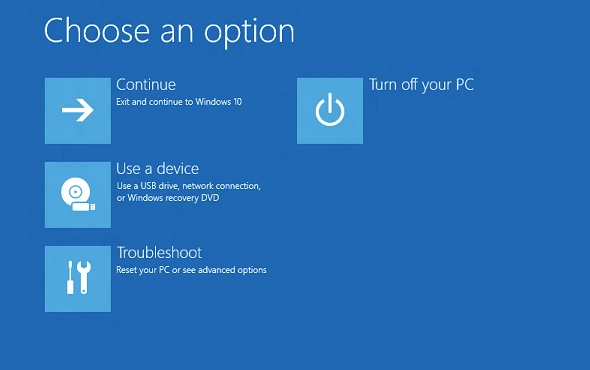

The Windows Recovery Environment in Windows 10/11.
Windows Recovery Environment (WinRE) is a recovery environment that can repair common causes of unbootable operating systems. It is preloaded by default on Windows 10 and Windows 11, as well as Windows Server 2016 and later server versions.[1]
Options
- Continue – this will restart the computer.
- Use a Device – used to boot off a USB device or a disc
- Troubleshoot – this will bring you more options.
- Refresh your PC – resets the computer and keeps your personal files
- Reset your PC – resets the computer entirely, even personal files.
- Advanced Options – this will bring you more options
- System Restore – lets you restore your computer from a restore point that was automatically created in the OS or you created it yourself
- System Image Recovery – lets you restore a system image from a disc or USB device
- Uninstall Updates – uninstalls the computer's updates
- Startup Repair – attempts to fix problems automatically
- Command Prompt – opens up a command window for you to preform advanced recovery methods.
- UEFI Firmware Settings (UEFI Systems Only) - reboots to the computer's setup Utility or boot menu, you can change settings in the setup.
- Startup Settings
Reboots into the Windows Startup Settings, Lets you enable safe mode, disable driver disable driver signature enforcement and more,
- Go back to previous build (Windows 10 Only)
Restores the computer back to the previous version.
Ways to start WinRE
- 2 times of failed startup - It will run Automatic Repair (The same thing as startup repair).
- Corrupted driver or file - It will run Automatic Repair (The same thing as startup repair).
- Shift + Restart then clicking an option. - It will load the option you choose when it enters the Recovery Environment.
- Holding recovery key to launch recovery partition. - It will bring you to the Choose an Option menu.
- Clicking the reset button on the reset your pc option. - It will automatically start resetting once it enters the recovery environment
- Running the reagentc /boottore command in an administrative command prompt and then rebooting the computer. - It will bring you to the Choose an Option menu.
- In Startup Settings, pressing F10, then pressing F1 or 1. - It will bring you to the Choose an Option menu.
History
Windows Vista
Windows Vista doesn't have the Windows Recovery Environment in the system, but it does have it on the installation media, being very similar to the Windows 7 Recovery Environment.
Windows 7
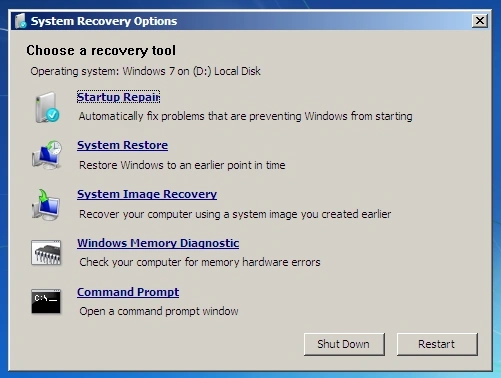

System Recovery Options in Windows 7.
In Windows 7, the recovery environment has a different interface, Startup Repair looks different too, windows memory diagnostic was removed from the Windows Recovery Environment, but you could still access it from the Windows 8 Recovery Environment by going to the command prompt, then notepad, then "File", then "Open", then "This PC", then "X:\", then "Windows", then 'System32", then look for the file, then right click and click "Open".
- ↑ Windows Recovery Environment (Windows RE), Microsoft Learn. 2023-02-09