Windows 10
 (codenamed Threshold) is a major release of Microsoft's Windows NT operating system. The successor to Windows 8.1, it was released to manufacturing on July 15, 2015, and later to retail on July 29, 2015.[1] Windows 10 was made available for download via MSDN and TechNet, as a free upgrade for retail copies of Windows 8 and Windows 8.1 users via the Microsoft Store, and to Windows 7 users via Windows Update. Unlike previous Windows NT releases, Windows 10 receives new builds on an ongoing basis, which are available at no additional cost to users; devices in enterprise environments can alternatively use long-term support milestones that only receive critical updates, such as security patches.[2][3] It was succeeded by Windows 11, which was released on October 5, 2021.[4]
In contrast to the tablet-oriented approach of Windows 8, Microsoft provided a desktop-oriented interface, similar to previous versions of Windows, in Windows 10. Other features added include Xbox Live integration, Cortana virtual assistant, virtual desktops, and the improved Settings component. Windows 10 also replaced Internet Explorer with Microsoft Edge. As with previous versions, Windows 10 has been developed primarily for x86 processors; in 2018, a version of Windows 10 for ARM processors was released.[5]
Windows 10 received generally positive reviews upon its original release, with praise given to the return of the desktop interface, improved bundled software compared to Windows 8.1, and other capabilities. However, media outlets had been critical of behavioral changes of the system, like mandatory update installation, privacy concerns over data collection, and adware-like tactics used to promote the operating system on its release.[6] Microsoft initially aimed to have Windows 10 installed on over one billion devices within three years of its release;[2] that goal was ultimately reached almost five years after released on March 16, 2020,[7] and it had surpassed Windows 7 as the most popular version of Windows worldwide by January 2018, which remained the case until Windows 11 took the top spot in June 2025. As of August 2025, Windows 10 is the second-most used version of Windows, accounting for 43% of the worldwide market share, while its successor Windows 11 holds 53%. Windows 10 is the second-most-used traditional PC operating system, with a 31% share of users.
History
Before Windows 8.1 was released, many reports claimed the existence of "Windows Threshold", a supposed OS that would be the successor to Windows 8. Nine months later, on July 21, 2013, build 9795 was leaked. Screenshots showed the new Start Menu, almost the same as the one shown at Build 2013. Microsoft China also confirmed Windows 10 on September 2, 2013, on Weibo. Additionally, Build 9834 was leaked by sites WinFuture and ComputerBase. It introduced multiple desktops to improve multitasking. Before Microsoft officially announced it, news reports referred to the operating system by several names, most notably Windows 9. Along with the announcement of Windows 10, Microsoft introduced the Windows Insider Program. The program is designed to allow people see the future of Windows and give feedback, introducing a public element to the development process. To aid in the receiving if feedback, Microsoft included a Windows Feedback app into the released builds of Windows 10. Build 9860 introduced a speed to receiving updates, along with an explanation as to how the Windows Insiders (as they've been called by Microsoft) get the builds. Since its unveiling in September 2014, Microsoft has pushed 15 builds officially through the Windows Insider Program: Build 9841, Build 9860, Build 9879, Build 9926, Build 10041, Build 10049, Build 10061, Build 10074, Build 10122, Build 10130, Build 10158, Build 10159, Build 10162, Build 10166 and Build 10240 (RTM). Additional builds, like Build 10051, were leaked and acknowledged by Microsoft, but were not officially released by Microsoft.
Features
.png)
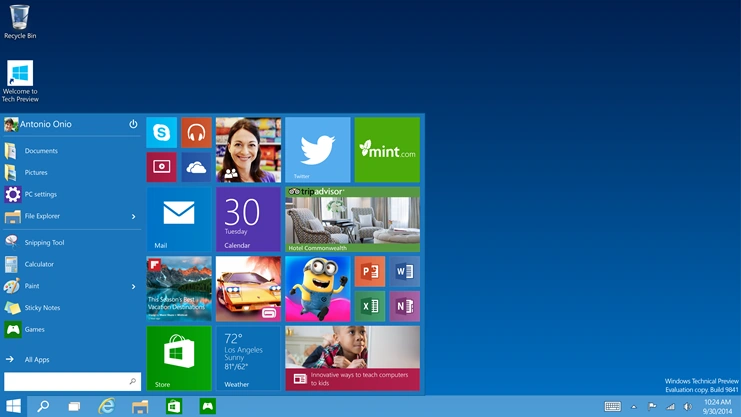
The Start Menu as it appears in early builds of Windows 10. It would somewhat resemble Windows 7.
Windows 10 makes its user experience and functionality more consistent between different classes of devices, and addresses many shortcomings of the user interface introduced in Windows 8. Windows 10 Mobile, the successor to Windows Phone 8.1, shared some user interface elements and apps with its PC counterpart.
Windows 10 supports universal apps, an expansion of the Metro-style first introduced in Windows 8. Universal apps can be designed to run across multiple Microsoft product families with nearly identical code—encompassing PCs, tablets, smartphones, embedded systems, Xbox One, Surface Hub, and Mixed Reality. The Windows user interface was revised to handle transitions between a mouse-oriented interface and a touchscreen-optimized interface based on available input devices—particularly on 2-in-1 PCs. Both interfaces include an updated Start menu which incorporates elements of Windows 7's traditional Start menu with the tiles of Windows 8. Windows 10 also introduced the Microsoft Edge series of web browsers, a virtual desktop system, a window and desktop management feature called Task View, support for fingerprint and face recognition login, new security features for enterprise environments, and DirectX 12.
The Windows Runtime app ecosystem was revised into the Universal Windows Platform (UWP). These universal apps are made to run across multiple platforms and device classes, including smartphones, tablets, Xbox One consoles, and other devices compatible with Windows 10. Windows apps share code across platforms, have responsive designs that adapt to the needs of the device and available inputs, can synchronize data between Windows 10 devices (including notifications, credentials, and allowing cross-platform multiplayer for games), and are distributed through the Microsoft Store (rebranded from Windows Store since September 2017). Developers can allow "cross-buys", where purchased licenses for an app apply to all of the user's compatible devices, rather than only the one they purchased on (e.g., a user purchasing an app on PC is also entitled to use the smartphone version at no extra cost).
The ARM version of Windows 10 allows running applications for x86 processors through 32-bit software emulation.
On Windows 10, the Microsoft Store serves as a unified storefront for apps, video content, and eBooks. Windows 10 also allows web apps and desktop software (using either Win32 or .NET Framework) to be packaged for distribution on the Microsoft Store. Desktop software distributed through the Microsoft Store is packaged using the App-V system to allow sandboxing.
User interface and desktop
A new iteration of the Start menu is used on the Windows 10 desktop, with a list of places and other options on the left side, and tiles representing applications on the right. The menu can be resized and expanded into a full-screen display, which is the default option in Tablet mode. A new virtual desktop system was added by a feature known as Task View, which displays all open windows and allows users to switch between them or switch between multiple workspaces. Universal apps, which previously could be used only in full-screen mode, can now be used in self-contained windows similar to other programs. Program windows can now be snapped to quadrants of the screen by dragging them to the corner. When a window is snapped to one side of the screen, Task View appears and the user is prompted to choose a second window to fill the unused side of the screen (called "Snap Assist"). The Windows system icons were also changed.
Charms have been removed; their functionality in universal apps is accessed from an App commands menu on their title bar. In its place is Action Center, which displays notifications and settings toggles. It is accessed by clicking an icon in the notification area or dragging from the right of the screen. Notifications can be synced between multiple devices. The Settings app (formerly PC Settings) was refreshed and now includes more options that were previously exclusive to the desktop Control Panel.
Windows 10 is designed to adapt its user interface based on the type of device being used and available input methods. It offers two separate user interface modes: a user interface optimized for mouse and keyboard, and a "Tablet mode" designed for touchscreens. Users can toggle between these two modes at any time, and Windows can prompt or automatically switch when certain events occur, such as disabling Tablet mode on a tablet if a keyboard or mouse is plugged in, or when a 2-in-1 PC is switched to its laptop state. In Tablet mode, programs default to a maximized view, and the taskbar contains a back button and hides buttons for opened or pinned programs by default; Task View is used instead to switch between programs. The full-screen Start menu is used in this mode, similarly to Windows 8, but scrolls vertically instead of horizontally.
System security
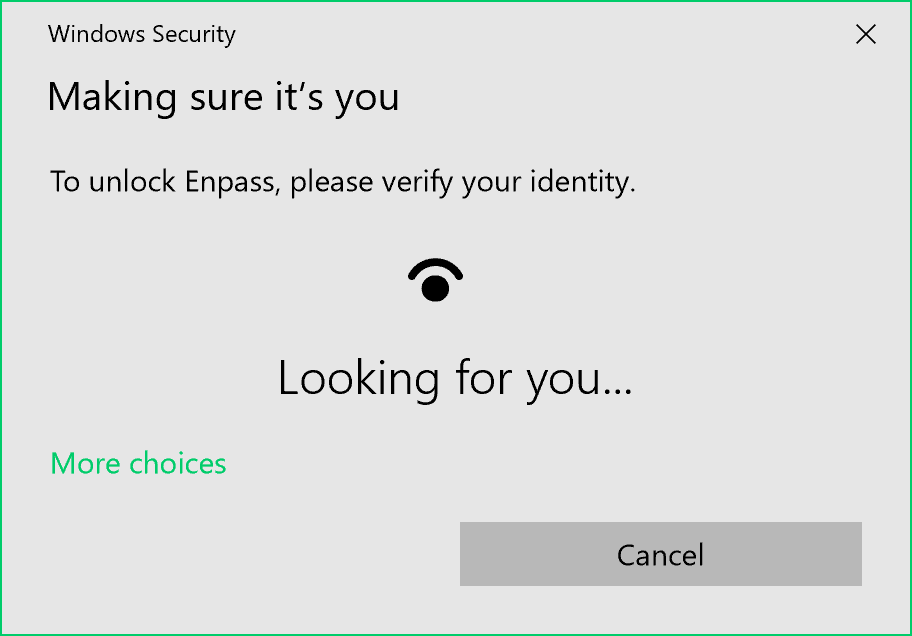

Windows Hello unlock prompt while using Enpass (a password manager).
Windows 10 incorporates multi-factor authentication technology based upon standards developed by the FIDO Alliance. The operating system includes improved support for biometric authentication through the Windows Hello platform. Devices with supported cameras (requiring infrared illumination, such as Intel RealSense) allow users to log in with iris or face recognition, similarly to Kinect. Devices with supported readers allow users to log in through fingerprint recognition. Support was also added for palm-vein scanning through a partnership with Fujitsu in February 2018. Credentials are stored locally and protected using asymmetric encryption.
In 2017, researchers demonstrated that Windows Hello could be bypassed on fully updated Windows 10 version 1703 with a color printout of a person's picture taken with an IR camera. In 2021, researchers were again able to bypass the Windows Hello functionalities by using custom hardware disguised as a camera, which presented an IR photo of the owner's face.
In addition to biometric authentication, Windows Hello supports authentication with a PIN. By default, Windows requires a PIN to consist of four digits, but can be configured to permit more complex PINs. However, a PIN is not a simpler password. While passwords are transmitted to domain controllers, PINs are not. They are tied to one device, and if compromised, only one device is affected. Backed by a Trusted Platform Module (TPM) chip, Windows uses PINs to create strong asymmetric key pairs. As such, the authentication token transmitted to the server is harder to crack. In addition, whereas weak passwords may be broken via rainbow tables, TPM causes the much simpler Windows PINs to be resilient to brute-force attacks.
When Windows 10 was first introduced, multi-factor authentication was provided by two components: Windows Hello and Passport (not to be confused with the Passport platform of 1998). Later, Passport was merged into Windows Hello.
The enterprise edition of Windows 10 offers additional security features; administrators can set up policies for the automatic encryption of sensitive data, selectively block applications from accessing encrypted data, and enable Device Guard—a system that allows administrators to enforce a high-security environment by blocking the execution of software that is not digitally signed by a trusted vendor or Microsoft. Device Guard is designed to protect against zero-day exploits, and runs inside a hypervisor so that its operation remains separated from the operating system itself.
Command line
The console windows based on Windows Console (for any console app, not just PowerShell and Command Prompt) can now be resized without any restrictions, can be made to cover the full screen by pressing Alt+Enter, and can use the standard keyboard shortcuts, such as those for cut, copy, and paste. Other features, such as word wrap and transparency, were also added. These functions can be disabled to revert to the legacy console if needed.
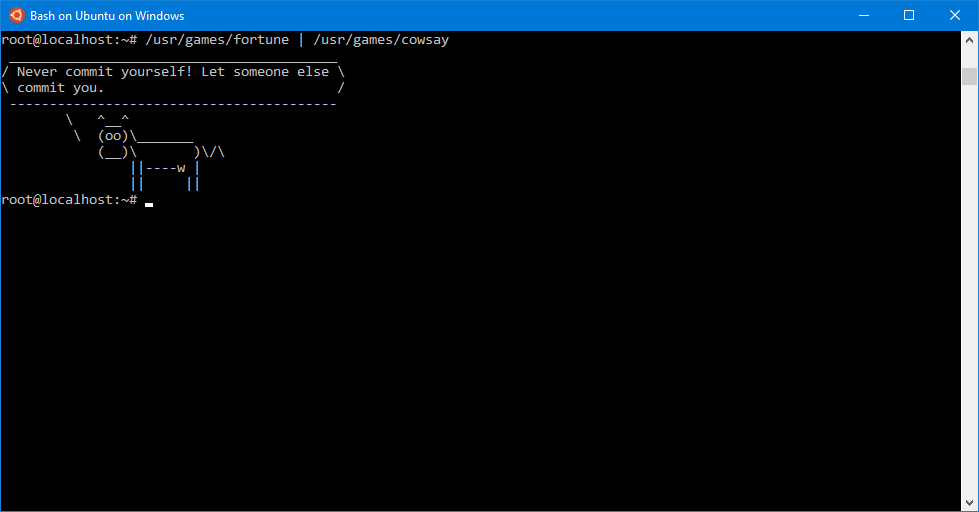

Bash for Ubuntu, running on Windows 10.
The Anniversary Update added Windows Subsystem for Linux (WSL), which allows the installation of a user space environment from a supported Linux distribution that runs natively on Windows. The subsystem translates Linux system calls to those of the Windows NT kernel (only claims full system call compatibility as of WSL 2, included in a later Windows update). The environment can execute the Bash shell and 64-bit command-line programs (WSL 2 also supports 32-bit Linux programs and graphics, assuming supporting software is installed, and GPU support for other uses). Linux distributions for Windows Subsystem for Linux are obtained through the Microsoft Store. The feature initially supported an Ubuntu-based environment; Microsoft announced in May 2017 that it would also add Fedora and OpenSUSE environment options.
Storage requirements
To reduce the storage footprint of the operating system, Windows 10 automatically compresses system files. The system can reduce the storage footprint of Windows by approximately 1.5 GB for 32-bit systems and 2.6 GB for 64-bit systems. The level of compression used is dependent on a performance assessment performed during installations or by OEMs, which tests how much compression can be used without harming operating system performance. Furthermore, the Refresh and Reset functions use runtime system files instead, making a separate recovery partition redundant, allowing patches and updates to remain installed following the operation, and further reducing the amount of space required for Windows 10 by up to 12 GB. These functions replace the WIMBoot mode introduced on Windows 8.1 Update, which allowed OEMs to configure low-capacity devices with flash-based storage to use Windows system files out of the compressed WIM image typically used for installation and recovery. Windows 10 also includes a function in its Settings app that allows users to view a breakdown of how their device's storage capacity is being used by different types of files, and determine whether certain types of files are saved to internal storage or an SD card by default.
Online services and functionality
Windows 10 introduces Microsoft Edge [Legacy], a new default web browser. It featured a new standards-compliant rendering engine derived from MSHTML (Trident), and also includes annotation tools and integration with other Microsoft platforms present within Windows 10. Internet Explorer 11 is maintained on Windows 10 for compatibility purposes, but is deprecated in favor of Edge and, since mid-June 2022, is no longer supported on editions that follow Microsoft's Modern Lifecycle Policy. The initial version of Edge (Edge Legacy) was later succeeded by a new iteration derived from the Chromium project and Blink layout engine (sometimes referred to as "New Edge"), which replaced the previous EdgeHTML-based version of Edge (Edge Legacy), and is bundled with the OS by default from build 20H2 onwards.
Windows 10 incorporates a universal search box located alongside the Start and Task View buttons, which can be hidden or condensed into a single button. Previous versions featured Microsoft's intelligent personal assistant Cortana, which was first introduced with Windows Phone 8.1 in 2014, and supports both text and voice input. Many of its features are a direct carryover from Windows Phone, including integration with Bing, setting reminders, a Notebook feature for managing personal information, as well as searching for files, playing music, launching applications, setting reminders, or sending emails. Since the November 2019 update, Microsoft has begun to phase out Cortana as part of a repositioning of the product towards enterprise use, with the May 2020 update removing its Windows shell integration and consumer-oriented features.
Microsoft Family Safety is replaced by Microsoft Family, a parental controls system that applies across Windows platforms and Microsoft online services. Users can create a designated family, and monitor and restrict the actions of users designated as children, such as access to websites, enforcing age ratings on Microsoft Store purchases, and other restrictions. The service can also send weekly e-mail reports to parents detailing a child's computer usage. Unlike previous versions of Windows, child accounts in a family must be associated with a Microsoft account, which allows these settings to apply across all Windows 10 devices that a particular child is using.
Windows 10 also offers the Wi-Fi Sense feature originating from Windows Phone 8.1; users can optionally have their device automatically connect to suggested open hotspots, and share their home network's password with contacts (either via Skype, People, or Facebook) so they may automatically connect to the network on a Windows 10 device without needing to manually enter its password. Credentials are stored in an encrypted form on Microsoft servers and sent to the devices of the selected contacts. Passwords are not viewable by the guest user, and the guest user is not allowed to access other computers or devices on the network. Wi-Fi Sense is not usable on 802.1X-encrypted networks. Adding "_optout" at the end of the SSID will also block the corresponding network from being used for this feature.
Universal calling and messaging apps for Windows 10 are built in as of the November 2015 update: Messaging, Skype Video, and Phone. These offer built-in alternatives to the Skype download and sync with Windows 10 Mobile.
Multimedia and gaming
Windows 10 provides greater integration with the Xbox ecosystem. Xbox SmartGlass is succeeded by the Xbox Console Companion (formerly the Xbox app), which allows users to browse their game library (including both PC and Xbox console games), and Game DVR is also available using a keyboard shortcut, allowing users to save the last 30 seconds of gameplay as a video that can be shared to Xbox Live, OneDrive, or elsewhere. Windows 10 also allows users to control and play games from an Xbox One console over a local network. The Xbox Live SDK allows application developers to incorporate Xbox Live functionality into their apps, and future wireless Xbox One accessories, such as controllers, are supported on Windows with an adapter. Microsoft also intends to allow cross-purchases and save synchronization between Xbox One and Windows 10 versions of games; Microsoft Studios games such as ReCore and Quantum Break are intended to be exclusive to Windows 10 and Xbox One.
Candy Crush Saga and Microsoft Solitaire Collection are also automatically installed upon installation of Windows 10.
Windows 10 adds native game recording and screenshot capture ability using the newly introduced Game Bar. Users can also have the OS continuously record gameplay in the background, which then allows the user to save the last few moments of gameplay to the storage device.
Windows 10 adds FLAC and HEVC codecs and support for the Matroska media container, allowing these formats to be opened in Windows Media Player and other applications. Windows Media Center is no longer bundled.
Windows 10 includes DirectX 12, alongside WDDM 2.0. Unveiled in March 2014 at GDC, DirectX 12 aims to provide "console-level efficiency" with "closer to the metal" access to hardware resources, and reduced CPU and graphics driver overhead. Most of the performance improvements are achieved through low-level programming, which allows developers to use resources more efficiently and reduce single-threaded CPU bottlenecking caused by abstraction through higher-level APIs. DirectX 12 will also feature support for vendor-agnostic multi-GPU setups. WDDM 2.0 introduces a new virtual memory management and allocation system to reduce workload on the kernel-mode driver.
Font support
Windows 10 adds three new default typefaces compared to Windows 8, but omits several others. The removed typefaces are available in supplemental packs and may be added manually over a non-metered internet connection.
Upgrade path


Logo (2015-present)
Microsoft made Windows 10 available as free upgrade for qualified Windows 7, Windows 8.1, and Windows Phone 8.1 devices. It became available on July 29, 2015, and remained a free upgrade for one year. You can still technically upgrade to Windows 10 for free, but it requires using the Media Creation Tool to upgrade your PC to Windows 10. When upgrading, you’ll stay on like-to-like editions of Windows. For example, Windows 7 Professional will upgrade to Windows 10 Home.
| Windows Version & Edition | Eligible Windows 10 Upgrade Edition |
|---|---|
| Windows 1.0 Windows 2.0 |
Ineligible |
|
Windows 7 Starter |
Windows 10 Home |
|
Windows 7 Professional |
Windows 10 Pro |
| Windows Phone 8.1 | Windows 10 Mobile |
Windows 10 is serviced in a significantly different manner from previous releases of Windows. Delivery is often described by Microsoft as a "service", due to its ongoing updates, with Terry Myerson explaining that Microsoft's aim is that "the question of 'what version of Windows are you running' will cease to make sense."
Unlike previous versions of Windows, Windows Update does not allow the selective installation of updates; instead, all updates (including patches, feature updates, and driver software) are downloaded automatically. Users can only choose whether the system will reboot automatically to install updates while the system is inactive, or be notified to schedule a reboot. Windows Update also uses a peer-to-peer system for distributing updates; by default, users' bandwidth is used to distribute previously downloaded updates to other users, in combination with Microsoft servers. Users can instead choose only to use peer-to-peer updates within their local area network.
Editions and pricing
- Main article: Windows 10 editions
Windows 10 is available in five main editions for personal computing devices: the Home and Pro editions of which are sold in most countries, and as pre-loaded software on new computers. Home is aimed at home users, while Pro is aimed at power users and small businesses. Each edition of Windows 10 includes all of the capabilities and features of the edition below it, and adds additional features oriented towards its market segments; for example, Pro adds additional networking and security features such as BitLocker, Device Guard, Windows Update for Business, and the ability to join a domain. Enterprise and Education contain additional features aimed towards business environments, and are only available through volume licensing.
As part of Microsoft's unification strategies, Windows products that are based on Windows 10's common platform but meant for specialized platforms are marketed as editions of the operating system, rather than as separate product lines. An updated version of Microsoft's Windows Phone operating system for smartphones and tablets was branded as Windows 10 Mobile. Editions of Enterprise and Mobile will also be produced for embedded systems, along with Windows 10 IoT Core, which is designed specifically for use in small-footprint, low-cost devices and Internet of Things (IoT) scenarios and is similar in scope to Windows Embedded Compact.
On May 2, 2017, Microsoft unveiled Windows 10 S (referred to in leaks as Windows 10 Cloud), a feature-limited edition of Windows 10 which was designed primarily for devices in the education market (competing, in particular, with ChromeOS netbooks), such as the Surface Laptop that Microsoft also unveiled at this time. The OS restricts software installation to applications obtained from the Microsoft Store; the device may be upgraded to Windows 10 Pro for a fee to enable unrestricted software installation. As a time-limited promotion, Microsoft stated that this upgrade would be free on the Surface Laptop until March 31, 2018. Windows 10 S also contains a faster initial setup and login process, and allows devices to be provisioned using a USB drive with the Windows Intune for Education platform. In March 2018, Microsoft announced that Windows 10 S would be deprecated because of market confusion and would be replaced by "S Mode", an OEM option wherein Windows defaults to only allowing applications to be installed from the Microsoft Store, but does not require payment in order to disable these restrictions.
Windows 10 versions
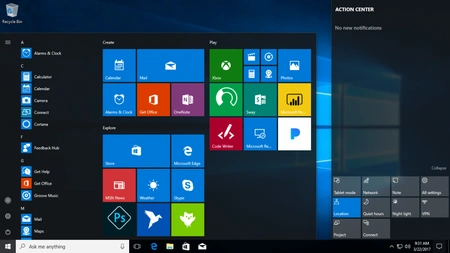

The Windows 10 Creators Update (version 1703) showing the Start menu and action center.
Every version of Windows 10 has a version number. The version number comes out when an update is released and it ends when it's no longer maintained.
- Version 1507 (RTM) - July 29, 2015
- Version 1511 (November Update) - November 10, 2015
- Version 1607 (Anniversary Update) - August 2, 2016
- Version 1703 (Creators Update) - April 5, 2017
- Version 1709 (Fall Creators Update) - October 17, 2017
- Version 1803 (April 2018 Update) - April 30, 2018
- Version 1809 (October 2018 Update) - October 2, 2018
- Version 1903 (May 2019 Update) - May 21, 2019
- Version 1909 (November 2019 Update) - November 12, 2019
- Version 2004 (May 2020 Update) - May 27, 2020
- Version 20H2 (October 2020 Update) - October 20, 2020
- Version 21H1 (May 2021 Update) - May 18, 2021
- Version 21H2 (November 2021 Update) - November 16, 2021
- Version 22H2 (2022 Update) - October 18, 2022
Hardware requirements
The basic hardware requirements to install the Windows 10 Insider Preview are the same as Windows 8.1, however some older 64-bit CPUs may not be supported as well as some 32 GB and all 16 GB devices with a compressed system image.
Important notes
- The upgradeability of a device has factors beyond the system specification. This includes driver and firmware support, application compatibility, and feature support, regardless of whether or not the device meets the minimum system specification for Windows 10.
- If your PC or tablet is currently running Windows 7 SP1 or Windows 8.1 Update, you can check to see if it meets the requirements by using ‘Check my PC’ in the Get Windows 10 app.
- Applications, files and settings will migrate as part of the upgrade, however some applications or settings may not migrate.
- For Anti-virus and Anti-malware applications, during upgrade Windows will check to see if your Anti-virus or Anti-malware subscription is current. Windows will uninstall your application while preserving your settings. After upgrade is complete, Windows will install the latest version available with the settings that were set prior to upgrade. If your subscription is not current, upgrade will enable Windows defender.
- Some applications that came from your OEM may be removed prior to upgrade.
- For certain third party applications, the “Get Windows 10” app will scan for application compatibility. If there is a known issue that will prevent the upgrade, you will be notified of the list of applications with known issues. You can choose to accept and the applications will be removed from the system prior to upgrade. Please copy the list before you accept the removal of the application.
Additional requirements
| Feature | Requirements |
|---|---|
| Biometric authentication | Fingerprint reader |
| BitLocker | Trusted Platform Module (TPM) 1.2 or 2.0, a dedicated USB flash drive, or a password |
| Device encryption | Trusted Platform Module (TPM) 2.0 and InstantGo |
| Hyper-V | Second Level Address Translation (SLAT) |
| Miracast | Wi-Fi adapter that supports Wi-Fi Direct, NDIS 6.30, WDDM 1.3 (Ivy Bridge) |
| Secure attention | Hardware equivalent of Ctrl+Alt+Delete or ⊞ Win+Power key sequence |
| Secure Boot | UEFI v2.3.1 Errata B with Microsoft Windows certification authority in its database |
| Speech recognition | Microphone |
| Windows Hello | Illuminated infrared camera |
- Speech recognition will vary by device microphone. For better speech experience you will need a:
- High fidelity microphone array
- Hardware driver with Microphone array geometry exposed
- Windows Hello requires specialized illuminated infrared camera for facial recognition or iris detection or a finger print reader which supports the Window Biometric Framework.
- Continuum is available on all Windows 10 editions by manually turning “tablet mode” on and off through the Action Center. Tablets and 2-in-1’s with GPIO indicators or those that have a laptop and slate indicator will be able to be configured to enter “tablet mode” automatically.
- Music and Video stream through the Xbox Music or Xbox video app available in certain regions. For the most up to date list of regions, please go to Xbox on Windows website.
- Two factor authentication requires the use of a PIN, Biometric (finger print reader or illuminated infrared camera), or a phone with Wi-Fi or Bluetooth capabilities.
- The number of applications that can be snapped will depend upon the minimum resolution for the application.
- To use touch, you need a tablet or a monitor that supports multi-touch. (more info)
- Microsoft account required for some features.
- Internet access (ISP) fees might apply.
- Secure boot requires firmware that supports UEFI v2.3.1 Errata B and has the Microsoft Windows Certification Authority in the UEFI signature database.
- Some IT administrators may enable Secure Logon (Ctrl + Alt + Del) before bringing you to the log in screen. On tablets without a keyboard, a tablet with the Windows button maybe required as the key combination on a tablet is Windows button + Power button.
- Some games and programs might require a graphics card compatible with DirectX 10 or higher for optimal performance.
- BitLocker To Go requires a USB flash drive (Windows 10 Pro only).
- BitLocker requires either Trusted Platform Module (TPM) 1.2, TPM 2.0 or a USB flash drive (Windows 10 Pro and Windows 10 Enterprise only).
- Client Hyper-V requires a 64-bit system with second level address translation (SLAT) capabilities and additional 2 GB of RAM (Windows 10 Pro and Windows 10 Enterprise only).
- Miracast requires a display adapter which supports Windows Display Driver Model (WDDM) 1.3, and a Wi-Fi adapter that supports Wi-Fi Direct.
- Wi-Fi Direct Printing requires a Wi-Fi adapter that supports Wi-Fi Direct and a device that supports Wi-Fi Direct Printing.
- To install a 64-bit OS on a 64-bit PC, your processor needs to support CMPXCHG16b, PrefetchW, and LAHF/SAHF.
- InstantGo works only with computers designed for Connected Standby.
- Device encryption requires a PC with InstantGo and TPM 2.0.
Trivia
- Windows 8 to 10 are the only versions of Windows to have different desktop and tablet UIs, with Windows 10's tablet mode, and Windows 8's Metro UI and desktop mode.[8]
- In Windows 10, the "X" button to close windows only turns red when you hover over it.[9]
- Windows 10's Cortana digital assistant was migrated to a feature of Microsoft 365 with the release of Windows 11.[10]
- Windows 10 was the last version of Windows to allow its taskbar to be moved to the top, left, and right of the screen. These options were removed in Windows 11.[11]
- In the Technical-Insider Preview (mostly in builds 9926, 10036, etc.) Windows 10 was supposed to use completely 2D icons which were changed to the icons in Windows 10 that we know today in later builds.
- Windows 10 is the last version to have sharp corners. This was added in Windows 8 but originally existed in the Windows Classic theme.
- Windows 10 had its logo as its default background along with Windows 7
- Windows 10 is the last version of Windows to support 32 bit processors. Windows 11 only supports 64 bit processors.
Videos
See also
- List of features removed in Windows 10
- Features new to Windows 10
- Windows 10 version history
- Criticism of Windows 10
References
- ↑ "Hello World: Windows 10 Available on July 29". Windows Blogs. Microsoft. June 1, 2015. Archived from the original on October 4, 2015.
- ↑ 2.0 2.1 Bott, Ed. "Microsoft's big Windows 10 goal: one billion or bust". ZDNet. CBS Interactive. Archived from the original on April 13, 2019.
- ↑ Bott, Ed (July 22, 2016). "Is the Windows 10 Long-Term Servicing Branch right for you?". TechProResearch. Archived from the original on September 11, 2017.
- ↑ "Upgrade to the New Windows 11 OS". Microsoft. Archived from the original on June 24, 2021.
- ↑ Howse, Brett. "Microsoft Launches Windows 10 on ARM: Always Connected PCs". AnandTech. Archived from the original on June 22, 2018.
- ↑ Chacos, Brad (May 22, 2016). "How Microsoft's tricky new Windows 10 pop-up deceives you into upgrading". PC World. IDG. Archived from the original on April 4, 2019.
- ↑ "Microsoft hits its goal of 1 billion devices running Windows 10". The Verge. March 16, 2020. Archived from the original on March 21, 2020.
- ↑ Switch Between Metro UI and Desktop in Windows 8 by Arun Choudhary, C#Corner. Nov 29, 2019.
- ↑ 8 ways to close apps in Windows 10 like a Pro by Diana Ann Roe, Digital Citizen. 3030-05-25.
- ↑ Whatever happened to Cortana? Think corner office and a hefty raise by Ed Bott, ZDNet. 2020-06-11.
- ↑ Microsoft Explains Why You Can’t Move the Windows 11 Taskbar by Cory Gunther, ReviewGeek. 2022-04-08.
External links
- Get Windows 10 at Microsoft
- Windows 10 at the BetaWiki
- Windows 10 at Wikipedia
Microsoft Windows family
|
|---|
| Versions • Components • History |
| Original |
| DOS-based |
| Windows 1.0 • Windows 2.0 • Windows 2.1 (Windows/286 • Windows/386) • Windows 3.0 • Windows 3.1 |
| Windows 9x |
| Windows 95 • Windows 98 • Windows Me |
| Windows NT |
| Early versions |
| Windows NT 3.1 • Windows NT 3.5 • Windows NT 3.51 • Windows NT 4.0 • Windows 2000 |
| Client |
| Windows XP (development) • Windows Vista (editions • development) • Windows 7 (editions • development) • Windows 8 • Windows 10 • Windows 11 |
| Windows Server |
| Server 2003 • Server 2008 (2008 R2) • HPC Server 2008 • Home Server • Small Business Server • Essential Business Server • Windows Server 2012 • Windows Server 2016 • Windows Server 2019 • Windows Server 2022 |
| Specialized |
| Windows Embedded • Windows PE • Windows Fundamentals for Legacy PCs |
| Mobile |
| Windows Mobile • Windows Phone |
| Cancelled |
| Cairo • Nashville • Neptune • Odyssey • Windows 10X |
| Related |
| Metro • Midori • OS/2 • Windows Aero • Windows Setup • Windows XP themes • Microsoft Plus! |