Windows 11
 (codenamed Sun Valley) is a personal computer operating system developed by Microsoft and is the latest major release of the Windows NT family, succeeding Windows 10.[2] It was formally announced at 11 a.m. Eastern Time on June 24, 2021.[3] Windows 11 became available as a free upgrade to eligible customers on October 5, 2021, more than six years after its predecessor's release date and the longest time span between successive releases of Microsoft Windows.[1]
Windows 11 features major changes to the Windows shell influenced by the cancelled Windows 10X, including a redesigned Start menu, the replacement of its "live tiles" with a separate "Widgets" panel on the Taskbar, the ability to create tiled sets of windows that can be minimized and restored from the Taskbar as a group, and new gaming technologies inherited from Xbox Series X and Series S such as Auto HDR and DirectStorage on compatible hardware. Internet Explorer (IE) has been replaced by the Chromium-based Microsoft Edge like its predecessor, Windows 10. Microsoft Teams is integrated into the shell. Microsoft also expanded support for third-party applications distributed via Microsoft Store, including limited compatibility with Android apps through a partnership with the Amazon Appstore.
Development
The UI of the project is codenamed "Sun Valley" and is based on the 21H2 Cobalt development cycle, done in the private, separate co-refresh branch.[4] Online support documents that were published (and withdrawn) in early June 2021 indicated that internal testing of "Windows Sun Valley" was underway at Microsoft.[5] On June 10, Microsoft teased the upcoming release of Windows 11 with a "slo-fi" video that runs exactly 11 minutes long.[6][7]
Leak of developer build
A 4GB ISO of the Windows 11 installer for build 21996.1, compiled on May 29, 2021 according to the build number was leaked on June 15, 2021[8] , after some screenshots were leaked on the Chinese website Baidu on the same date. Configuration files included with the installer indicated that it could have been made freely available to owners of genuine licenses of Windows 7 and later.[9] The build also includes an ARM binary that allows it to be installed on smartphones that supported Windows 10 Mobile, but the feature set was otherwise incomplete.[10][11]
Official preview releases
A Windows Preinstallation Environment build 22000.41 of Windows 11 was released on June 24, 2021, for selected members of the Windows Insider Program.[12] The official preview build 22000.51 became publicly available on June 28.[11] Updated previews of Office began being released to Insiders on July 7, 2021, with a new UI designed to match Windows 11.[13] Starting on September 2, 2021, the Windows Insider channels began receiving different builds, as the Beta Channel was focused on the 21H2 Cobalt release for October 2021, while the Dev Channel was focused on the following 22H1 Nickel release for the first half of 2022.[14] The Windows Subsystem for Android, which allows Android apps to run in Windows 11, became available for testing through the Windows Insider Program on October 20, 2021.[15]
General availability
Microsoft announced on August 31, 2021, that Windows 11 would first become available as a free upgrade for customers with new eligible devices on October 5, 2021, although Android support was not ready in time for the first release. A phased rollout would make it available to all other eligible devices in the market by mid-2022.[1][16]
In May 2022, physically packaged versions of Windows 11 began appearing at retailers for the first time. The retail boxes were available in Home and Pro editions. The installation software was contained on a USB flash drive.[17]


Upgrade eligibility
Windows 11 Upgrade Experience
Windows 11 became available for free through Windows Update to Windows 10 users who met the minimum system requirements. Users of Windows 7 to 8.1 need to update to 10 first to qualify for the free upgrade.[18] Microsoft confirmed that Windows 11 would be available "this holiday", though tech websites observed dates ranging from October 6 to 20 in sample screenshots provided by Microsoft.[19] Unlike early releases of Windows 10, there is no 32-bit version of Windows 11. An Intel Coffee Lake, AMD Zen 2, or later generation processor is required to support new security requirements.[20] Users who choose to upgrade to Windows 11 are provided 10 days to decide whether to roll back to Windows 10 through Windows Update > Advanced Options > Recovery. After this period has passed, users are on their own to back up their computer and perform a clean install of Windows 10.[21]
Minimum system requirements
- 1 GHz or faster 64-bit processor or SoC with at least 2 cores
- 4 GB or more RAM
- 64 GB or larger internal drive
- UEFI firmware that supports Secure Boot, TPM 2.0[22]
- DirectX 12 compatible GPU with support for WDDM 2.0 or later.
- 720p or larger display
- Internet access with a Microsoft account for activation
Features
- Main article: Features new to Windows 11


Updated window arrangement features
Windows 11 supports Android apps through the Amazon Appstore.[23] It also salvages some features from the cancelled Windows 10X project. The user interface was revised to follow Microsoft's new Fluent Design guidelines, which focus on ease of use and accessibility. A new startup sound was also introduced. The updated Start Menu omits Live Tiles and is centered by default, though it can be set back to the bottom left corner of the screen. News and Interests, is now called Widgets and is displayed as an icon rather than showing weather information.[24]


The new File Explorer tabs in version 22H2.
Windows 11 adds support for DirectStorage and auto HDR, which were first introduced in the Xbox Series X/S. DirectStorage is an API designed to take advantage of NVMe solid-state drives to improve application and game loading times. Auto HDR automatically improves the displayed dynamic range of older SDR games on supported monitors.[25]
The updated Microsoft Store allows developers to implement their own payment systems and supports distribution of Android apps. Microsoft stated that they will take no cut of revenue from apps that implement their own payment system.[23][26] This special deal does not extend to games, which will be subject to a 12% fee through Microsoft’s payment platform.[27] The Microsoft Store also allows developers to distribute Win32, progressive web applications, and other packaging technologies, alongside Universal Windows Platform apps.[28]
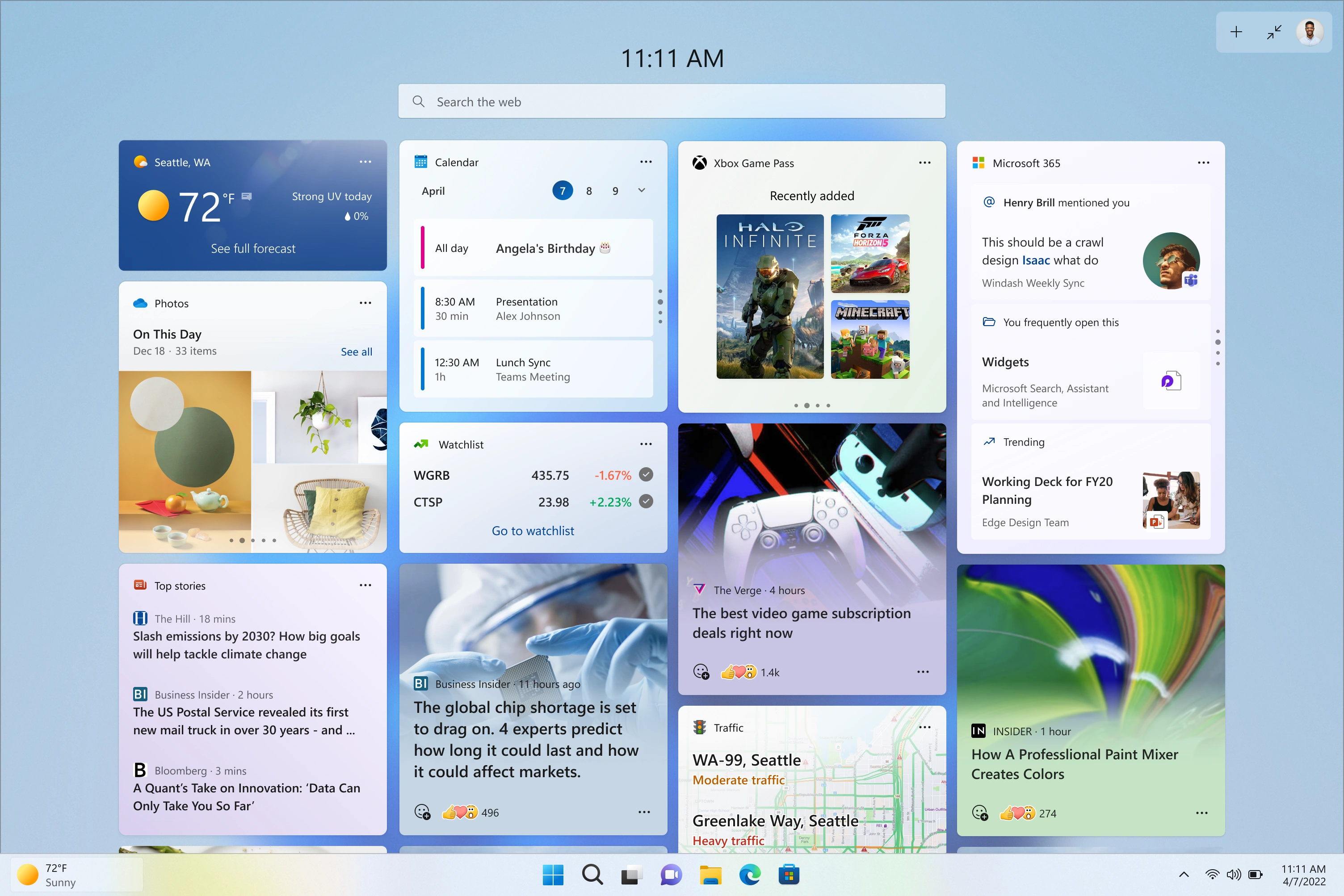

The expanded Widgets menu in version 23H2.
Notable artificial intelligence features in Windows 11 include Microsoft Copilot, a generative AI chatbot and successor to Cortana, and Windows Recall, a feature exclusive to Copilot+ PCs that locally stores snapshots of the user's activity (including content transcribed using live captions) and allows users to search through them.
Deprecated apps
The following Windows apps and programs are no longer bundled with Windows 11:
- 3D Viewer
- OneNote for Windows 10
- Paint 3D
- Skype
- Microsoft Wallet
- Internet Explorer
- Cortana
Default web browser
How to Enable IE Mode on Microsoft Edge Chromium
Windows 11 includes Microsoft Edge based on the newer Chromium browser engine, which Microsoft recommends for improved privacy and security.[29] For legacy websites that can only function with the older Internet Explorer browser, Edge users can enable "Internet Explorer mode" (IE mode) to switch from Chromium to the legacy MSHTML engine to handle such circumstances.[30] Microsoft stated that this feature would be supported in Edge until at least 2029.[31]
Unlike Windows 10, Windows 11 does not include support for Internet Explorer 11 by default. A procedure was found to re-enable it. However, it was acknowledged that Internet Explorer is no longer suitable for present-day use due to a lack of security and an inability to support modern cloud services like Microsoft 365 and Teams.[32][33]
Editions
Windows 11 is available in two main editions: Home, which is intended for consumer users, and Pro, which contains additional networking and security features such as BitLocker and the ability to join a domain. Windows 11 Home may be restricted by default to verified software obtained from the Microsoft Store ("S Mode"). Windows 11 Home requires an Internet connection and a Microsoft account to complete first-time setup. The restriction is also applied to Windows 11 Pro since version 22H2, as it was announced in February 2022, although a Microsoft account is not required if it is not for personal use.
Windows 11 SE was announced on November 9, 2021, as an edition exclusively for low-end devices sold in the education market; it is intended as a successor to Windows 10 S and competes primarily with ChromeOS. It is designed to be managed via Microsoft Intune. Based on feedback from educators, Windows 11 SE has multiple UI differences and limitations, including Snap Layouts not containing layouts for more than two applications at once, all applications opening maximized by default, and Widgets being removed. It is bundled with applications such as Microsoft Office for Microsoft 365, Minecraft Education Edition, and Flipgrid, while OneDrive is used to save files by default. Windows 11 SE does not include the Microsoft Store; third-party software is provisioned or installed by administrators. To target organizations migrating from Google Chrome, Microsoft Edge is configured by default to enable the installation of extensions from the Chrome Web Store. In July 2025, Microsoft announced that it would drop support for Windows 11 SE in October 2026 after the 2024 Update.
Updates
- Main article: Windows 11 version history
- Sun Valley (21H2): The original version of Windows 11, released in October 2021. It carries the build number 10.0.22000.
- Sun Valley 2 (22H2): The first major update to Windows 11, carrying the build number 10.0.22621. It was released in five component updates between October 2022 and February 2024.
- Sun Valley 3 (23H2): The second major update to Windows 11, carrying the build number 10.0.22631. It was rolled out on October 31, 2023.
- Hudson Valley (24H2): The third major update to Windows 11, carrying the build number 10.0.26100. It was first released to Copilot+ PCs on June 15, 2024, with a rollout to all users on October 1, 2024.
- Hudson Valley 2 (25H2): The fourth and latest major update to Windows 11, carrying the build number 10.0.26200. It was rolled out on September 30, 2025.
Future updates
- Version 26H1: The upcoming fifth major update to Windows 11, first released to Insiders who opted in to the Canary Channel on November 7, 2025. It will only be available to devices with certain silicon.
Reception
How to Disable Rounded corners on Windows 11!
Windows 11 received a mixed reception with praise for the updated Settings menu and the reintroduction of Widgets, and criticism for the reorganized Start menu and default Edge browser.[34] The centered Taskbar was compared to the appearance of Apple's macOS, as was the return of rounded window corners, last seen in Windows 7's Aero UI.[35]
Some users who preferred the appearance of previous versions of Microsoft Windows have developed various hacks and tutorials to make Windows 11 more closely resemble Windows 10, with its sharper window corners and all.[36][37]
Videos
Gallery


Trivia
- Microsoft partnered with Mikey Likes It Ice Cream to produce a flavor of Ice Cream called Bloomberry to celebrate the release of Windows 11. Bloomberry consists of "Blueberry ice cream that is naturally color[ed] using butterfly blue pea protein added to luscious pound cake pieces [and] royal blue chocolate-covered candies with a blueberry pie swirl" to somewhat resemble the "bloom" wallpapers from Windows 11. It was given out for free as part of a promotional event at the Mikey Likes It Ice Cream locations in the East Village and Harlem neighborhoods of New York City.
- This is the first version of Windows since Windows Vista to have a new startup sound.
References
- ↑ 1.0 1.1 1.2 Windows 11 available on October 5 by Aaron Woodman, Microsoft. 2021-08-31.
- ↑ Windows 11 with new UX confirmed in a leak, ahead of Microsoft's June 24 announcement by Zac Bowden and Daniel Rubino, Windows Central. 2021-06-15.
- ↑ Microsoft to unveil new version of Windows on June 24, by Jordan Novet, CNBC. 2021-06-02.
- ↑ Microsoft plans big Windows 10 UI refresh in 2021 codenamed 'Sun Valley' by Zac Bowden, Windows Central. 2020-10-28.
- ↑ Microsoft accidentally confirms Windows Sun Valley update by Mayank Parmar, Windows Latest. 2021-06-09.
- ↑ Microsoft teases Windows 11 with startup sound slo-fi remix by Sean Endicott, Windows Central. 2021-06-10.
- ↑ Windows Startup Sounds - Slo-fi Remix by Windows on YouTube. Uploaded June 10, 2021.
- ↑ Windows 11 hands on: First look at the leaked OS by Mark Hachman, PCWorld. 2021-06-15.
- ↑ Windows 11 could be a free upgrade for Windows 7 by Mayank Parmar, Windows Latest. 2021-06-17.
- ↑ Of course Windows 11 has been ported to the Lumia 950 XL smartphone by Brad Linder, Liliputing. 2021-06-17.
- ↑ 11.0 11.1 Microsoft releases Windows 11 preview, available to download now by Tom Warren, The Verge. 2021-06-28.
- ↑ Preparing for Insider Preview Builds of Windows 11 by Amanda Langowski and Brandon LeBlanc, Microsoft. 2021-06-24.
- ↑ Microsoft’s new Office UI now available for testers by Tom Warren, The Verge. 2021-07-07.
- ↑ Announcing Windows 11 Insider Preview Build 22449 by Amanda Langowski and Brandon LeBlanc, Microsoft. 2021-09-02.
- ↑ Introducing Android Apps on Windows 11 to Windows Insiders by Aidan Marcuss and Giorgio Sardo, Microsoft. 2021-10-20.
- ↑ Windows 11 release: Android apps won't be available today by Katie Teague, CNET. 2021-10-05.
- ↑ Windows 11 now comes in physical retail boxes too by Usama Jawad, Neowin. 2022-05-09.
- ↑ Windows 11 is a free upgrade by Tom Warren, The Verge. 2021-06-24.
- ↑ Microsoft keeps hinting at an October release for Windows 11 by Tom Warren, The Verge. 2021-06-28.
- ↑ Windows 11 will leave millions of PCs behind, and Microsoft is struggling to explain why by Tom Warren, The Verge. 2021-06-29.
- ↑ Why you should be wary of the Windows 11 10-day rollback countdown by Mary King, CNET. 2021-07-09.
- ↑ What is a TPM? And here's why you need it for Windows 11 by Imad Khan, Tom's Guide. 2021-06-27.
- ↑ 23.0 23.1 Microsoft is bringing Android apps to Windows 11 by Tom Warren, The Verge. 2021-06-24.
- ↑ Windows 11 leak reveals new UI, Start menu, and more by Tom Warren, The Verge. 2021-06-15.
- ↑ Microsoft launches Windows 11: Here's all you need to know by Neeraj Bhateja, TechieTechTech. 2021-06-25.
- ↑ Live Blog: Microsoft’s Windows 11 event by Tom Warren, Monica Chin, and Dieter Bohn, The Verge. 2021-06-24.
- ↑ Microsoft reveals the new Microsoft Store for Windows 11, and it has Android apps, too by Sean Hollister, The Verge. 2021-06-24.
- ↑ Microsoft is committed to the Microsoft Store with Windows 11 by Sean Endicott, Windows Central. 2021-06-24.
- ↑ Make the switch from Internet Explorer to Microsoft Edge, Microsoft Support. Accessed 2022-03-12.
- ↑ What is Internet Explorer (IE) mode?, Microsoft Docs. 2022-03-02.
- ↑ Lifecycle FAQ - Internet Explorer and Microsoft Edge, Microsoft Docs. 2016-07-18. Updated 2021-11-03.
- ↑ Internet Explorer on Windows 11 by aqua95, YouTube. 2022-02-22.
- ↑ Microsoft 365 apps say farewell to Internet Explorer 11 and Windows 10 sunsets Microsoft Edge Legacy, Microsoft 365 Blog. 2021-02-08.
- ↑ 3 things we love in Windows 11 (and 3 things we hate) by Mark Hachman, PCWorld. 2021-10-08.
- ↑ Windows 11 - The Bits That Look Like A Mac by Barry Collins, Forbes. 2021-06-22.
- ↑ How to Make Windows 11 Look and Feel Like Windows 10 by Avram Piltch, Tom's Hardware. 2021-07-17.
- ↑ How to Disable Rounded corners on Windows 11! by SahimTech, YouTube. 2021-12-12.
External links
- Windows 11 at Microsoft
- Download Windows 11
- Introducing Windows 11 by Panos Panay (2021-06-24)
- Available today: The Windows 11 2022 Update by Panos Panay (2022-09-20)
- Inside Windows 11 at Windows Insider
- Announcing Windows 11 Insider Preview Build 22000.65 by Amanda Langowski and Brandon LeBlanc (2021-07-08)
- Announcing Windows 11 Insider Preview Build 26120.4151 (Beta Channel) by Amanda Langowski and Brandon LeBlanc (2025-05-19)
- Announcing Windows 11 Insider Preview Build 26200.5603 (Dev Channel) by Amanda Langowski and Brandon LeBlanc (2025-05-19)
- Announcing Windows 11 Insider Preview Build 27858 (Canary Channel) by Amanda Langowski and Brandon LeBlanc (2025-05-16)
- Find Windows 11 specs, features, and computer requirements
- Update on Windows 11 minimum system requirements (2021-06-28)
- Windows 11 known issues and notifications (2021-10-08)
- Windows 11 at the BetaWiki
- Windows 11 at Wikipedia
Microsoft Windows family
|
|---|
| Versions • Components • History |
| Original |
| DOS-based |
| Windows 1.0 • Windows 2.0 • Windows 2.1 (Windows/286 • Windows/386) • Windows 3.0 • Windows 3.1 |
| Windows 9x |
| Windows 95 • Windows 98 • Windows Me |
| Windows NT |
| Early versions |
| Windows NT 3.1 • Windows NT 3.5 • Windows NT 3.51 • Windows NT 4.0 • Windows 2000 |
| Client |
| Windows XP (development) • Windows Vista (editions • development) • Windows 7 (editions • development) • Windows 8 • Windows 10 • Windows 11 |
| Windows Server |
| Server 2003 • Server 2008 (2008 R2) • HPC Server 2008 • Home Server • Small Business Server • Essential Business Server • Windows Server 2012 • Windows Server 2016 • Windows Server 2019 • Windows Server 2022 |
| Specialized |
| Windows Embedded • Windows PE • Windows Fundamentals for Legacy PCs |
| Mobile |
| Windows Mobile • Windows Phone |
| Cancelled |
| Cairo • Nashville • Neptune • Odyssey • Windows 10X |
| Related |
| Metro • Midori • OS/2 • Windows Aero • Windows Setup • Windows XP themes • Microsoft Plus! |