
Microsoft Windows Server 2003 logo screen.
Windows Server 2003 (codenamed Whistler Server) is the sixth major version of the Windows NT operating system produced by Microsoft and the first server version to be released under the Windows Server brand name. It was released to manufacturing on March 28, 2003, and generally available on April 24, 2003. Windows Server 2003 is the successor to the Server editions of Windows 2000 and the predecessor to Windows Server 2008. An updated version, Windows Server 2003 R2, was released to manufacturing on December 6, 2005. Windows Server 2003 is based on Windows XP, and its kernel has also been used in Windows XP 64-bit Edition and Windows XP Professional x64 Edition.
It is the final version of Windows Server that supports processors without ACPI. IA-64 and x64 builds of Windows Server 2003 strictly require ACPI.
As of July 2016, 18% of organizations used servers that were running Windows Server 2003.
Overview
Released on April 24, 2003, Windows Server 2003 (which carries the version number 5.2) is the follow-up to Windows 2000 Server, incorporating compatibility and other features from Windows XP. Unlike Windows 2000 Server, Windows Server 2003's default installation has none of the server components enabled to reduce the attack surface of new machines. Windows Server 2003 includes compatibility modes to allow older applications to run with greater stability. It was made more compatible with Windows NT 4.0 domain-based networking. Incorporating and upgrading a Windows NT 4.0 domain to Windows 2000 was considered difficult and time-consuming, and generally was considered an all-or-nothing upgrade, particularly when dealing with Active Directory. Windows Server 2003 brought in enhanced Active Directory compatibility and better deployment support to ease the transition from Windows NT 4.0 to Windows Server 2003 and Windows XP Professional.
Significant enhancements were made to various services such as the IIS web server (which was almost completely re-written to improve performance and security), Distributed File System (which now supports hosting multiple DFS roots on a single server), Terminal Server, Active Directory, Print Server, and several other areas. Windows Server 2003 was also the first operating system released by Microsoft after the announcement of their Trustworthy Computing initiative, and as a result, contains several improvements to security defaults and practices.
The product went through several name changes during the course of development. When first introduced to technical beta testers in mid-2000, it was known by its codename, "Whistler Server"; it then changed to "Windows Server 2002" for a brief time in mid-2001, before being renamed "Windows .NET Server" as part of Microsoft's effort to promote their new integrated enterprise and development framework, Microsoft .NET. However, due to fears of confusing the market about what ".NET" represents and responding to criticism, Microsoft removed .NET from the name during the Release Candidate stage in late 2002. This allowed the name .NET to exclusively apply to the .NET Framework, as previously it had appeared that .NET was just a tag for a generation of Microsoft products.
Windows Server 2003's codebase was reused for the development of Windows Vista under its codename, "Longhorn". Pre-reset builds of "Longhorn" were based on the Windows .NET Server Release Candidate 1 (3663) codebase, whereas post-reset builds of "Longhorn/Vista" after the development rest in 2004 are based on the works-in-progress Windows Server 2003 SP1 (3790.1232) codebase.
Notable features
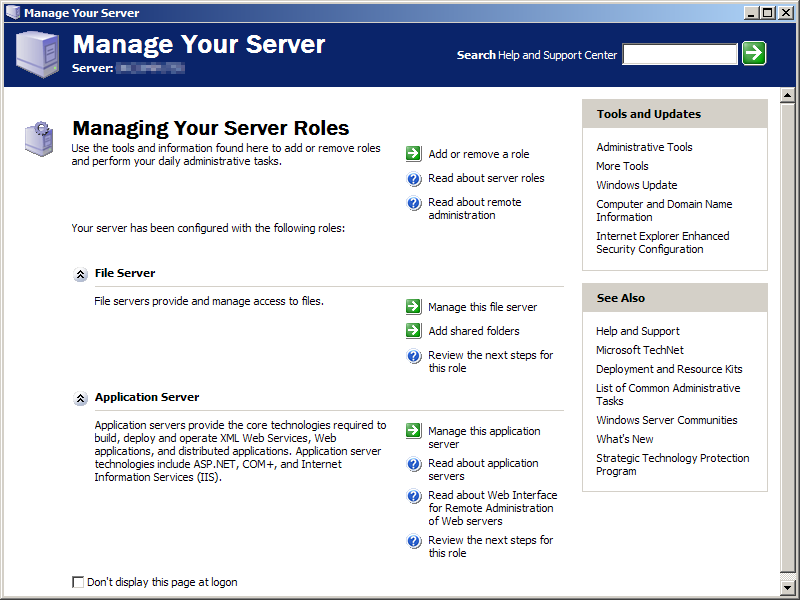

Manage Your Server
- See also: Features new to Windows XP and List of features removed in Windows XP
- Most versions of Windows Server include Terminal Services support (using the Remote Desktop Protocol), enabling multiple simultaneous remote graphical logins. This enables thin client computing on the Windows platform, where all applications run remotely on the server. This feature was first introduced with a special "Terminal Server Edition" of Windows NT Server 4.0, but became more important when made a standard part of Windows 2000.
- Internet Information Services (IIS) v6.0 - again, versions of IIS were available on Windows 2000 and earlier, but IIS is improved significantly in Windows Server 2003.
- Active Directory - like Terminal Services, significantly improved since Windows 2000
- Increased default security over previous versions, due to the built-in firewall and most services being disabled by default.
- Message Queuing - significantly improved since Windows 2000
- Manage Your Server - a role management administrative tool that allows an administrator to choose what functionality the server should provide.
Variants
Windows Server 2003 comes in several variants, each targeted towards a particular size and type of business: See Compare the Editions of Windows Server 2003 for a concise comparison. In general, all variants of Windows Server 2003 can share files and printers, act as an application server, and host message queues, provide email services, authenticate users, act as an X.509 certificate server, provide LDAP directory services, serve streaming media, and to perform other server-oriented functions.
Small Business Server
Windows Small Business Server (SBS) is a software suite that includes Windows Server and additional technologies aimed at providing a small business with a complete technology solution.
The Standard Edition of SBS includes Remote Web Workplace, Windows SharePoint Services, Microsoft Exchange Server, Fax Server, Active Directory, a basic firewall, DHCP server and network address translation capabilities. The Premium Edition of SBS adds Microsoft SQL Server 2000 and Microsoft ISA Server 2004.
SBS has its own type of client access license (CAL), which is different and costs slightly more than CALs for the other editions of Windows Server 2003. However, the SBS CAL encompasses the user CALs for Windows Server, Exchange Server, SQL Server, and ISA Server, and hence is less expensive than buying all the other CALs individually.
The SBS server has the following design considerations:
- Only one computer in a Windows Server domain can be running Windows Server 2003 for Small Business Server.
- Windows Server 2003 for Small Business Server must be the root of the Active Directory forest.
- Windows Server 2003 for Small Business Server cannot trust any other domains.
- Windows Server 2003 for Small Business Server is limited to 75 users or devices, depending on the type of CAL.
- A Windows Server 2003 for Small Business Server domain cannot have any child domains.
- Terminal Services only operates in remote administration mode on the server running SBS 2003. (Change from SBS 2000 policy)
- Each additional server must have a Windows Server 2003 for Small Business Server CAL. CALs can be employed on a per-user or per-device basis.
Web Edition
Windows Server 2003 Web Edition is mainly for building and hosting Web applications, Web pages, and XML Web Services. It is designed to be used primarily as an IIS 6.0 Web server and provides a platform for rapidly developing and deploying XML Web services and applications that use ASP.NET technology, a key part of the .NET Framework. This edition does not require Client Access Licenses and Terminal Server mode is not included on Web Edition. However, Remote Desktop for Administration is available on Windows Server 2003, Web Edition. Only 10 concurrent file-sharing connections are allowed at any moment. It is not possible to install Microsoft SQL Server and Microsoft Exchange software on this version of Windows, although MSDE and SQL Server 2005 Express are fully supported after service pack 1 is installed. The most important limitation of Web edition is a maximum memory of 2 GB RAM. Additionally, Web Edition cannot act as a domain controller.
Standard Edition
Windows Server 2003 Standard Edition is aimed towards small to medium sized businesses. Flexible and versatile, Standard Edition supports file and printer sharing, offers secure Internet connectivity, and allows centralized desktop application deployment. This edition of Windows will run on up to 4 processors with up to 4 GB RAM. 64-bit versions are also available for the AMD x86-64 architecture and the Intel clone of that same architecture, EM64T. The 64-bit version of Standard Edition is capable of addressing up to 32 GB of RAM and it also supports Non-Uniform Memory Access (NUMA), something the 32-bit version does not.
Enterprise Edition
Windows Server 2003 Enterprise Edition is aimed towards medium to large businesses. It is a full-function server operating system that supports up to eight processors and provides enterprise-class features such as eight-node clustering using Microsoft Cluster Server (MSCS) software and support for up to 32 GB of memory. Enterprise Edition also comes in a 64-bit edition for Intel. 64-bit versions are also available for the AMD x86-64 architecture and the Intel clone of that same architecture, EM64T. The 64-bit version of Enterprise Edition is capable of addressing up to 1 TB of RAM. Both 32-bit and 64-bit versions support Non-Uniform Memory Access (NUMA).
Datacenter Edition
Windows Server 2003 Datacenter Edition is designed for infrastructures demanding high security and reliability. Windows Server 2003 is available for x86 32-bit, x86 64-bit and x64 bit processors. It supports a minimum of 8 processors and a maximum of 64 processors, however it is limited to 32 processors when run on 32-bit architecture. 32-bit architecture also limits memory addressability to 64GB, while the 64-bit versions support up to 512 GB. Datacenter Edition also allows limiting processor and memory usage on a per-application basis.
Windows Server 2003 Datacenter Edition also supports Non-Uniform Memory Access. If supported by the system, Windows, with help from the system firmware creates a Static Resource Affinity Table, that defines the NUMA topology of the system. Windows then uses this table to optimize memory accesses, and provide NUMA awareness to applications, thereby increasing the efficiency of thread scheduling and memory management.
Windows Server 2003 Datacenter Edition has better support for Storage Area Networks (SAN). It features a service which uses Windows sockets to emulate TCP/IP communication over native SAN service providers, thereby allowing a SAN to be accessed over any TCP/IP channel. With this, any application that can communicate over TCP/IP can use a SAN, without any modification to the application.
Windows Server 2003 Datacenter Edition also supports 8-node clustering. Clustering increases availability and fault tolerance of server installations, by distributing and replicating the service among many servers. Windows supports clustering, with each cluster having its own dedicated storage, or all clusters connected to a common Storage Area Network (SAN), which can be running on Windows as well as non-Windows Operating systems. The SAN may be connected to other computers as well.
Compute Cluster Server
Windows Compute Cluster Server 2003 is designed for working with demanding problems in computing, that requires high performance computing clusters. Compute Cluster edition deploys in clusters of multiple servers to form large supercomputers. Microsoft intended to release this edition in 2006.
Storage Server
Windows Storage Server 2003, a part of the Windows Server 2003 family, is a specialized server operating system for Network Attached Storage (NAS). It is optimized for use in file and print sharing and also in Storage Area Network (SAN) scenarios. It is only available through OEMs, with Network Attached Storage (NAS) devices, with capacities in excess of a few terabytes. Unlike other Windows Server 2003 editions that provide file and printer sharing functionality, Windows Storage Server 2003 does not require any Client access licenses.
Windows Storage Server 2003 NAS equipments are headless, which means that they are without any monitors, keyboards or mice, and are administered remotely. Such devices are plugged into any existing IP network and the storage capacity is available to all users. Using NAS devices means that data is decentralized and shared amongst all users of the network, even though access through the data can be controlled. Windows Storage Server 2003 can use RAID arrays to provide redundancy, fault-tolerance and high-performance. Multiple such NAS servers can be clustered to appear as a single device. This allows for very high performance as well as it allows the service to remain up even if one of the servers goes down.
Windows Storage Server 2003 can also be used to create a Storage Area Network, in which the data is transferred in terms of chunks rather than files, thus providing more granularity to the data that can be transferred. This provides higher performance to database and transaction processing applications. Windows Storage Server 2003 also allows NAS devices to be connected to a SAN.
Windows Storage Server 2003 R2, as a follow-up to Windows Storage Server 2003, adds file-server performance optimization, Single Instance Storage (SIS), and index-based search. Single instance storage(SIS) scans storage volumes for duplicate files and moves the duplicate files to the common SIS store. then moves duplicates to the SIS common store. The file on the volume is replaced with a link to the file. This substitution reduces the amount of storage space required by as much as 70%
Windows Storage Server R2 provides an index-based, full-text search based on the indexing engine already built into Windows Server. The updated search engine speeds up indexed searches on network shares. Storage Server R2 also provides filters for searching many standard file formats, such as .zip, AutoCAD, XML, MP3, and .pdf, and all Microsoft Office file formats.
Windows Storage Server 2003 R2 includes built-in support for Windows SharePoint Services and Microsoft SharePoint Portal Server, and adds Storage Management snap-in for the Microsoft Management Console. It can be used to centrally manage storage volumes, including DFS shares, on servers running Windows Storage Server R2.
Windows Storage Server R2 cannot be used as an iSCSI target, but can be an iSCSI initiator.
Features
- Distributed File System (DFS): DFS allows multiple Network Shares to be aggregated as a virtual file system.
- Support for SAN and iSCSI: Computers can connect to a Storage Server over the LAN, and there is no need for a separate fibre channel network. Thus a Storage Area Network can be created over the LAN itself. iSCSI uses the SCSI protocol to transfer data as a block of bytes, rather than as a file. This increases performance of the Storage network in some scenarios, such as using a database server.
- Virtual Disc Service: It allows NAS devices, RAID devices and SAN shares to be exposed and managed as if they were normal hard drives.
- JBOD systems: JBOD (Just a bunch of discs) systems, by using VDS, can manage a group of individual storage devices as a single unit. There is no need for the storage units to be of the same make and model.
- Software and Hardware RAID: Windows Storage Server 2003 as intrinsic support for hardware implementation of RAID. In case hardware support is not available, it can use software enabled RAID. In that case, all processing is done by the OS.
- Multi Path IO (MPIO): It provides an alternate connection to IO devices in case the primary path is down.
Updates
Service Pack 1
On March 30, 2005, Microsoft released Service Pack 1 for Windows Server 2003. Among the improvements are many of the same updates that were provided to Windows XP users with Service Pack 2. Features added with Service Pack 1 include:
- Security Configuration Wizard, a tool that allows administrators to more easily research and make changes to security policies.[1]
- Hot Patching, a feature made to extend Windows Server 2003's ability to take DLL, Driver, and non-kernel patches without a reboot.
- IIS 6.0 Metabase Auditing, which allows the tracking of metabase edits.[2]
- Windows Firewall, which brings many of the improvements from Windows XP Service Pack 2 to Windows Server 2003; also, with the Security Configuration Wizard, it allows administrators to more easily manage the incoming open ports, as it will automatically detect and select default roles.
- Other networking improvements include support for Wireless Provisioning Services, better IPv6 support, and new protections against TCP SYN attacks. [3]
- Post-Setup Security Updates: A default mode that is turned on when a Service Pack 1 server is first booted up after installation. It configures the firewall to block all incoming connections and directs the user to install updates.
- Data Execution Prevention (DEP): Support for the No Execute (NX) bit which helps to prevent buffer overflow exploits that are often the attack vector of Windows Server exploits.[4]
- Windows Media Player version 10
- Internet Explorer 6 SV1 (e.g., "IE6 SP2")
- Support for fixed disks bearing data organized using the GUID Partition Table system.
A full list of updates is available on the Microsoft Support website here (archived April 6, 2005)
Service Pack 2
Service Pack 2 for Windows Server 2003 was released on March 13, 2007. The release date was originally scheduled for the first half of 2006. On June 13, 2006, Microsoft made an initial test version of Service Pack 2 available to Microsoft Connect users, with a build number of 3790.2721. This was followed by build 3790.2805, known as Beta 2 Refresh. The final build is 3790.3959.
Microsoft has described Service Pack 2 as a "standard" service pack release containing previously released security updates, hotfixes, and reliability and performance improvements. In addition, Service Pack 2 contains Microsoft Management Console 3.0, Windows Deployment Services (which replaces Remote Installation Services), support for WPA2, and improvements to IPsec and MSConfig. Service Pack 2 also adds Windows Server 2003 Scalable Networking Pack (SNP), which allows hardware acceleration for processing network packets, thereby enabling faster throughput. SNP was previously available as an out-of-band update for Windows Server 2003 Service Pack 1.
Windows Server 2003 R2
Windows Server 2003 R2 is an updated release of Windows Server 2003, released on March 5, 2006, for IA-32 and x64 platforms, but not for IA-64. It came distributed in two discs, one containing a copy of Windows Server 2003 Service Pack 1 and another containing a host of optionally-installed new features needed for Windows Server 2003 R2 installation, similar to that of Microsoft Plus! for Windows 95 and Microsoft Plus! 98. It was succeeded by Windows Server 2008.
New features for Windows Server 2003 include:
- .NET Framework 2.0, which replaces the .NET Framework 1.0 included with the standard releases
- Active Directory Federation Services, a single sign-on solution for Active Directory Services
- Microsoft Management Console version 3.0, with several new snap-ins included:
- Print Management Console, for managing print servers
- File Server Resource Manager, for managing disk quotas on file servers
- Storage Manager for SANs, for managing logical unit numbers (LUNs)
- A new version of Distributed File System that includes remote differential compression technology
- Microsoft Virtual Server 2005, a hypervisor and the precursor to Hyper-V
- Windows Services for UNIX, a UNIX environment for Windows
Pricing
Small Business Server: Average cost is $599 USD, the product is purchased through a brick-and-mortar retailer, while an open new license must be purchased through a volume license reseller.
Web Edition: This operating system is priced at $397 USD. Client Access Licenses are not required.
Standard Edition: This operating system is priced at $999 USD, although licenses may be purchased for less from a reseller. For more than 5 Active Directory remote-connected users (users of Exchange, for example) additional costs are incurred.
Enterprise Edition: This operating system is priced at $3,999 USD. For more than 25 remote-connected users, additional costs are incurred (either CALs or the EC license).
Datacenter Edition: This operating system's price is unknown, since it must be obtained through an OEM.
Compute Cluster Edition: This operating system's price is unknown, since it is yet to be released in January 2006.
Storage Server: This operating system's price is unknown, since it must be obtained through an OEM. It is rumored to cost between $500 and $1000.
External Connector: an additional license required when non-employees authenticate to Windows applications, for example on an internet-connected application server. Priced at $3999 USD per server.
All these prices were estimated retail; actual prices varied depending on the reseller.
See also
- Comparison of operating systems
- Windows Server System
- Windows NT Startup Process
References
- ↑ Security Configuration Wizard for Windows Server 2003 by Microsoft.
- ↑ Metabase Auditing (IIS 6.0) by Microsoft.
- ↑ The Cable Guy – December 2004: New Networking Features in Microsoft Windows Server 2003 Service Pack 1 by Microsoft TechNet.
- ↑ A detailed description of the Data Execution Prevention (DEP) feature in Windows XP Service Pack 2, Windows XP Tablet PC Edition 2005, and Windows Server 2003 (KB 875352) by Microsoft.
External links
- Microsoft's Windows Server 2003 homepage
- GUIdebook: Windows Server 2003 Gallery — Window Server 2003 screenshots
- Problems with Windows Server 2003 SP1
- Overview of Small Business Server 2003 for the IT Pro
- Overview of Windows Server 2003 security
- Windows Server is an Application Server
- ServerCentral for helping new users for deploying server applications
Microsoft Windows family
|
|---|
| Versions • Components • History |
| Original |
| DOS-based |
| Windows 1.0 • Windows 2.0 • Windows 2.1 (Windows/286 • Windows/386) • Windows 3.0 • Windows 3.1 |
| Windows 9x |
| Windows 95 • Windows 98 • Windows Me |
| Windows NT |
| Early versions |
| Windows NT 3.1 • Windows NT 3.5 • Windows NT 3.51 • Windows NT 4.0 • Windows 2000 |
| Client |
| Windows XP (development) • Windows Vista (editions • development) • Windows 7 (editions • development) • Windows 8 • Windows 10 • Windows 11 |
| Windows Server |
| Server 2003 • Server 2008 (2008 R2) • HPC Server 2008 • Home Server • Small Business Server • Essential Business Server • Windows Server 2012 • Windows Server 2016 • Windows Server 2019 • Windows Server 2022 |
| Specialized |
| Windows Embedded • Windows PE • Windows Fundamentals for Legacy PCs |
| Mobile |
| Windows Mobile • Windows Phone |
| Cancelled |
| Cairo • Nashville • Neptune • Odyssey • Windows 10X |
| Related |
| Metro • Midori • OS/2 • Windows Aero • Windows Setup • Windows XP themes • Microsoft Plus! |