Microsoft Excel
 is a spreadsheet application developed by Microsoft for Windows, iOS, iPadOS, macOS, and Android. It features calculation and computation capabilities, graphing tools, pivot tables, and a macro programming language called Visual Basic for Applications (VBA).
Excel forms part of the Microsoft 365 and Microsoft Office suites of software and has been developed since 1985.
Features
Basic operation
- For a general explanation of how a spreadsheet works, see "Spreadsheet" on Wikipedia.
Microsoft Excel has the basic features of all spreadsheets, using a grid of cells arranged in numbered rows and letter-named columns to organize data manipulations like arithmetic operations. It has a battery of supplied functions to answer statistical, engineering, and financial needs. In addition, it can display data as line graphs, histograms, and charts, and with a very limited three-dimensional graphical display. It allows sectioning of data to view its dependencies on various factors for different perspectives (using pivot tables and the scenario manager). A PivotTable is a tool for data analysis. It does this by simplifying large data sets via PivotTable fields. It has a programming aspect, Visual Basic for Applications, allowing the user to employ a wide variety of numerical methods, for example, for solving differential equations of mathematical physics, and then reporting the results back to the spreadsheet. It also has a variety of interactive features allowing user interfaces that can completely hide the spreadsheet from the user, so the spreadsheet presents itself as a so-called application, or decision support system (DSS), via a custom-designed user interface, for example, a stock analyzer, or in general, as a design tool that asks the user questions and provides answers and reports. In a more elaborate realization, an Excel application can automatically poll external databases and measuring instruments using an update schedule, analyze the results, make a Word report or PowerPoint slide show, and email these presentations regularly to a list of participants.
Microsoft allows for several optional command-line switches to control the manner in which Excel starts.
Functions
- See also: Microsoft Power Fx
Excel 2016 has 484 functions. Of these, 360 existed prior to Excel 2010. Microsoft classifies these functions into 14 categories. Of the 484 current functions, 386 may be called from VBA methods of the object "WorksheetFunction" and 44 have the same names as VBA functions.
With the introduction of LAMBA, Excel became Turing-complete.
Macro programming
VBA programming
- Main article: Visual Basic for Applications
The Windows version of Excel supports programming through Microsoft's Visual Basic for Applications (VBA), which is a dialect of Visual Basic. Programming with VBA allows spreadsheet manipulation that is awkward or impossible with standard spreadsheet techniques. Programmers may write code directly using the Visual Basic Editor (VBE), which includes a window for writing code, debugging code, and a code module organization environment. The user can implement numerical methods and automate tasks such as formatting or data organization in VBA, and guide the calculation by using any desired intermediate results that are reported back to the spreadsheet.
VBA was removed from Mac Excel 2008, as the developers did not believe that a timely release would allow porting the VBA engine natively to Mac OS X. VBA was restored in the next version, Mac Excel 2011, although the build lacks support for ActiveX objects, impacting some high-level developer tools.
A common and easy way to generate VBA code is by using the Macro Recorder. The Macro Recorder records actions of the user and generates VBA code in the form of a macro. These actions can then be repeated automatically by running the macro. The macros can also be linked to different trigger types like keyboard shortcuts, a command button or a graphic. The actions in the macro can be executed from these trigger types or from the generic toolbar options. The VBA code of the macro can also be edited in the VBE. Certain features, such as loop functions and screen prompts by their own properties, and some graphical display items, cannot be recorded but must be entered into the VBA module directly by the programmer. Advanced users can utilize user prompts to create an interactive program or respond to events, such as sheets being loaded or modified.
Macro-recorded code may not be compatible with Excel versions. Some code that is used in Excel 2010 cannot be used in Excel 2003. Making a Macro that changes the cell colors and making changes to other aspects of cells may not be backward compatible.
VBA code interacts with the spreadsheet through the Excel Object Model, a vocabulary identifying spreadsheet objects, and a set of supplied functions or methods that enable reading and writing to the spreadsheet and interaction with its users (for example, through custom toolbars or command bars and message boxes). User-created VBA subroutines execute these actions and operate like macros generated using the macro recorder, but are more flexible and efficient.
History
From its first version, Excel supported end-user programming of macros (automation of repetitive tasks) and user-defined functions (extension of Excel's built-in function library). In early versions of Excel, these programs were written in a macro language whose statements had formula syntax and resided in the cells of special-purpose macro sheets (stored with file extension .XLM in Windows). XLM was the default macro language for Excel through Excel 4.0. Beginning with version 5.0, Excel recorded macros in VBA by default, but with version 5.0, XLM recording was still allowed as an option. After version 5.0, that option was discontinued. All versions of Excel, including Excel 2021, are capable of running an XLM macro, though Microsoft discourages their use.
Python programming
In 2023, Microsoft announced that Excel would support the Python programming language directly. As of 2025, Python in Excel is available to Enterprise and Business users, although with some exceptions, and is in preview for Family, Personal, and Education users.
Charts
Excel supports charts, graphs, or histograms generated from specified groups of cells. It also supports Pivot Charts that allow for a chart to be linked directly to a Pivot table. This allows the chart to be refreshed with the Pivot Table. The generated graphic component can either be embedded within the current sheet or added as a separate object.
These displays are dynamically updated if the content of cells changes. For example, suppose that the important design requirements are displayed visually; then, in response to a user's change in trial values for parameters, the curves describing the design change shape, and their points of intersection shift, assisting the selection of the best design.
Add-ins
Additional features are available using add-ins. Several are provided with Excel, including:
- Analysis ToolPak – provides data analysis tools for statistical and engineering analysis (includes analysis of variance and regression analysis).
- Analysis ToolPak VBA – VBA functions for Analysis ToolPak
- Euro Currency Tools – conversion and formatting for euro currency
- Solver Add-In – tools for optimization and equation solving
History
Early history
Microsoft originally marketed a spreadsheet program called Multiplan in 1982, which was very popular on CP/M systems, but on MS-DOS systems, it lost popularity to Lotus 1-2-3. Microsoft released the first version of Excel for the Macintosh on September 30, 1985, and the first Windows version was 2.05 (to synchronize with Macintosh version 2.2) on November 19, 1987. Lotus was slow to bring 1-2-3 to Windows, and by the early 1990s, Excel had started to outsell 1-2-3 and helped Microsoft achieve the position of leading PC software developer. This accomplishment, dethroning the king of the software world, solidified Microsoft as a valid competitor and showed its future of developing GUI software. Microsoft pushed its advantage with regular new releases, every two years or so.
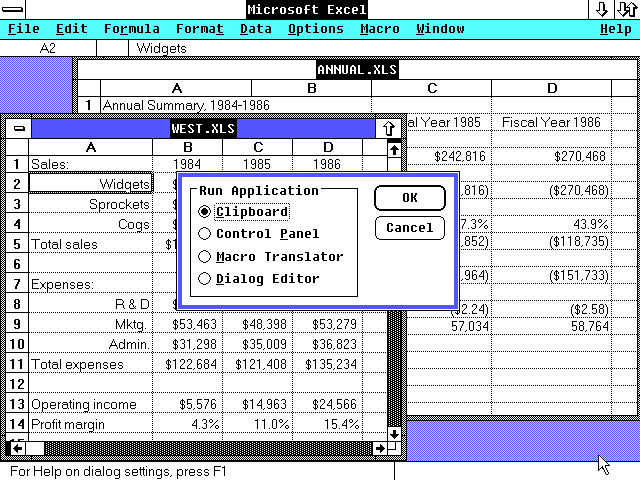

Microsoft Excel 2.1 included a runtime version of Windows 2.1
Early in its life Excel became the target of a trademark lawsuit by another company already selling a software package named "Excel" in the finance industry. As the result of the dispute Microsoft was required to refer to the program as "Microsoft Excel" in all of its formal press releases and legal documents. However, over time this practice has been ignored, and Microsoft cleared up the issue permanently when they purchased the trademark of the other program. Microsoft also encouraged the use of the letters XL as shorthand for the program; while this is no longer common, the program's icon on Windows still consists of a stylized combination of the two letters, and the file extension of the default Excel format is .xls. Excel offers many user interface tweaks over the earliest electronic spreadsheets; however, the essence remains the same as in the original spreadsheet, VisiCalc: the cells are organized in rows and columns, and contain data or formulas with relative or absolute references to other cells.
Excel was the first spreadsheet that allowed the user to define the appearance of spreadsheets (fonts, character attributes and cell appearance). It also introduced intelligent cell recomputation, where only cells dependent on the cell being modified are updated (previous spreadsheet programs recomputed everything all the time or waited for a specific user command). Excel has extensive graphing capabilities.
When first bundled into Microsoft Office in 1993, Microsoft Word and Microsoft PowerPoint had their GUIs redesigned for consistency with Excel, the killer app on the PC at the time.
Microsoft Windows
Excel 2.0 is the first version of Excel for the Intel platform. Versions before 2.0 were only available on the Apple Macintosh.
Excel 2.0 (1987)
The first Windows version was labeled "2" to correspond to the Mac version. It was announced on October 6, 1987, and released on November 19. This included a runtime version of Windows.
BYTE magazine in 1989 listed Excel for Windows as among the "Distinction" winners of the BYTE Awards. The magazine stated that the port of the "extraordinary" Macintosh version "shines", with a user interface as good as or better than the original.
Excel 3.0 (1990)
Included toolbars, drawing capabilities, outlining, add-in support, 3D charts, and other new features
Excel 4.0 (1992)
Included with Microsoft Office 3.0, this version introduced autofill.
Also, an easter egg in Excel 4.0 reveals a hidden animation of a dancing set of numbers 1 through 3, representing Lotus 1–2–3, which is then crushed by an Excel logo.
Excel 5.0 (1993)
Included with Microsoft Office 4.0, Excel included Visual Basic for Applications (VBA), a programming language based on Visual Basic, which adds the ability to automate tasks in Excel and to provide user-defined functions (UDF) for use in worksheets. VBA includes a fully featured integrated development environment (IDE). Macro recording can produce VBA code that replicates user actions, thus allowing for the simple automation of regular tasks. VBA allows the creation of forms and in‑worksheet controls to communicate with the user. The language supports the use (but not creation) of ActiveX (COM) DLLs; later versions add support for class modules, allowing the use of basic object-oriented programming techniques.
The automation functionality provided by VBA made Excel a target for macro viruses. This caused serious problems until antivirus products began to detect these viruses. Microsoft belatedly took steps to prevent the misuse by adding the ability to disable macros completely, to enable macros when opening a workbook, or to trust all macros signed using a trusted certificate.
Versions 5.0 to 9.0 of Excel contain various Easter eggs, including a "Hall of Tortured Souls", a Doom-like minigame. However, since version 10, Microsoft has taken measures to eliminate such undocumented features from its products.
Excel 95 (v7.0)
Released in 1995 with Microsoft Office 95, this is the first major version after Excel 5.0, as there is no Excel 6.0 with all of the Office applications standardizing on the same major version number.
Internal rewrite to 32 bits. Almost no external changes, but faster and more stable.
Excel 95 contained a hidden Doom-like mini-game called "The Hall of Tortured Souls", a series of rooms featuring the names and faces of the developers as an Easter egg.
Excel 97 (v8.0)
Included in Microsoft Office 97 (for x86 and Alpha). This was a major upgrade that introduced the paper clip Office Assistant and featured standard VBA used instead of internal Excel Basic. It introduced the now-removed Natural Language labels.
This version of Excel includes a flight simulator as an easter egg.
Excel 2000 (v9.0)
Included in Microsoft Office 2000. This was a minor upgrade, but it introduced an upgrade to the clipboard where it can hold multiple objects at once. The Office Assistant, whose frequent unsolicited appearance in Excel 97 had annoyed many users, became less intrusive.
A small 3D game called "Dev Hunter" (inspired by Spy Hunter) was included as an Easter egg.
Excel 2002 (v10.0)
Included in Office XP with minor enhancements over the previous version.
Excel 2003 (v11.0)
Included in Office 2003 with minor enhancements over the previous version.
Excel 2007 (v12.0)
Included in Office 2007. This release was a major upgrade from the previous version. Similar to other updated Office products, Excel in 2007 used the new Ribbon menu system. This was different from what users were used to and was met with mixed reactions. One study reported fairly good acceptance by users except for highly experienced users and users of word processing applications with a classical WIMP interface, but was less convinced in terms of efficiency and organization. However, an online survey reported that a majority of respondents had a negative opinion of the change, with advanced users being "somewhat more negative" than intermediate users, and users reporting a self-estimated reduction in productivity.
Added functionality included Tables and the SmartArt set of editable business diagrams. Also added was an improved management of named variables through the Name Manager, and much-improved flexibility in formatting graphs, which allows (x, y) coordinate labeling and lines of arbitrary weight. Several improvements to pivot tables were introduced.
Like with other Office 2007 products, the Office Open XML file formats were introduced, including .xlsm for a workbook with macros and .xlsx for a workbook without macros.
Specifically, many of the size limitations of previous versions were greatly increased. To illustrate, the number of rows was now 1,048,576 (220) and the columns were 16,384 (214; the far-right column is XFD). This changes what is a valid A1 reference versus a named range. This version made more extensive use of multiple cores for the calculation of spreadsheets; however, VBA macros are not handled in parallel, and XLL add‑ins were only executed in parallel if they were thread-safe, and this was indicated at registration.
Excel 2010 (v14.0)
Included in Office 2010, this is the next major version after v12.0, as version number 13 was skipped.
Minor enhancements and 64-bit support, including the following:
- Multi-threading reconstruction (MTR) for commonly used functions
- Improved Pivot tables
- More conditional formatting options
- Additional image editing capabilities
- In-cell charts called "sparklines"
- Ability to preview before pasting
- Office 2010 Backstage feature for document-related tasks
- Ability to customize the Ribbon
- Many new formulas, most of which are highly specialized to improve accuracy
Excel 2013 (v15.0)
Included in Office 2013, along with a lot of new tools included in this release:
- Improved multi-threading and Memory Contention
- FlashFill
- Power View
- [[Power Pivot]
- Timeline Slicer
- Inquire
- 50 new functions
Excel 2016 (v16.0)
Included in Office 2016, along with a lot of new tools included in this release:
- Power Query integration
- Read-only mode
- Keyboard access for Pivot Tables and Slicers in Excel
- New Chart types
- Quick data linking in Visio
- Excel forecasting functions
- Support for multi-selection of Slicer items using touch
- Time grouping and Pivot Chart Drill Down
- Excel data cards
Excel 2019, Excel 2021, Excel 2024, Office 365 and subsequent (v16.0)
Microsoft no longer releases Office or Excel in distinctive versions. Instead, features are introduced automatically over time. The version number remains 16.0. Thereafter, only the approximate dates when features appear can now be given. New features include:
- Dynamic Arrays. These are essentially Array Formulas, but they "Spill" automatically into neighboring cells and do not need the Ctrl-Shift-Enter to create them. Further, dynamic arrays are the default format, with new "@" and "#" operators to provide compatibility with previous versions. This is perhaps the biggest structural change since 2007, and is in response to a similar feature in Google Sheets. Dynamic arrays started appearing in pre-releases about 2018, and as of March 2020 are available in published versions of Office 365 provided a user selected "Office Insiders".
Microsoft Office 2024, the fourth perpetual release of Office 16.0 for Windows and macOS, was released on October 1, 2024.
Versions
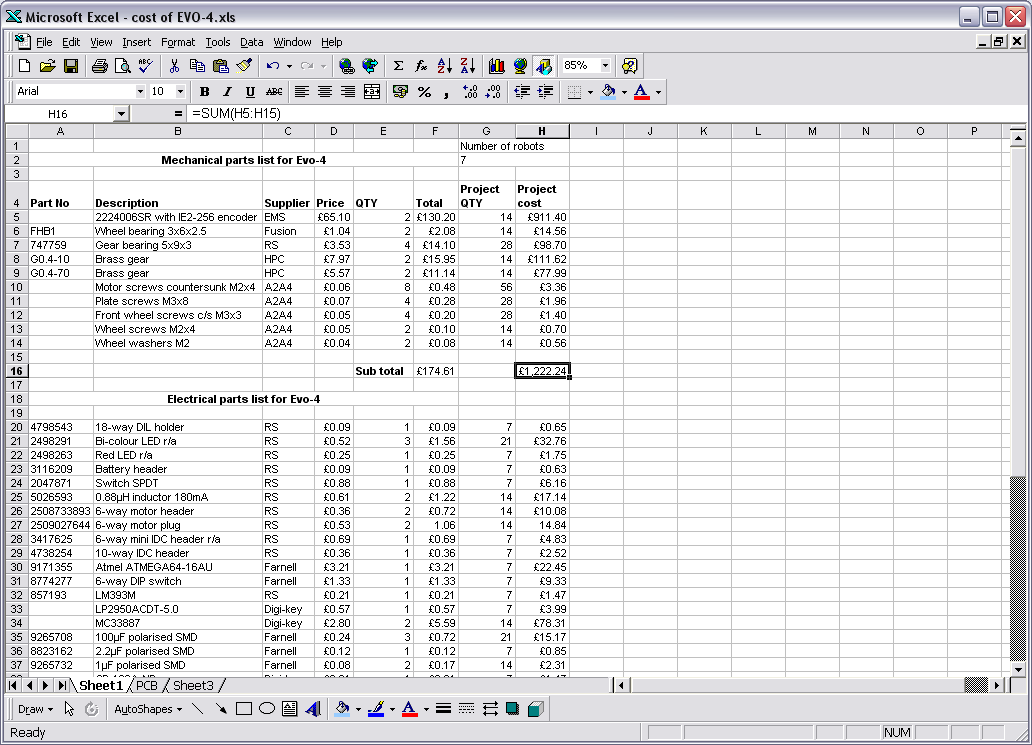

'Excel 97' (8.0) being run on Windows XP
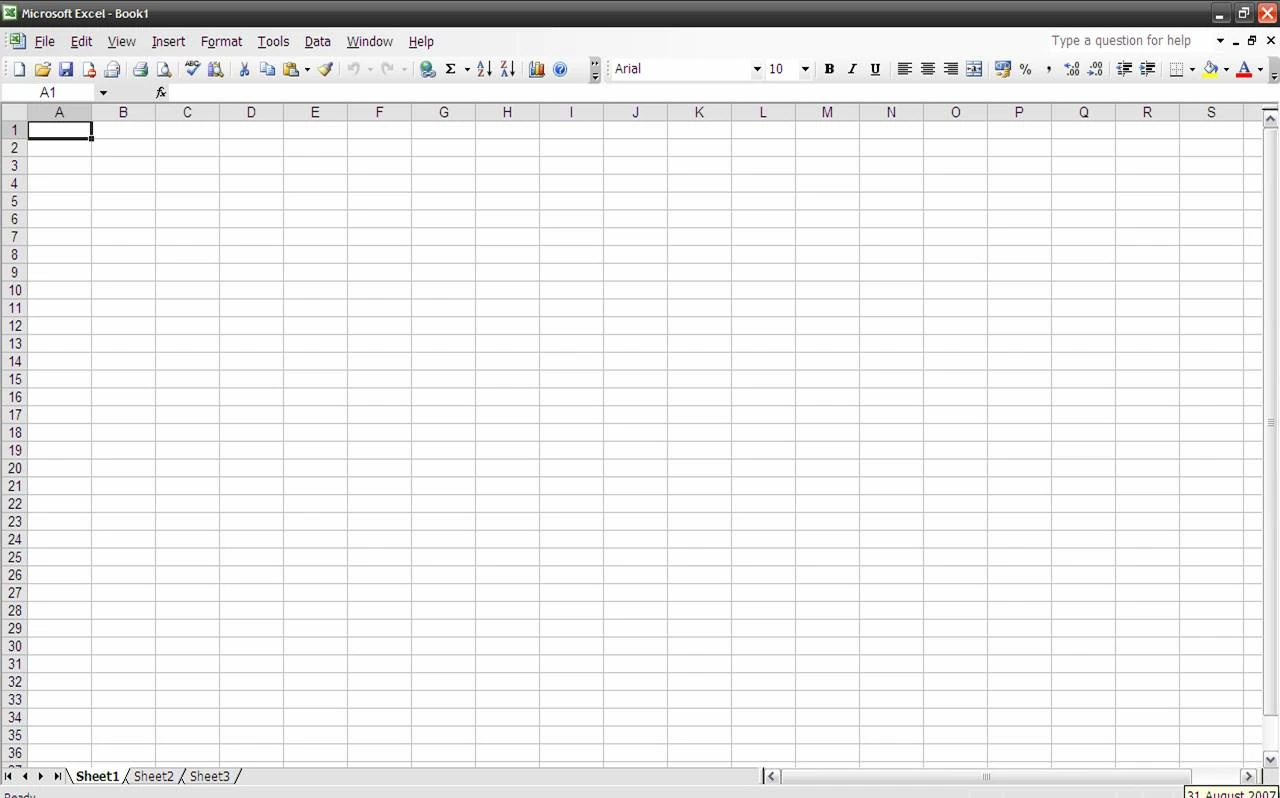

Microsoft Excel 2003 running under Windows XP Home Edition

Excel 2003 icon
Versions for Microsoft Windows include:
- 1987 Excel 2 for Windows*
- 1990 Excel 3
- 1992 Excel 4 included in Microsoft Office 3.0
- 1993 Excel 5 (Office 4.2 & 4.3, also a 32-bit version for Windows NT only on the PowerPC, DEC Alpha, and MIPS)
- 1995 Excel for Windows 95 (version 7) included in Microsoft Office 95*
- 1997 Excel 97 (version 8) included in Microsoft Office 97 (x86 and also a DEC Alpha version)
- 1999 Excel 2000 (version 9) included in Microsoft Office 2000
- 2001 Excel 2002 (version 10) included in Microsoft Office XP
- 2003 Excel 2003 (version 11) included in Microsoft Office 2003
- 2007 Excel 2007 (version 12) included in Microsoft Office 2007
- 2010 Excel 2010 (version 14) included in Microsoft Office 2010*
- 2012 Excel 2013 (version 15) included in Microsoft Office 2013
- 2015 Excel 2016 (version 16) included in Microsoft Office 2016
- 2018 Excel 2019 (version 16) included in Microsoft Office 2019
- 2021 Excel 2021 (version 16) included in Microsoft Office 2021
- Note: There is no Excel 1.0, in order to avoid confusion with Apple versions.
- Note: There is no Excel 6.0, because the Windows 95 version was launched with Word 7. All the Office 95 & Office 4.X products have OLE 2 capacity - moving data automatically from various programs - and Excel 7 should show that it was contemporary with Word 7.
- Note: There is no Excel 13.0 because of triskaidekaphobia.
Versions for the Apple Macintosh include:
- 1985 Excel 1.0
- 1988 Excel 1.5
- 1989 Excel 2.2
- 1990 Excel 3.0
- 1992 Excel 4.0 (part of Microsoft Office 3.0 for Macintosh)
- 1994 Excel 5.0 (part of Microsoft Office 4.2 for Macintosh, first PowerPC version)
- 1998 Excel 8.0 (part of Microsoft Office 98 Macintosh Edition)
- 2000 Excel 9.0 (part of Microsoft Office 2001)
- 2001 Excel 10.0 (part of Microsoft Office v. X)
- 2004 Excel 11.0 (part of Microsoft Office 2004 for Mac)
- 2008 Excel 12.0 (part of Microsoft Office 2008 for Mac)
- 2010 Excel 14.0 (part of Microsoft Office for Mac 2011)
- 2015 Excel 15.0 (part of Microsoft Office 2016 for Mac)
- 2018 Excel 2019 (part of Microsoft Office 2019 for Mac)
- 2021 Excel 2021 (part of Microsoft Office 2021 for Mac)
Versions for OS/2 include:
- 1989 Excel 2.2
- 1990 Excel 2.3
- 1991 Excel 3.0
Data storage and communication
Number of rows and columns
Versions of Excel up to 7.0 had a limitation in the size of their data sets of 16K (214 = 16,384) rows. Versions 8.0 through 11.0 could handle 64K 216 = 65,536) rows and 256 columns (28 as label 'IV'). Version 12.0 onwards, including the current version 16.x, can handle over 1M (220 = 1,048,576) rows, and 16,384 (214, labeled sa column 'XFD') columns.
File formats
Up until the 2007 version, Microsoft Excel used a proprietary binary file format called Excel Binary File Format (.XLS) as its primary format. Excel 2007 uses Office Open XML as its primary file format, an XML-based format that followed a previous XML-based format called "XML Spreadsheet" ("XMLSS"), first introduced in Excel 2002.
Although supporting and encouraging the use of new XML-based formats as replacements, Excel 2007 remained backward-compatible with the traditional, binary formats. Additionally, most versions of Microsoft Excel can read CSV, DBF, SYLK, DIF, and other legacy formats. Support for some older file formats was removed in Excel 2007. The file formats were mainly from DOS-based programs.
Binary
OpenOffice.org has created documentation of the Excel format. Two epochs of the format exist: the 97-2003 OLE format, and the older stream format. Microsoft has made the Excel binary format specification available for free download.
XML Spreadsheet
- Main article: Microsoft Office XML formats
The XML Spreadsheet format, introduced in Excel 2002, is a simple, XML-based format missing some more advanced features like the storage of VBA macros. Though the intended file extension for this format is .xml, the program also correctly handles XML files with .xls extension. This feature is widely used by third-party applications (e.g., MySQL Query Browser) to offer "export to Excel" capabilities without implementing binary file format. The following example will be correctly opened by Excel if saved either as Book1.xml or Book1.xls:
<?xml version="1.0"?>
<Workbook xmlns="urn:schemas-microsoft-com:office:spreadsheet"
 xmlns:o="urn:schemas-microsoft-com:office:office"
 xmlns:x="urn:schemas-microsoft-com:office:excel"
 xmlns:ss="urn:schemas-microsoft-com:office:spreadsheet"
 xmlns:html="http://www.w3.org/TR/REC-html40">
 <Worksheet ss:Name="Sheet1">
  <Table ss:ExpandedColumnCount="2" ss:ExpandedRowCount="2" x:FullColumns="1" x:FullRows="1">
   <Row>
    <Cell><Data ss:Type="String">Name</Data></Cell>
    <Cell><Data ss:Type="String">Example</Data></Cell>
   </Row>
   <Row>
    <Cell><Data ss:Type="String">Value</Data></Cell>
    <Cell><Data ss:Type="Number">123</Data></Cell>
   </Row>
  </Table>
 </Worksheet>
</Workbook><?xml version="1.0"?>
<Workbook xmlns="urn:schemas-microsoft-com:office:spreadsheet"
 xmlns:o="urn:schemas-microsoft-com:office:office"
 xmlns:x="urn:schemas-microsoft-com:office:excel"
 xmlns:ss="urn:schemas-microsoft-com:office:spreadsheet"
 xmlns:html="http://www.w3.org/TR/REC-html40">
 <Worksheet ss:Name="Sheet1">
  <Table ss:ExpandedColumnCount="2" ss:ExpandedRowCount="2" x:FullColumns="1" x:FullRows="1">
   <Row>
    <Cell><Data ss:Type="String">Name</Data></Cell>
    <Cell><Data ss:Type="String">Example</Data></Cell>
   </Row>
   <Row>
    <Cell><Data ss:Type="String">Value</Data></Cell>
    <Cell><Data ss:Type="Number">123</Data></Cell>
   </Row>
  </Table>
 </Worksheet>
</Workbook>
Current file extensions
- Main article: Office Open XML
Microsoft Excel 2007, along with other products in the Microsoft Office 2007 suite, introduced new file formats. The first of these (.xlsx) is defined in the Office Open XML (OOXML) specification.
| Format | Extension | Description |
|---|---|---|
| Excel Workbook | .xlsx | The default Excel 2007 and later workbook format. In reality, a ZIP compressed archive with a directory structure of XML text documents. Functions as the primary replacement for the former binary .xls format, although it does not support Excel macros for security reasons. Saving as .xlsx offers file size reduction over .xls |
| Excel Macro-enabled Workbook | .xlsm | Same as Excel Workbook, but with macro support. |
| Excel Binary Workbook | .xlsb | Same as Excel Macro-enabled Workbook, but storing information in binary form rather than XML documents for opening and saving documents more quickly and efficiently. Intended especially for very large documents with tens of thousands of rows, and/or several hundreds of columns. This format is very useful for shrinking large Excel files as is often the case when doing data analysis. |
| Excel Macro-enabled Template | .xltm | A template document that forms a basis for actual workbooks, with macro support. The replacement for the old .xlt format. |
| Excel Add-in | .xlam | Excel add-in to add extra functionality and tools. Inherent macro support because of the file's purpose. |
Old file extensions
| Format | Extension | Description |
|---|---|---|
| Spreadsheet | .xls | Main spreadsheet format, which holds data in worksheets, charts, and macros. |
| Add-in (VBA) | .xla | Adds custom functionality; written in VBA |
| Toolbar | .xlb | The file extension where Microsoft Excel's custom toolbar settings are stored |
| Chart | .xlc | A chart created with data from a Microsoft Excel spreadsheet that only saves the chart. To save the chart and spreadsheet, save as .XLS. XLC is not supported in Excel 2007 or in any newer versions of Excel. |
| Dialog | .xld | Used in older versions of Excel |
| Archive | .xlk | A backup of an Excel spreadsheet |
| Add-in (DLL) | .xll | Adds custom functionality; written in C++/C, Fortran, etc. and compiled into a special dynamic-link library |
| Macro | .xlm | A macro that is created by the user or pre-installed with Excel. |
| Template | .xlt | A pre-formatted spreadsheet created by the user or by Microsoft Excel |
| Module | .xlv | A module written in VBA (Visual Basic for Applications) for Microsoft Excel |
| Library | .DLL | Code written in VBA may access functions in a DLL, typically this is used to access the Windows API |
| Workspace | .xlw | Arrangement of the windows of multiple Workbooks |
Using other Windows applications
Using external data
Export and migration of spreadsheets
Programmers have produced APIs to open Excel spreadsheets in a variety of applications and environments other than Microsoft Excel. These include opening Excel documents on the web using either ActiveX controls or plugins like the Adobe Flash Player. The Apache POI open-source project provides Java libraries for reading and writing Excel spreadsheet files.
Password protection
Microsoft Excel protection offers several types of passwords:
- Password to open a document
- Password to modify a document
- Password to unprotect the worksheet
- Password to protect workbook
- Password to protect the sharing workbook
All passwords except password to open a document can be removed instantly, regardless of the Microsoft Excel version used to create the document. These types of passwords are used primarily for shared work on a document. Such password-protected documents are not encrypted, and data sources from a set password are saved in a document's header. Password to protect workbook is an exception – when it is set, a document is encrypted with the standard password "VelvetSweatshop", but since it is known to the public, it actually does not add any extra protection to the document. The only type of password that can prevent a trespasser from gaining access to a document is the password to open a document. The cryptographic strength of this kind of protection depends strongly on the Microsoft Excel version that was used to create the document.
In Excel 95 and earlier versions, the password to open is converted to a 16-bit key that can be instantly cracked. In Excel 97/2000, the password is converted to a 40-bit key, which can also be cracked very quickly using modern equipment. As regards services that use rainbow tables (e.g., Password-Find), it takes up to several seconds to remove protection. In addition, password-cracking programs can brute-force attack passwords at a rate of hundreds of thousands of passwords a second, which not only lets them decrypt a document but also find the original password.
In Excel 2003/XP, the encryption is slightly better – a user can choose any encryption algorithm that is available in the system (see Cryptographic Service Provider). Due to the CSP, an Excel file cannot be decrypted, and thus, the password to open cannot be removed, though the brute-force attack speed remains quite high. Nevertheless, the older Excel 97/2000 algorithm is set by default. Therefore, users who do not change the default settings lack reliable protection of their documents.
The situation changed fundamentally in Excel 2007, where the modern AES algorithm with a key of 128 bits started being used for decryption, and a 50,000-fold use of the hash function SHA1 reduced the speed of brute-force attacks down to hundreds of passwords per second. In Excel 2010, the strength of the protection by default was increased two times due to the use of a 100,000-fold SHA1 to convert a password to a key.
Other platforms
Excel for mobile
Excel Mobile is a spreadsheet program that can edit XLSX files. It can edit and format text in cells, calculate formulas, search within the spreadsheet, sort rows and columns, freeze panes, filter the columns, add comments, and create charts. It cannot add columns or rows except at the edge of the document, rearrange columns or rows, delete rows or columns, or add spreadsheet tabs. The 2007 version can use a full-screen mode to deal with limited screen resolution, as well as split panes to view different parts of a worksheet at one time. Protection settings, zoom settings, autofilter settings, certain chart formatting, hidden sheets, and other features are not supported on Excel Mobile and will be modified upon opening and saving a workbook. In 2015, Excel Mobile became available for Windows 10 and Windows 10 Mobile on the Microsoft Store.
Excel for the web
Microsoft Excel Viewer
- Main article: Microsoft Excel Viewer
Limitations and errors
In addition to issues with spreadsheets in general, other problems specific to Excel include numeric precision, misleading statistics functions, mod function errors, and data limitations, among others.
Criticism
Due to Excel's foundation on floating point calculations, the statistical accuracy of Excel has been criticized, as has the lack of certain statistical tools. Excel proponents have responded that some of these errors represent edge cases and that the relatively few users who would be affected by these know of them and have workarounds and alternatives.
Excel incorrectly assumes that 1900 is a leap year. The bug originated from Lotus 1-2-3, and was implemented in Excel for the purpose of backward compatibility. This legacy has later been carried over into Office Open XML file format. Excel also supports the second date format based on year 1904 epoch.
Quirks
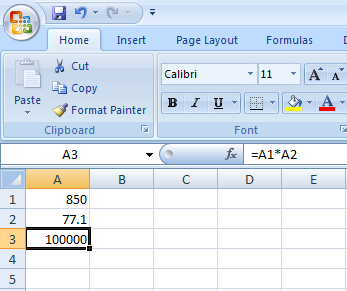

Screenshot of Microsoft Excel 2007 showing the 65,535 display error
On September 22, 2007 it was reported that Excel 2007 will show incorrect results in certain situations. Specifically, for some pairs of numbers with a product of 65,535 (such as 850 and 77.1), Excel will report their product as 100,000. This occurs with about 14.5% of such pairs. In addition, if one is added to this result, Excel will give 100,001. However, if one is subtracted from the original product, the correct result of 65,534 is reported. (Also if it is multiplied or divided by 2, the correct answers 131,070 and 32,767.5 are reported, respectively.)
Microsoft has reported on the Microsoft Excel Blog that the problem exists in the display of six specific floating point values between 65534.99999999995 and 65,535, and six values between 65535.99999999995 and 65,536 (not including the integers). Any calculation that results in one of these twelve values will be displayed incorrectly. The actual value stored and passed to other cells is correct, only the displayed value is wrong. However, some instances, such as rounding the value to zero decimal places, will result in an incorrect value in memory. The error was introduced with changes made to the Excel calculation logic for the 2007 version, and does not exist in previous versions. On October 9, 2007, Microsoft released a fix to the public. Chris Lomont presented a detailed explanation of the bug, how it was likely caused by changing 16-bit formatting code to 32-bit code, why it only affects 12 values and then only while formatting, and how the hotfix corrects the bug.
Security
Because of its wide use, Excel has been attacked by hackers. While Excel is not directly exposed on the Internet, if an attacker can get a victim to open a file in Excel, and there is an appropriate security bug in the program, the attacker can then gain control of the victim's computer.[2] The UK's GCHQ has a tool named TORNADO ALLEY with this purpose.
Games
Besides the easter eggs, numerous games have been created or recreated in Excel, such as Tetris, 2048, Scrabble, Yahtzee, Pac-Man, and Space Invaders.
In 2020, Excel became an e-sport with the advent of the Financial Modeling World Cup.[3]
References
- ↑ Buy Microsoft Excel, Microsoft. Accessed 2022-01-12.
- ↑ Keizer, Gregg (24 February 2009). "Attackers exploit unpatched Excel vulnerability". Computerworld.
- ↑ "Microsoft Excel esports is real and it already has an international tournament". ONE Esports. 9 June 2021.
External links
- Microsoft Excel at Microsoft 365
- Excel Files Generation with .net framework
- A variety of links offering mainly free Excel Help by Microsoft recognized Most Valued Professionals
- Microsoft Excel at Wikipedia
 |
Wikipedia
|
|---|