Microsoft PowerPoint
 is a presentation program developed by Microsoft.
It was created by Robert Gaskins, Tom Rudkin, and Dennis Austin at a software company named Forethought, Inc. It was released on April 20, 1987, initially for Macintosh computers only. Microsoft acquired PowerPoint for about $14 million three months after it appeared. This was Microsoft's first significant acquisition, and Microsoft set up a new business unit for PowerPoint in Silicon Valley, where Forethought had been located.
PowerPoint became a component of the Microsoft Office suite, first offered in 1989 for Macintosh and in 1990 for Windows, which bundled several Microsoft apps. Beginning with PowerPoint 4.0 (1994), PowerPoint was integrated into Microsoft Office development, and adopted shared common components and a converged user interface.
PowerPoint's market share was very small at first, before introducing a version for Windows, but it grew rapidly with the growth of Windows and of Office. Since the late 1990s, PowerPoint's worldwide market share of presentation software has been estimated at 95 percent.
PowerPoint was originally designed to provide visuals for group presentations within business organizations, but has come to be widely used in other communication situations in business and beyond. The wider use led to the development of the PowerPoint presentation as a new form of communication, with strong reactions including advice that it should be used less, differently, or better.
The first PowerPoint version (Macintosh, 1987) was used to produce overhead transparencies, the second (Macintosh, 1988; Windows, 1990) could also produce 35 mm slides. The third version (Windows and Macintosh, 1992) introduced video output of virtual slideshows to digital projectors, which would, over time, replace transparencies and slides. A dozen major versions since then have added additional features and modes of operation and have made PowerPoint available beyond Apple Macintosh and Microsoft Windows, adding versions for iOS, Android, and web access.
History
Creation at Forethought (1984-1987)
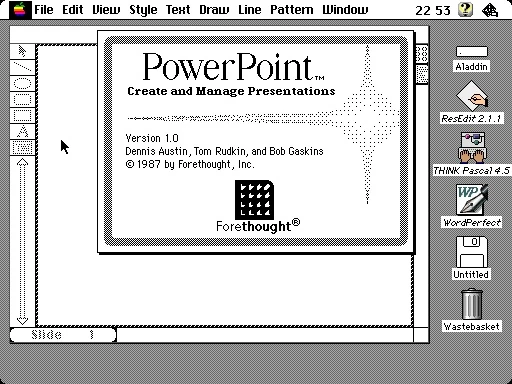

The about box for PowerPoint 1.0, with an empty document in the background.
PowerPoint was created by software developers Robert Gaskins and Dennis Austin at Forethought, Inc., a software startup company founded in 1983. On July 5, 1984, Forethought hired Robert Gaskins as its vice president of product development to create a new application that would be especially suited to the new graphical personal computers, such as the Apple Macintosh and later Microsoft Windows. Gaskins produced his initial description of PowerPoint about a month later, on August 14, in the form of a 2-page document titled "Presentation Graphics for Overhead Projection". By October 1984, Gaskins had selected Dennis Austin to be the developer for PowerPoint. Gaskins and Austin worked together on the definition and design of the new product for nearly a year and produced the first specification document dated August 21, 1985. This first design document showed a product as it would look in Windows 1.0, which at that time had not been released.
Development from that specification began in November 1985, first for the Macintosh. Around June 1986, the developers produced a second and final major design specification document, this time showing a Macintosh look.
The product was originally called "Presenter" throughout much of its development, but was changed to "PowerPoint" due to a trademark dispute; Gaskins says that he thought of the name "PowerPoint", based on the product's goal of "empowering" individual presenters.
In mid-January 1987, funding to complete the development of PowerPoint was assured. A month later, on February 22, 1987, Forethought announced PowerPoint athe Personal Computer Forum in Phoenix, Arizona.
PowerPoint 1.0 for Macintosh shipped from manufacturing on April 20, 1987, which ran in monochrome, generating text and graphics pages for overhead transparencies. The first production run of 10,000 units was sold out.
Acquisition by Microsoft (1987-1992)
Microsoft acquired Forethought Inc. and its PowerPoint software on July 31, 1987, for US$14 million.
A new PowerPoint 2.0 for Macintosh, adding full color slides, shipped in May 1988. The same PowerPoint 2.0 product re-developed for Windows was shipped in mid-1990, at the same time as Windows 3.0.
PowerPoint 3.0 shipped in 1992 for both Windows and Mac, and added live video for projectors and monitors.
Part of Microsoft Office (since 1993)
PowerPoint has been a standard part of the Microsoft Office suite of applications. PowerPoint 2.0 for Macintosh was part of the first Office bundle for Macintosh, which was offered in mid-1989. When PowerPoint 2.0 for Windows appeared a year later, it was part of a similar Office bundle for Windows, which was offered in late 1990. Both of these were bundling promotions, in which the independent applications were packaged together and offered for a lower total price.
PowerPoint 3.0 (1992) was again separately specified and developed, and was advertised and sold separately from Office. It was, as before, included in Microsoft Office 3.0, both for Windows and the corresponding for Macintosh.
A plan to integrate the applications themselves more tightly had been indicated as early as February 1991, toward the end of PowerPoint 3.0 development, in an internal memo by Bill Gates:
| “ | Another important question is what portion of our applications sales over time will be a set of applications versus a single product. ... Please assume that we stay ahead in integrating our family together in evaluating our future strategies—the product teams WILL deliver on this. ... I believe that we should position the "OFFICE" as our most important application. | ” |
The move from bundling separate products to integrated development began with PowerPoint 4.0, developed in 1993-1994, under new management from Redmond. The PowerPoint group in Silicon Valley was reorganized from the independent "Graphics Business Unit" (GBU) to become the "Graphics Product Unit" (GPU) for Office, and PowerPoint 4.0 changed to adopt a converged user interface and other components shared with the other apps in Office.
When it was released, the computer press reported on the change approvingly: "PowerPoint 4.0 has been re-engineered from the ground up to resemble and work with the latest applications in Office: Word 6.0, Excel 5.0, and Access 2.0. The integration is so good, you'll have to look twice to make sure you're running PowerPoint and not Word or Excel." Office integration was further underscored in the following version, PowerPoint 95, which was given the version number PowerPoint 7.0 (skipping 5.0 and 6.0) so that all the components of Office would share the same major version number.
Although PowerPoint by this point had become part of the integrated Microsoft Office product, its development remained in Silicon Valley. Succeeding versions of PowerPoint introduced important changes, particularly version 12.0 (2007), which had a very different shared Office "ribbon" user interface, and a new shared Office XML-based file format. This marked the 20th anniversary of PowerPoint, and Microsoft held an event to commemorate that anniversary at its Silicon Valley Campus for the PowerPoint team there. Special guests were Robert Gaskins, Dennis Austin, and Thomas Rudkin, and the featured speaker was Jeff Raikes, all from the PowerPoint 1.0 days, 20 years before.
Since then, the major development of PowerPoint as part of Office has continued. New development techniques (shared across Office) for PowerPoint 2016 have made it possible to ship versions of PowerPoint 2016 for Windows, Mac, iOS, Android, and web access nearly simultaneously, and to release new features on an almost monthly schedule. PowerPoint development is still carried out in Silicon Valley as of 2017.
In 2010, Jeff Raikes, who had most recently been President of the Business Division of Microsoft (including responsibility for Office), observed: "of course, today we know that PowerPoint is oftentimes the number two—or in some cases even the number one—most-used tool" among the applications in Office.
Operation
In PowerPoint, as in most other presentation software, text, graphics, movies, and other objects are positioned on individual pages or "slides". The "slide" analogy is a reference to the slide projector, a device which has become somewhat obsolete due to the use of PowerPoint and other presentation software. Slides can be printed, or (more often) displayed on-screen and navigated through at the command of the presenter. Slides can also form the basis of webcasts. PowerPoint provides two types of movements. Entrance, emphasis, and exit of elements on a slide itself are controlled by what PowerPoint calls Custom Animations. Transitions, on the other hand are movements between slides. These can be animated in a variety of ways. The overall design of a presentation can be controlled with a master slide; and the overall structure, extending to the text on each slide, can be edited using a primitive outliner. Presentations can be saved and run in any of the file formats: the default .ppt (presentation), .pps (PowerPoint Show) or .pot (template). In PowerPoint 2007, the XML-based file formats .pptx, .ppsx, and .potx have been introduced.
Other platforms
PowerPoint for mobile
PowerPoint Mobile was included with Windows Mobile 5.0. It is a presentation program capable of reading and editing PowerPoint presentations, although authoring abilities are limited to adding notes, editing text, and rearranging slides; it cannot create new presentations. Versions of PowerPoint Mobile for Windows Phone 7 can also watch presentation broadcasts streamed from the Internet. In 2015, Microsoft released PowerPoint Mobile for Windows 10 as a UWP app. In this version of PowerPoint, users can create and edit new presentations, as well as present and share their PowerPoint documents.
PowerPoint for the web
PowerPoint for the web is a free, lightweight version of Microsoft PowerPoint available as part of Office on the web, which also includes web versions of Microsoft Excel and Microsoft Word.
PowerPoint for the web does not support inserting or editing charts, equations, or audio or video stored on your PC; however, they are all displayed in the presentation if added using a desktop app. Some elements, like WordArt effects or more advanced animations and transitions, are not displayed at all, although they are preserved in the document. PowerPoint for the web also lacks the Outline, Master, Slide Sorter, and Presenter views present in the desktop app, as well as having limited printing options.
Compatibility
As Microsoft Office files are often sent from one computer user to another, arguably the most important feature of any presentation software—such as Apple's Keynote, or OpenOffice.org Impress—has become the ability to open Microsoft Office PowerPoint files. However, because of PowerPoint's ability to embed content from other applications through OLE, some kinds of presentations become highly tied to the Windows platform, meaning that even PowerPoint on Mac OS X cannot always successfully open its own files originating in the Windows version. This has led to a movement towards open standards, such as PDF and OASIS OpenDocument.
Cultural effects
Supporters & critics generally agree that the ease of use of presentation software can save a lot of time for people who otherwise would have used other types of visual aid—hand-drawn or mechanically typeset slides, blackboards or whiteboards, or overhead projections. Ease of use also encourages those who otherwise would not have used visual aids, or would not have given a presentation at all, to make presentations. As PowerPoint's style, animation, and multimedia abilities have become more sophisticated, and as PowerPoint has become generally easier to produce presentations with (even to the point of having an "AutoContent Wizard" suggesting a structure for a presentation—initially started as a joke by the Microsoft engineers but later included as a serious feature in the 1990s), the difference in needs and desires of presenters and audiences has become more noticeable.
Criticism
One major source of criticism of PowerPoint comes from Yale professor of statistics and graphic design Edward Tufte, who criticizes many emergent properties of the software: It is used to guide and reassure a presenter, rather than to enlighten the audience; Unhelpfully simplistic tables and charts, resulting from the low resolution of computer displays; The outliner causing ideas to be arranged in an unnecessarily deep hierarchy, itself subverted by the need to restate the hierarchy on each slide; Enforcement of the audience's linear progression through that hierarchy (whereas with handouts, readers could browse and relate items at their leisure); Poor typography and chart layout, from presenters who are poor designers and who use poorly designed templates and default settings; Simplistic thinking, from ideas being squashed into bulleted lists, and stories with beginning, middle, and end being turned into a collection of disparate, loosely disguised points. This may present a kind of image of objectivity and neutrality that people associate with science, technology, and "bullet points". Tufte's criticism of the use of PowerPoint has extended to its use by NASA engineers in the events leading to the Columbia disaster. Tufte's analysis of a representative NASA PowerPoint slide is included in a full page sidebar entitled "Engineering by View-graphs" in Volume 1 of the Columbia Accident Investigation Board's report.
Versions
Versions for Mac OS include:
- 1987 PowerPoint 1.0 for Mac OS classic
- 1988 PowerPoint 2.0 for Mac OS classic
- 1992 PowerPoint 3.0 for Mac OS classic (Office 3.0)
- 1994 PowerPoint 4.0 for Mac OS classic (Office 4.2 for Macintosh)
- 1998 PowerPoint 98 (8.0) for Mac OS classic (Office 98 Macintosh Edition)
- 2000 PowerPoint 2001 (9.0) for Mac OS X (Office 2001 for Mac)
- 2002 PowerPoint v. X (10.0) for Mac OS X (Office v. X)
- 2004 PowerPoint 2004 (11.0) for Mac OS X (Office 2004 for Mac)
- 2008 PowerPoint 2008 (12.0) for Mac OS X (Office 2008 for Mac)
- 2010 PowerPoint 2011 (14.0) for Mac OS X (Office for Mac 2011)
- 2015 PowerPoint 2016 (16.0) for Mac OS X (Office 2016 for Mac)
- 2018 PowerPoint 2019 (16.0) for macOS (Office 2019 for Mac)
- 2021 PowerPoint 2021 (16.0) for macOS (Office 2021 for Mac)
- Note: There is no PowerPoint 5.0 , 6.0 or 7.0 for Mac. There is no version 5.0 or 6.0 because the Windows 95 version was launched with Word 7. All of the Office 95 products have OLE 2 capacity - moving data automatically from various programs - and PowerPoint 7 shows that it was contemporary with Word 7. There wasn't any version 7.0 made for mac to coincide with neither version 7.0 for windows nor PowerPoint 97.


Microsoft PowerPoint 4.0 - 2007 Icons (Windows versions)
Versions for Microsoft Windows include:
- 1990 PowerPoint 2 for Windows 3.0
- 1992 PowerPoint 3 for Windows 3.1 (Office 3.0)
- 1993 PowerPoint 4 (Office 4.x)
- 1995 PowerPoint for Windows 95 (version 7) (Office 95)
- 1997 PowerPoint 97 (version 8) (Office 97)
- 1999 PowerPoint 2000 (version 9) (Office 2000)
- 2001 PowerPoint 2002 (version 10) (Office XP)
- 2003 PowerPoint 2003 (version 11) (Office 2003)
- 2007 PowerPoint 2007 (version 12) (Office 2007)
- 2010 PowerPoint 2010 (version 14) (Office 2010)
- 2012 PowerPoint 2013 (version 15) (Office 2013)
- 2015 PowerPoint 2016 (version 16) (Office 2016)
- 2018 PowerPoint 2019 (version 16) (Office 2019)
- 2021 PowerPoint 2021 (version 16) (Office 2021)
- Note: There is no PowerPoint versions 5.0 or 6.0, because the Windows 95 version was launched with Word 7.0. All of the Office 95 products have OLE 2 capacity - moving data automatically from various programs - and PowerPoint 7.0 shows that it was contemporary with Word 7.0.
File formats
Binary (1987-2007)
Early versions of PowerPoint, from 1985 through 1995 (versions 1.0 through 7.0), evolved through a sequence of binary file formats, different in each version, as functionality was added. This set of formats was never documented, but an open source libmwaw' (used by LibreOffice) exists to read them.
A stable binary format (called a .ppt file, like all earlier binary formats) that was shared as the default in PowerPoint 97 through PowerPoint 2003 for Windows, and PowerPoint 98 through PowerPoint 2004 for Mac (that is, versions 8.0 through 11.0) was finally created. It was based on the Compound File Binary Format. The specification document is actively maintained and can be freely downloaded because, although no longer the default, that binary format can be read and written by some later versions of PowerPoint, including PowerPoint 2016. After the stable binary format was adopted, versions of PowerPoint continued to be able to read and write differing file formats from earlier versions. Beginning with PowerPoint 2007 and PowerPoint 2008 for Mac (version 12.0), this was the only binary format available for saving; PowerPoint 2007 (version 12.0) no longer supported saving to binary file formats used earlier than PowerPoint 97 (version 8.0), ten years before.
The ".pps" and ".ppsx" file extensions are technically the same as the ".ppt" and ".pptx", except that they are launched as presentations instead of for editing by default.
Office Open XML (since 2007)
The big change in PowerPoint 2007 and PowerPoint 2008 for Mac (PowerPoint version 12.0) was that the stable binary file format of 97–2003 was replaced as the default by a new zipped XML-based Office Open XML format (.pptx files). Microsoft's explanation of the benefits of the change included: smaller file sizes, up to 75% smaller than comparable binary documents; security, through being able to identify and exclude executable macros and personal data; less chance of being corrupted than binary formats; and easier interoperability for exchanging data among Microsoft and other business applications, all while maintaining backward compatibility.
See also
External links
- Microsoft PowerPoint at Microsoft 365
- Microsoft PowerPoint at Wikipedia
 |
Wikipedia
|
|---|
| History • Website • Microsoft Product Activation • Genuine Advantage |
| Windows |
| 3.0 • 95 • 97 • 2000 • XP • 2003 • 2007 • 2010 • 2013 • 2016 • 2019 • 2021 |
| Mac OS/OS X/macOS |
| 3.0 • 4.2 • 98 • 2001 • X • 2004 • 2008 • 2011 • 2016 • 2019 • 2021 |
| Applications (List) |
| Desktop |
| Access • Excel (Viewer) • InfoPath • Lync • OneNote • Outlook (Hotmail Connector • Add-ins) • PowerPoint (Viewer) • Project • Publisher • SharePoint (Designer • Workspace) • Visio • Word (Viewer) |
| Server |
| Forms Server • Groove Server • Lync Server • PerformancePoint Server • Project Server • Project Portfolio Server • SharePoint Server • Excel Services • InfoPath Forms Services |
| Mobile |
| Office Mobile |
| Online |
| Live Meeting • Office Live • Office Web Apps • Outlook Web App • Office 365 • Outlook.com |
| Office tools |
| Microsoft Office shared tools • Ribbon Hero • Ribbon Hero 2 |
| Discontinued |
| Accounting • Document Imaging • Entourage • FrontPage • Microsoft InterConnect • Liquid Motion • Mail • Office Assistants • Microsoft PhotoDraw • Photo Editor • Schedule+ • Snapshot Viewer for Access • Microsoft Vizact |
| Related products |
| Works • MapPoint • Search Server • Language Packs |
| Technologies |
| Information Bridge Framework • Object Linking and Embedding • Office Open XML • Office XML formats • Smart tags • Visual Basic for Applications |