




Universal Serial Bus 3.0 (USB 3.0), marketed as SuperSpeed USB, is the third major revision of the Universal Serial Bus (USB) standard for interfacing computers and electronic devices, released in November 2008. The USB 3.0 specification defined a new architecture and protocol, named SuperSpeed, which included a new lane for providing full-duplex data transfers that physically required five additional wires and pins, while also adding a new signal coding scheme (8b/10b symbols, 5 Gbit/s; also known later as Gen 1), and preserving the USB 2.0 architecture and protocols and therefore keeping the original four pins and wires for the USB 2.0 backward-compatibility, resulting in nine wires in total and nine or ten pins at connector interfaces (ID-pin is not wired). The new transfer rate, marketed as SuperSpeed USB (SS), can transfer signals at up to 5 Gbit/s (with a raw data rate of 500 MB/s after encoding overhead), which is about 10 times faster than High-Speed (maximum for the USB 2.0 standard). In USB 3.0 Type-A (and usually also Type-B) connectors, the visible inside insulators are often blue, to distinguish them from USB 2.0 connectors, as recommended by the specification, and by the initials SS.
USB 3.1, released in July 2013, is the successor to USB 3.0 and fully replaces it. USB 3.1 preserves the existing SuperSpeed USB architecture and protocol with its operation mode (8b/10b symbols, 5 Gbit/s), giving it the label USB 3.1 Gen 1. USB 3.1 introduced an Enhanced SuperSpeed System – while preserving and incorporating the SuperSpeed architecture and protocol – with an additional SuperSpeedPlus architecture adding and providing a new coding schema (128b/132b symbols) and protocol named SuperSpeedPlus (sometimes marketed as SuperSpeed+ or SS+ while defining a new transfer mode called USB 3.1 Gen 2 with a signal speed of 10 Gbit/s and a raw data rate of 1212 MB/s over existing Type-A, Type-B, and Type-C (USB-C) connections, more than twice the rate of USB 3.0. Backward compatibility is still given by the parallel USB 2.0 implementation. USB 3.1 Gen 2 Standard‑A and Standard‑B connectors are often teal-colored, though this is nonstandard. (The standard recommends that all Standard‑A plugs and receptacles capable of USB 3, including those capable of Gen 2, have blue insulators, specifically Pantone 300 C. It makes no mention of teal, or Standard‑B connector color, and all other Type‑A and Type‑B connectors—Micro and Mini—are required to have white, black, or grey insulators for Type‑A, ‑B, and ‑AB, respectively.)
USB 3.2, released in September 2017, fully replaces the USB 3.1 specification. It added a second lane to the Enhanced SuperSpeed System besides other enhancements, so that SuperSpeedPlus USB implements the Gen 2×1 (formerly known as USB 3.1 Gen 2) and the two new Gen 1×2 and Gen 2×2 operation modes while operating on two lanes. The SuperSpeed architecture and protocol (aka SuperSpeed USB) still implements the one-lane Gen 1×1 (formerly known as USB 3.1 Gen 1) operation mode. Therefore, two-lane operations, namely USB 3.2 Gen 1×2 (10 Gbit/s with a raw data rate of 1 GB/s after encoding overhead) and USB 3.2 Gen 2×2 (20 Gbit/s, 2.422 GB/s), are only possible with Full-Featured Fabrics (host, hubs, peripheral device, and fully wired cables and plugs with 24 pins). As of 2023, USB 3.2 Gen 1×2 and Gen 2×2 are not implemented on many products yet; Intel, however, started to include them in its LGA 1200 Rocket Lake chipsets (500 series) in January 2021 and AMD in its LGA 1718 AM5 chipsets in September 2022, but Apple never provided them. On the other hand, USB 3.2 Gen 1×1 (5 Gbit/s) and Gen 2×1 (10 Gbit/s) implementations have become quite common. Again, backward compatibility is given by the parallel USB 2.0 implementation.
Implementation differences compared to USB 2.0[]
The USB 3.0 specification uses the same concepts of USB 2.0 but with many improvements and totally different implementation. Earlier USB concepts like endpoints and four transfer types (bulk, control, isochronous and interrupt) are preserved but the protocol and electrical interface are significantly different. It is so different that the specification defines a physically separate channel to carry USB 3.0 traffic. The changes in this specification make improvements in the following areas:
transfer speed – added a new transfer type called Super Speed or SS – 5 Gbit/s (electrically it is more similar to PCIe Gen2 than USB 2.0);
more bandwidth – instead of one-way communication, USB 3.0 uses two unidirectional data paths: one to receive data and the other to transmit;
power management – U0 through U3 link power management states are defined;
improved bus utilization – a new feature is added (using packets NRDY and ERDY) to let a device asynchronously notify the host of its readiness (no need of polling);
support to rotating media – Bulk protocol is updated with a new feature called Stream Protocol that allows a large number of logical streams within an Endpoint.
USB 3.0 has transmission speeds of up to 5 Gbit/s, which is 10 times faster than USB 2.0 (480 Mbit/s). USB 3.0 significantly reduces the time required for data transmission, reduces power consumption, and is backwards compatible with USB 2.0.
Architecture and features[]
In USB 3.0 dual-bus architecture is used to allow both USB 0 (HIGH Speed/LOW Speed/FULL Speed) and USB 3.0 (Super Speed) operations to take place simultaneously, thus providing backward compatibility. Connections are such that they also permit forward compatibility, that is, run USB 3 devices on USB 2.0 ports. The structural topology is the same, consisting of a tiered star topology with a root hub at level 0 and hubs at lower levels to provide bus connectivity to devices.
Data transfer and synchronization[]
The SuperSpeed transaction is initiated by the host making a request followed by a response from the device. The device either accepts the request or rejects it. If accepted then device sends data or accepts data from the host. If the endpoint is halted, the device shall respond with a STALL handshake. If there is lack of buffer space or data, it responds with a Not Ready (NRDY) signal to tell the host that it is not able to process the request. When the device is ready then, it will send an Endpoint Ready (ERDY) to the host which will then reschedule the transaction.
The use of unicasting and the limited multicasting of packets, combined with asynchronous notifications, enables links that are not actively passing packets to be put into reduced power states, allowing for better power management.
Data encoding[]
The "SuperSpeed" bus provides a transfer mode at 5.0 Gbit/s additionally to the three existing transfer modes. The raw throughput is 4 Gbit/s, and the specification considers it reasonable to achieve 3.2 Gbit/s (0.4 GB/s or 400 MB/s) or more.
All data is sent as a stream of eight bits which are scrambled and then converted into 10-bit format. This helps to reduce electromagnetic interference (EMI). The inverse process is carried out at the receiving end. Scrambling is implemented using a free running Linear Feedback Shift Register (LFSR). The LFSR is reset whenever a COM symbol is sent or received.
It is still going to be tethered to 16 feet (5 meters, maximum) cables with active repeaters for extended lengths. So far, USB 3.0 still runs on copper cabling with most likely the same inherent limitations.
Availability[]
The USB 3.0 Promoter Group announced on 17 November 2008 that the specification of version 3.0 had been completed and had made the transition to the USB Implementers Forum (USB-IF), the managing body of USB specifications. This move effectively opened the specification to hardware developers for implementation in future products.
The first USB 3.0 consumer products were announced and shipped by Buffalo Technology in November 2009, while the first certified USB 3.0 consumer products were announced January 5, 2010, at the Las Vegas Consumer Electronics Show (CES), including two motherboards by ASUS and Gigabyte Technology.
Manufacturers of USB 3.0 host controllers include, but are not limited to, Renesas Electronics, Fresco Logic, ASMedia Technology, Etron, VIA Technologies, Texas Instruments, NEC and Nvidia. As of November 2010, Renesas and Fresco Logic have passed USB-IF certification. Motherboards for Intel's Sandy Bridge processors have been seen with Asmedia and Etron host controllers as well. On October 28, 2010, Hewlett-Packard released the HP Envy 17 3D featuring a Renesas USB 3.0 host controller several months before some of their competitors. AMD worked with Renesas to add its USB 3.0 implementation into its chipsets for its 2011 platforms.Template:Update after At CES2011, Toshiba unveiled a laptop called "Toshiba Qosmio X500" that included USB 3.0 and Bluetooth 3.0, and Sony released a new series of Sony VAIO laptops that will include USB 3.0. As of April 2011, the Inspiron and Dell XPS series are available with USB 3.0 ports. On June 11, 2012, Apple announced new MacBook Airs and MacBook Pro with USB 3.0.
Adding to existing equipment[]
In laptop computers that lack USB 3.0 ports but have an ExpressCard slot, USB 3.0 ports can be added by using an ExpressCard-to-USB 3.0 adapter. However, the ExpressCard standard cannot supply power for tasks such as charging phones or powering external hard drives. Therefore, the ExpressCard (and hence the USB 3 ports) must derive power from a USB 2 port. If the ExpressCard has more than one USB 3 port then only 100mA (milli-amps) is available from each port (contrast to typical desktop PC's being able to supply a full 0.9 A (or 900 mA) to each USB 3.0 port). Additional power for multiple ports on a laptop PC may be derived in the following ways:
- Some ExpressCard-to-USB 3.0 adapters may connect by a cable to an additional USB 2.0 port on the computer, which supplies additional power.
- The ExpressCard may have a socket for an external power supply.
- If the external device has an appropriate connector, it can be powered by an external power supply.
On the motherboards of desktop PC's which have PCI Express (PCI-e) slots (or the older PCI standard, but few are available and they are more expensive), USB 3.0 support can be added as a PCI-e expansion card. In addition to an empty PCI-e slot on the motherboard, many "PCI-e to USB 3.0" expansion cards must be connected to a power supply such as a molex adapter or external power supply, in order to power many USB 3.0 devices such as mobile phones, or external hard drives that have no power source other than USB; as of 2011, this is often used to supply two (2) to four (4) USB 3.0 ports with the full 0.9 amps (4.5 watts) of power that each USB 3.0 port is capable of (whilst also transmitting data), whereas the PCI-e slot itself cannot supply the 0.9 amps.
If faster connections to storage devices are the reason to consider USB 3.0, an alternative is to use instead storage devices using eSATAp and add an inexpensive bracket adding an eSATAp port to the motherboard. Some external drives support both USB (2.0 or 3.0) and eSATAp with an exchangeable adapter, so the same drive can be used with a USB 3.0 laptop.
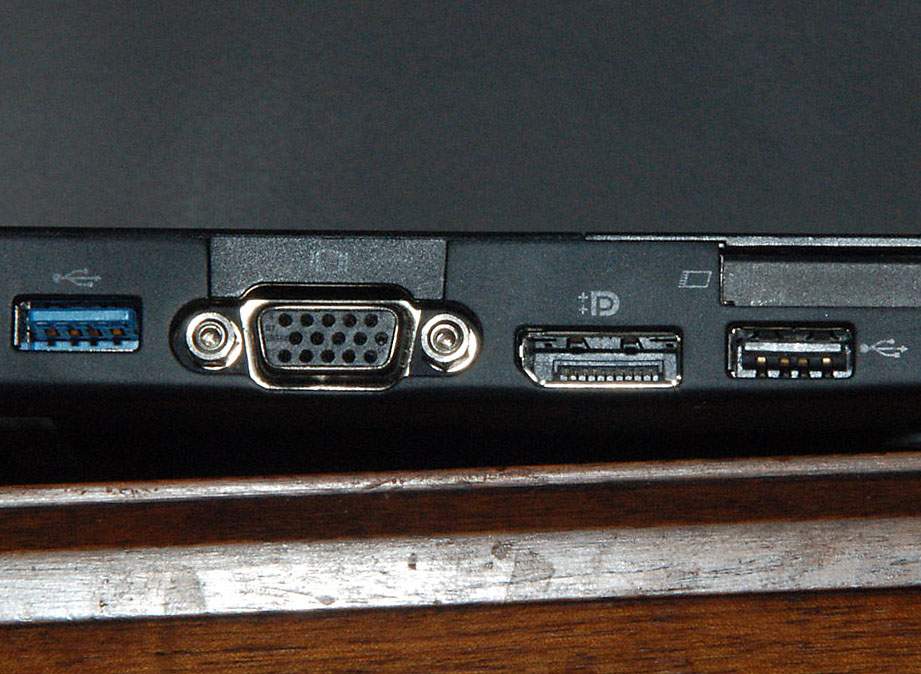

Side connectors on a laptop. Left to right: USB 3.0 host, VGA connector, DisplayPort connector, USB 2.0 host. Note the additional pins on the top side of the USB 3.0 port.
Adoption[]
On 5 January 2010, USB-IF announced the first two certified USB 3.0 motherboards, one by Asus and one by Gigabyte. Previous announcements included Gigabyte's October 2009 list of seven P55 chipset USB 3.0 motherboards, and an ASUS motherboard that was cancelled before production.
Commercial controllers were expected to enter into volume production in the first quarter of 2010. On 14 September 2009, Freecom announced a USB 3.0 external hard drive. On January 4, 2010, Seagate announced a small portable HDD with PC Card targeted for laptops (or desktop with PC Card slot addition) at the CES in Las Vegas Nevada.
Drivers are under development for Windows 7, but support was not included with the initial release of the operating system. However, drivers are available for Windows through manufacturer websites. The Linux kernel has supported USB 3.0 since version 2.6.31, which was released in September 2009.
Windows 8 will have built in support for USB 3.0.
Intel released its first chipset with integrated USB 3.0 ports in 2012 with the release of the Panther Point chipset. Some industry analysts have claimed that Intel was slow to integrate USB 3.0 into the chipset, thus slowing mainstream adoption. a focus to advance the Nehalem platform, a wait to mature all the 3.0 connections standards (USB 3.0, PCIe 3.0, SATA 3.0) before developing a new chipset, or a tactic by Intel to favor its new Thunderbolt interface. Apple, Inc. announced laptops with USB 3.0 ports on June 11, 2012, nearly four years after USB 3.0 was finalized. Because Apple computers use only Intel processors and "bridge" chipsets, Intel's lack of integrated support for USB 3.0 may have proved to be a primary reason why the company didn't add support sooner.
AMD began supporting USB 3.0 with its Fusion Controller Hubs in 2011. Samsung Electronics announced support of USB 3.0 with its ARM-based Exynos 5 Dual platform intended for handheld devices.
Speed issues[]
There have been many reports of USB 3.0 equipment only transferring data at USB 2.0 speed, usually with a message "This USB Mass Storage Device can transfer information faster if you connect it to a Super-Speed USB 3.0 port". This has been due to several causes, including drivers, certain cables specified as USB 3.0 (problems disappeared when a different cable was used), order of starting equipment, equipment needing to be disconnected and reconnected, and overclocked computers.
All major test equipment vendors offer electrical compliance test tools meeting USB 3.0 electrical compliance. Electrical testing requires USB 3.0 test board. provided type A, B, mini AB electrical compliance test breakout adapters.
Connectors[]
Standard-A[]
A USB 3.0 Standard-A receptacle accepts either a USB 3.0 Standard-A plug or a USB 2.0 Standard-A plug. Conversely, it's possible to plug USB 3.0 Standard-A plug into a USB 2.0 Standard-A receptacle. The Standard-A is used for connecting to the computer port.
The connector has the same physical configuration as its predecessor but with more pins for USB 3.0. The VBUS, D-, D+, and GND pins are required for USB 2.0 support, while for USB 3.0 Standard-A connector, five more pins are included–two differential pairs and one ground (GND_DRAIN). The two additional differential pairs are for SuperSpeed data transfer, that support dual simplex SuperSpeed signaling; while the GND_DRAIN pin is for drain wire termination, and to control EMI and maintain signal integrity. Since USB 2.0 and USB 3.0 ports may coexist on the same machine and look similar, the USB 3.0 connector is blue (Pantone 300C) in color.
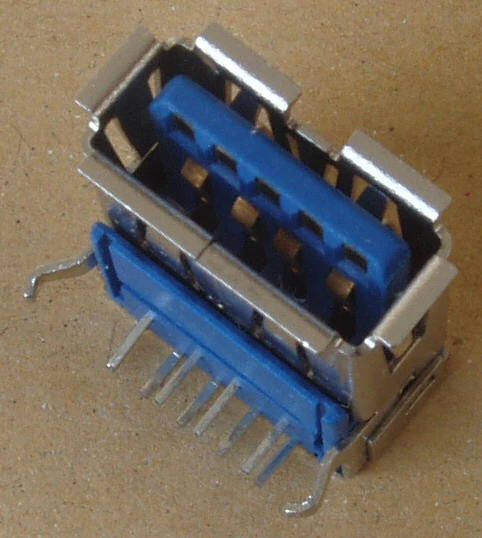

USB 3.0 Standard-A connector
| Pin | Color | Signal name ('A' connector) |
Signal name ('B' connector) |
|---|---|---|---|
| 1 | Red | VBUS | |
| 2 | White | D− | |
| 3 | Green | D+ | |
| 4 | Black | GND | |
| 5 | Blue | StdA_SSRX− | StdA_SSTX− |
| 6 | Yellow | StdA_SSRX+ | StdA_SSTX+ |
| 7 | Shield | GND_DRAIN | |
| 8 | Purple | StdA_SSTX− | StdA_SSRX− |
| 9 | Orange | StdA_SSTX+ | StdA_SSRX+ |
| Shell | Shell | Shield | |


USB 3.0 Micro-B connector
| PIN NO. | SIGNAL NAME | DESCRIPTIONS |
|---|---|---|
| 1 | VBUS | POWER |
| 2 | D- | USB 2.0 DIFFERENTIAL PAIR |
| 3 | D+ | |
| 4 | GND | Ground for Power Return |
| 5 | StdB_SSTX- | Superspeed transmitter differential pair |
| 6 | StdB_SSTX+ | |
| 7 | GND_DRAIN | Ground for signal return |
| 8 | StdB_SSRX- | Superspeed receiver differential pair |
| 9 | StdB_SSRX+ | |
| 10 | DPWR | Power provided by device |
| 11 | DGND | Ground return to DPWR |
| Shell | Shield | Connector metal |
See also[]
- Computer bus
- List of computer peripheral bus bit rates
- EXtensible Host Controller Interface (xHCI)
External links[]
 |
Wikipedia
|
|---|