 |
Stub
This article is a stub, an article too short to provide more than rudimentary information about a subject. You can help the Microsoft Wiki by expanding it.
|
|---|
Windows Live Messenger (formerly MSN Messenger and known colloquially as MSN) was a cross-platform instant messaging client developed by Microsoft. It connected to the Microsoft Messenger service and, in later versions, was compatible with Yahoo! Messenger and Facebook Messenger. The service was discontinued in 2013 in favor of Skype, which was later replaced with Microsoft Teams.
The client was first released as MSN Messenger Service on July 22, 1999, and was marketed under the MSN brand until 2005, when it was rebranded under the Windows Live name. In June 2009, Microsoft reported the service attracted over 330 million active users each month, placing it among the most widely used instant-messaging clients in the world.
Following its acquisition of Skype Technologies in May 2011, Microsoft added interoperability between Skype and Microsoft accounts, allowing Skype, which had features unique to its platform and a wider user base, to communicate with Windows Live Messenger contacts. In 2013, under the leadership of CEO Steve Ballmer, the product was discontinued, and Microsoft began cutting the service to existing clients. It remained active in China for another 18 months before ceasing operations there on October 31, 2014.
In 2018, a free version of Microsoft Teams became available after years as a component of an Office 365 subscription. Teams inherited the Microsoft accounts architecture, allowing users to invite contacts from the discontinued services, MSN Messenger and Skype.[citation needed]
History
MSN Messenger 1.0-7.5 (1999-2005)
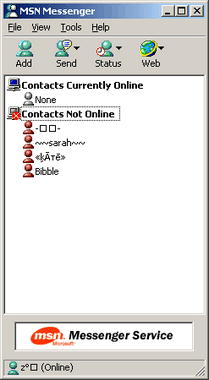

MSN Messenger 1.0
The product was named "MSN Messenger" from 1999 to 2006. The first version of MSN Messenger Service, version 1.0 (1.0.0863), was released on July 22, 1999. It included only basic features, such as plain text messaging and a simplistic contact list.[citation needed] When it was first released, it featured support for access to America Online's AIM network. America Online continually attempted to block Microsoft from accessing its service, and the feature was eventually removed. It has not resurfaced in any later versions of the software.[citation needed] AOL did this by exploiting a buffer overflow bug in AIM, which causes it to execute a bit of machine code sent by the server.[citation needed] When this code runs, it determines if the client is AIM and sends a message back to verify the client.[citation needed] Since then, the software has only allowed connections to its own service, requiring a Windows Live ID (at that time called a .NET Passport) account to connect. Microsoft released the first major update, version 2.0 (2.0.0083), on November 16, 1999. It included a rotating advertising banner and the ability to customize the appearance of the chat window. It came as an install option for Windows Me. This version was followed the next year by version 3.0 (3.0.0080), which was released May 29, 2000. It included file transfers and PC-to-PC and PC-to-phone audio capabilities with Net2Phone and Callserve,[citation needed] two of the larger VoIP providers.[citation needed]
With the release of Windows XP came version 4.6 of MSN Messenger on October 23, 2001. It included major changes to the user interface, the ability to group contacts, and support for voice conversations.[citation needed] In this version, the client software was renamed from "MSN Messenger Service" to just "MSN Messenger", while the underlying service became known as ".NET Messenger Service". This version was only compatible with Windows 95, 98, ME, NT 4.0, and 2000, because Microsoft provided a scaled-down new program for Windows XP, called Windows Messenger. Version 5.0 of MSN Messenger was released on October 24, 2002, and was the first version that was allowed to be installed along with Windows Messenger on Windows XP.[citation needed] It included Universal Plug and Play (UPnP) based file transfers, minor changes to the user interface artwork, and a Windows Media Player interface plug-in.[citation needed]
Version 6.0 of MSN Messenger was released on July 17, 2003. MSN Messenger 6.0 was a major overhaul of the whole platform, upgrading its simple text-based interface to include customizable elements such as emoticons, personalized avatars, and backgrounds. An update, version 6.1, focused on improvements to the conversation window, enabling users to hide the window frame and menu bar, and also the ability to change the theme color. The theme color could be set differently for each user. Another update, version 6.2, was released on April 22, 2004, and it was the last version of the MSN Messenger 6 series. The most notable changes were a dedicated Mobile group for mobile contacts, a connection troubleshooter, and the Launch Site feature was renamed to Fun & Games.[citation needed]
MSN Messenger received a major upgrade to version 7.0 on April 7, 2005. This version brought wink features that were previously only available in threedegrees. This version also advertised items to sell, including animated display pictures, emoticons, and backgrounds. The contact list window style was also updated to match instant message windows. This version also introduced the Xbox Live Integration feature. This version also introduced digital ink and handwriting recognition support. It is the last version of MSN Messenger to support Windows 98, Windows Me, and Windows 2000.[citation needed]
The last version of MSN Messenger before the name change, version 7.5, was released on August 23, 2005. New features included the Dynamic Backgrounds feature and the "msnim" protocol handler, which allowed websites to provide links that automatically add a contact or start conversations. Additionally, a new Voice Clips feature allowed users to hold down F2 and record a message for a maximum of 15 seconds and send it to the recipient. The window for conversations was changed slightly with an added video button. This version also introduced the Windows Installer for its auto-update feature.[citation needed]
Windows Live Messenger 8.0-8.5 (2005-2009)

As part of Microsoft's Windows Live effort, which rebranded many existing MSN services and programs, MSN Messenger was renamed "Windows Live Messenger" beginning with version 8.0.[citation needed]
The first beta of the newly renamed Windows Live Messenger, Beta 1, was released on December 13, 2005.[citation needed] Major changes and additions included offline messaging, an option to change the color theme of the windows, separated send and search boxes, a word wheel search box in the main window, and additional details for contacts when hovering over their names in the contact list window.[citation needed]
The second beta of version 8.0, Beta 2, was released on February 26, 2006.[citation needed] The overall theme of this version was improved, fixing and improving several smaller places in the program. Major changes and additions included the introduction of Windows Live Contacts, the reintroduction of single file transfer, improvements to the "Add a Contact" dialog box, improved color themes, minor changes in the conversation window, and revert of the "Busy" status icon to the normal dash icon, and a redesign of the login page.[citation needed]
The final beta version, Beta 3, was released on May 2, 2006.[citation needed] Major changes and additions included new icons for the program, PC-to-phone calling, an updated look for the Windows Live Call window, a new default display picture, the Windows Live Today window, improvements to the grouping of sequential messages from each contact, Rhapsody integration in the US, and an option for sounds to be edited and/or turned off and another redesign of the login page.[citation needed]
The official release of Windows Live Messenger version 8.0 was on June 19, 2006.[citation needed] Although no notable changes were made between Beta 3 and the final version,[citation needed] the change from MSN Messenger to Windows Live Messenger brought some additional changes, such as customization for the nicknames of individual contacts, timestamps on messages, the ability to see a contact's name only once if the same person writes multiple messages in a row, and color schemes for the entire application. The main authentication system, Microsoft Passport Network, was replaced with Windows Live ID at the same time. A refresh to version 8.0 was released on August 10, 2006.[citation needed] It included audio and video improvements and fixed minor bugs.[citation needed]
The first update to Windows Live Messenger was previewed on October 30, 2006, with the release of Beta 1 of version 8.1.[citation needed] No major changes were made, but several minor changes were included. These included the addition of the roaming identity feature (so that the same user's display name and picture would appear on any computer), a new contact card appearance, a "recently used" list for the emoticon, wink, display picture and background menus, an SMS phone book in the main menu allowing the association and editing of a phone number to the contact and allowing text messaging to a contact, a "sign out" button, a "report abuse" option in the help menu, interoperability with Yahoo! Messenger, and improvements to user status on Windows Vista.[citation needed]
A minor update, the Windows Live Messenger 8.1 Beta 1 Refresh, was released on December 13, 2006,[citation needed] and fixed bugs that were causing some users to be unable to sign in and others to see their contact list.[citation needed]
The final version 8.1 was released on January 29, 2007. No changes were made from the Beta 1 Refresh. All versions of Windows Live Messenger below version 8.1 were rendered obsolete on September 12, 2007, due to a security issue identified when a user accepts a webcam or video chat invitation from an attacker.[citation needed]
On September 12, 2007, the Windows Live Messenger blog posted a fix that resolved a security problem. It reported of a security vulnerability in versions of Messenger older than 8.1, which the released fix would resolve. This led to an auto-update being released to all older versions. Versions running on Windows 2000 and below were required to update to a new version of MSN Messenger 7.0, and versions running on Windows XP and above were required to update to Windows Live Messenger 8.1.[citation needed]
On August 27, 2009, the Windows Live Messenger blog posted that due to a security problem, all users of versions 8.1 and newer need to update to the latest version, 14.0.8089. The mandatory upgrade requirement would be fully phased in by late October 2009 and began on September 15, 2009.[citation needed]
The first beta of Windows Live Messenger 8.5, Beta 1, was released on May 31, 2007.[citation needed] An update was released on June 21, 2007, to test updates being installed by Windows Update. This version required Windows XP Service Pack 2, compared to previous versions requiring Windows XP SP1. It was the first version to be installed in a "Windows Live" folder under "Program Files", with the shortcuts placed in a "Windows Live" folder in the Start Menu.[citation needed]
Major changes and additions in Beta 1 included a new installation program in conjunction with the release of Windows Live 2.0, a new look for all of its windows that matches the aesthetic styles of Windows Vista,[citation needed] a new "bunny" emoticon,[citation needed] and integration with Windows Live OneCare Family Safety.[citation needed] Beginning with this version, updates could be downloaded and installed through Microsoft Update.
The second beta of Windows Live Messenger 8.5, Beta 2, was released on September 5, 2007.[citation needed] Several issues were fixed in Beta 2, but no significant changes were applied. Compared with the first beta, the build does not say "Beta" at the top of the window, although developers had noted that it was not the final release. The new Windows Live Installer, which is used to install Windows Live Messenger 8.5 Beta 2, does not run on Windows Server 2003.[citation needed]
The final release of Windows Live Messenger version 8.5 was released on November 6, 2007, but it introduced no major changes.[citation needed]
Windows Live Messenger 14.0-16.4 (2009-2012)
![[icon]](https://static.wikia.nocookie.net/windows/images/3/31/Wiki_letter_w_cropped.png/revision/latest?cb=20151108163730) | This section requires expansion. |
Windows Live Messenger 2009 was originally designated version 9.0, but was later assigned the technical version number 14.0 to be unified with the other Windows Live programs and Microsoft Office programs.[citation needed]
In a presentation to the Georgia Institute of Technology's IEEE Student Branch, Microsoft employee Andrew Jenks reported that the Messenger team had been working on multi-person audio/video chat, and they are also attempting to create interoperability with AIM/XMPP/ICQ. There is a basic internal version that works with XMPP already.[citation needed] However, these features were not seen in any versions of Windows Live Messenger 2009.[citation needed]
Microsoft sent an invitation to participate in the Windows Live Messenger "9" beta program to Microsoft Connect members on November 20, 2007; a week later, Microsoft began sending out emails welcoming them to the Windows Live Messenger "9" beta program for the first release, known as Beta 0.[citation needed]
A fan site for Windows Live Messenger, Mess.be, claimed to have a new build of Windows Live Messenger "9" on August 11, 2008, and published screenshots along with a brief summary of new features. The screenshots featured a new user interface design matching the "Wave 3" design in development by Microsoft. The images were later removed by the site after a DMCA notice was received.[citation needed] The installer for the same build was leaked through private forums on August 23, 2008. It would later be discovered this build was a preview of Milestone 2, or M2.[citation needed]
News website LiveSide published an article on September 4, 2008, with screenshots of M2 of the newly minted "Windows Live Messenger 2009", which had become version 14.0 instead of 9.0 as previously expected. LiveSide summarized its new features, including protection against messaging spam, the ability to stay signed into the application from several computers (referred to as "Multiple Points of Presence Support"), animated GIF files in the photo area, per-contact customized sounds for various user actions, and clickable URLs in the status area.[citation needed]
Microsoft began the official beta program for Windows Live Messenger 2009 on September 17, 2008, when it released a new beta officially known as Windows Live Messenger 2009 Beta (Milestone 3, Build 14.0.5027.908), which was made available to the general public as a free download. The ability to submit feedback, however, was restricted to select participants of the Microsoft Connect closed beta program.[citation needed]
Notable changes in Milestone 3 include a new, revamped, and refined user interface to follow suit with the rest of the Windows Live "Wave 3" design, the ability to set a "Scene" by customizing the background image and color of the contact list, and the display of these scenes in conversation windows for improved contact identification and window management.[citation needed]
Milestone 3 also brings a new "Groups" feature that allows users to create a continuous group conversation between select contacts, newly redesigned status icons resembling small gems rather than the previous "Messenger Buddy" icons, a new default "Favorites" category in which users can place their favorite contacts for easy access, a new Photo Sharing utility that allows contacts to quickly and easily browse photos together, and a "What's New" section at the bottom of the contact list to outline recent contact updates. Display pictures have been moved over to the left side of conversation windows, and new colorful borders appear around display pictures to display the current status of that contact. Milestone 3 is the first version of Windows Live Messenger to use the standard window frame on Windows Vista in accordance with the user experience guidelines.[citation needed]
Several features were removed in version 9.0, however, such as the ability to use add-ins, the ability to transfer files when the recipient is offline, the "Be right back", "Out to lunch", and "In a call" status options, the Go to my space button, the ability to adjust webcam settings during a video call, the Send button, some games (depending on your localization) and integration with Windows Contacts. Other features were replaced, such as Sharing Folders (replaced by integration with Windows Live SkyDrive) and background sharing (replaced by the "Scene" feature).
On December 15, 2008, Windows Live Messenger 2009 RC (Build 14.0.8050.1202) was released together with the other Windows Live Wave 3 software applications, now renamed as Windows Live Essentials.[citation needed] This version saw a removal of the custom sign-in sound feature; however, it is still possible to select a sound for other individuals, as well as changes to how the background image chosen is applied to the conversation windows. This build also included over 200 bug fixes, including the "Custom Emoticon Bug" and the saving of pictures when using the photo-sharing feature. On January 7, 2009, the same build was released as the final version of Windows Live Messenger 2009.[citation needed]
The last QFE update for Wave 3 was released on May 12, 2010, and saw the removal of some features from Windows Live Messenger. Specifically, the ability to independently show only your own webcam or your contacts' webcam (one-way webcam) and without an audio call is gone. It is only possible to start a video call that starts the webcams of both people communicating, and which also automatically starts audio calling. Also removed is the ability to import and save/export instant messaging contacts to and from .CTT files.
In late March 2010, a beta of Windows Live Essentials Wave 4 was leaked onto the internet and has since spread to various BitTorrent networks, which included a private beta build of Windows Live Messenger Wave 4. However, as the software was designed for private beta testing, non-beta testers cannot sign into this leaked build.
Discontinuation and legacy
On November 6, 2012, Microsoft announced that Messenger and Skype services would merge in the first quarter of 2013. According to the then-President of Skype Division, Tony Bates, Messenger users could sign into Skype using their Microsoft accounts, access their Messenger contacts, and communicate as usual.[citation needed] On January 8, 2013, Microsoft emailed Messenger users and informed them that, except for mainland China, the Messenger service would stop working on March 15, 2013, and users would not be able to sign in.[citation needed]
On February 15, 2013, ZDNet wrote that the discontinuation email was only sent to one percent of Messenger users, a test group.[citation needed] On the same day, Microsoft announced its plans to phase out Messenger: the process would start on April 8, 2013, with English users and would end on April 30, 2013; Messenger would remain available in mainland China.[citation needed] According to ZDNet, this might only apply to the ability to sign in with Messenger client; Microsoft would keep its Messenger service running for another year.[citation needed] "Windows Live Messenger Upgrades to Skype", as they were referred to by Microsoft, started on April 8, 2013. This transition took place language by language. Brazil was the last country to be "upgraded", on April 30.[citation needed]
Chinese Messenger users received an email from Microsoft in August 2014, containing an announcement that the Messenger service in China would end on October 31, 2014; users were advised to migrate to Skype and receive free credits.[citation needed]
In 2017, a number of developers managed to reverse engineer the Messenger protocol and designed custom servers that make the MSN/Windows Live Messenger functional again. The service is now provided under the name Escargot.[citation needed]
Features
In addition to its basic functionality and general capability as an instant messaging client, the latest version of Windows Live Messenger offered the following features:
Album Viewer
- See also: Windows Photo Gallery
Windows Live Messenger's album viewer is based on Windows Photo Gallery and provides a photo-viewing experience for albums shared via SkyDrive and Facebook. The album viewer is interactive and supports full-screen and slideshow modes, as well as viewing and uploading comments on Facebook and SkyDrive albums. It also supports tagging people for SkyDrive. The album viewer closely resembles the Silverlight counterpart for web photo albums present on SkyDrive.
Appear offline to individuals or categories
Windows Live Messenger allows users to appear offline to particular individual contacts, as well as to an entire category within Windows Live Messenger, while appearing online to other contacts.
This is a recent feature of Windows Live Messenger 2011, and is a departure from the previous versions of Windows Live Messenger, where blocking a contact would prevent the "blockee" from sending the user any messages to the "blocker". With the "appear offline to" configuration currently implemented, "hidden from" users can still send "offline messages" to the target.
Social network integration
Offline messaging
Games and applications
- Main article: Games and applications for Windows Live Messenger
Messenger Companion
Windows Live Messenger Companion was an add-in for Internet Explorer that detected when a user is on a website that one of their friends has shared content from and surfaces that update so that the user can instantly view what their friends have shared and leave a comment on the shared content on Windows Live. The service uses Windows Live ID and integrates tightly with Windows Live Messenger to retrieve the user's contact list and shared contacts. The features of Windows Live Messenger Companion include:
- Sharing links to web pages with the user's friends on Windows Live within the web browser
- See links to web pages the user's friends have shared
- Add comments to the links the user's friends have shared
Windows Live Messenger Companion was made available as part of Windows Live Essentials 2011. However, Microsoft discontinued Messenger Companion in its newer Windows Essentials 2012 suite.
Protocol
- Main article: Microsoft Notification Protocol
Content filtering
The content of users' messages is filtered by the message servers, not by the client. For example, the user cannot send links to The Pirate Bay's pages, neither from Windows Live Messenger nor through other clients supporting the protocol. However, links to other P2P networks are allowed.
"i'm" initiative
Interoperability
On October 13, 2005, Yahoo and Microsoft announced plans to add interoperability between their messenger services. The announcement came after years of third-party interoperability (most notably, PowWow by Trial Voice, Trillian, and Pidgin) and criticisms from Tribal Voice and iCast that the major real time communications services were locking their networks. Yahoo and Windows Live Messenger became interoperable on July 12, 2006. For six years, Yahoo! Messenger and Windows Live Messenger in possession of up-to-date software could communicate across the two networks. Instant messaging as well as transmission of emoticons, nudges, offline messages, presence information, and personal status messages were supported. Interoperability ended on December 14, 2012.
Interoperability with Facebook Chat was added on September 30, 2010, with the launch of Windows Live Messenger 2011.
Platforms
Versions were developed for Windows, Xbox 360, Mac OS X (under the name Microsoft Messenger for Mac), BlackBerry OS, iOS, Java ME, S60 on Symbian OS 9.x, MSN TV, Zune HD, and Windows Phone, Windows Mobile, and Windows CE.
Messenger Mobile (formerly named Windows Live Messenger Mobile) was the version of Messenger that was aimed to be used on mobile devices over cellular data or Wi-Fi (if supported by the phone). There was also a WAP-compatible version that may be used on any mobile device, and also specific client versions designed for Windows Mobile, iOS, BlackBerry, and Nokia Series 60 devices.
Windows Mobile
A client version of Windows Live Messenger Mobile was included with Windows Mobile 6, named "Windows Live for Windows Mobile". It was included in both Windows Mobile 6 smartphone edition (non-touchscreen phones) and professional (touchscreen phones). Users could send voice clips (maximum 10 seconds), pictures, and emoticons.
Xbox
Support for Windows Live Messenger was included in the Xbox 360 spring 2007 dashboard update, released on May 9, 2007. It was known as Xbox Live Messenger.
Users on Windows Live Messenger were able to see the gamertags of friends logged into Xbox Live, including the games that they were playing. Xbox 360 users could chat in-game or while watching a movie. Support for child accounts was added in December 2007.
To coincide with the arrival of the integration of Windows Live Messenger with Xbox Live, Microsoft released a new keyboard adapter for the Xbox 360 called the Xbox 360 Messenger Kit for easier text input. The keyboard device attaches to the standard Xbox 360 controller through the headphone jack and features a QWERTY-style key layout with 47 backlit keys.
Microsoft also announced on June 14, 2010, that users on Xbox Live with the Kinect could have real-time video conversations with Windows Live Messenger contacts. This feature was enabled at launch.
MSN TV (WebTV)
Mac
Microsoft Messenger for Mac (formerly MSN Messenger for Mac) was the official Mac OS X instant messaging client for use with Microsoft Messenger service, developed by Macintosh Business Unit, a division of Microsoft. It was limited in features compared to its Windows counterpart.
The versions 3.x and later featured new Aqua graphics, whereas prior versions had graphics similar to Windows Messenger 4.0. Versions 5.x used the brushed metal theme.
iOS
The Windows Live Messenger for iOS client supported the receiving of instant messaging notifications even when the application is closed, and allowed Multiple Points of Presence (MPOP) such that a user can be signed into multiple locations at the same time. Photos and albums could also be uploaded from mobile devices to Windows Live Photos, based on SkyDrive, and the application allowed simple image editing capabilities and people tagging within photos. It also supported the "Messenger social" feed on Windows Live Profile, allowing users to view and comment on the social updates and activities of their contacts on Windows Live, as well as those on Facebook, MySpace, and LinkedIn.
Java ME
Nokia Series 40
The Windows Live Messenger Mobile client came as a Java ME mobile application pre-loaded on devices such as the Nokia 7610, Nokia 7510, Nokia 7210, Nokia 6700c, Nokia 6600s, Nokia 6303c, Nokia 6260s, Nokia 5220, Nokia 5130XM, Nokia 3720c, Nokia 3710f, Nokia 3600s, Nokia 2730c, Nokia 2700c, Nokia 5530, and Nokia X3.[citation needed]
Sony Ericsson
A version of the Windows Live Messenger Mobile client was pre-loaded on most Sony Ericsson mobile devices as a Java ME application.
Symbian
A client for Windows Live Messenger was developed by Microsoft for the Symbian S60 Platform, commonly used on mobile phones such as Nokia smartphones, and released on August 23, 2007, to select markets. In May 2009, the client was made available on the Ovi Store. This version of Windows Live Messenger included many of the features of the Windows Live Messenger client, including grouped contacts, voice clips (max 10 seconds), image and file sending, as well as features unique to S60, such as tabbed chat windows and integration with the contact list and other features of the S60 platform. When the trial expires, the cost to Messenger users for S60 is £1.50/$2.94 for 30 calendar days of use. As of February 2009, Microsoft stopped charging for Windows Live Mobile, and the service is now free.
See also
- Microsoft Lync
- Messenger Plus!
- Windows Live Web Messenger
References
 |
Wikipedia (article: MSN Messenger)
|
|---|